> ## Content Index
> Fetch the complete content index at: https://www.hubwiz.com/blog/llms.txt
> Use this file to discover other available public pages before exploring further.
# CPU实测Gemma 4 E2B
- URL: https://www.hubwiz.com/blog/test-gemma-4-e2b-on-cpu/
- Published: 2026-04-16T12:16:08.000Z
- Updated: 2026-04-16T12:16:08.000Z
- Description: 测试 Google DeepMind 最新的开放模型在无 GPU 配置下的表现——性能、限制和实际可用性。
- Author: admin
- Tags: TESTING, GEMMA4, #Import 2026-10-14 14:41
当 Google DeepMind 发布 Gemma 4 时,它承诺了一些大胆的目标: **最先进的推理模型可以在本地运行——即使在普通硬件上。**
但有一个问题。大多数演示仍然假设使用 GPU、高 VRAM优化的推理栈。所以我提出了一个简单的问题:
👉 *Gemma 4 真的可以仅在 CPU 上运行吗——并且仍然可用?*
为了找出答案,我在 Kaggle 笔记本中运行了一系列实验,使用 **Gemma 4 E2B 模型**——**完全没有 GPU 加速**。
本文将介绍设置过程获得的性能、限制,以及仅使用 CPU 的 AI 在今天是否现实。
## 1、为什么 Gemma 4 很重要
Gemma 4 不仅仅是一个普通的开放模型。
它代表了一种向**可访问的本地优先 AI**的转变:高达 **256K token 上下文窗口**、多模态能力(文本 + 图像 + 更 多)。它专为**边缘设备和笔记本电脑**设计。从许可角度来看,它在 Apache 2.0 下拥有开放权重(对开发者来说意义重大)。
最重要的是:**E2B 等较小的变体针对本地运行进行了明确优化。** 但"优化"不一定意味着"在 CPU 上运行快速"。
## 2、实验设置
我使用了这个[笔记本](https://www.kaggle.com/code/gpreda/test-gemma-4-e2b-on-cpu?ref=hubwiz.com):
#### 环境
- Kaggle 笔记本(CPU 运行时,30 GB,8 核心)
- 无 GPU / 无 TPU
- 标准 Python + 推理栈
#### 模型
- **Gemma 4 E2B(指令微调版本)**
- \~2.3B 活跃参数(高效架构)
#### 目标
实验的目标是在 CPU 上测试 Gemma 4:E2B 模型(非量化):运行推理、测量响应能力,并评估可用性(不仅仅是"它能运行")。
### 关键限制:CPU 推理
在 CPU 上运行 LLM 与在 GPU 上运行有本质不同。没有并行张量核心。内存带宽成为瓶颈。Token 生成是顺序的。即使是优化过的模型也会受到影响。参考值:CPU 推理可能比 GPU **慢 5-10 倍。** 所以真正的问题不是:"它能运行吗?"而是:"它可用吗?"
## 3、Gemma 4 的多模态实验
在 Kaggle 笔记本中,我对 Gemma 4:E2B(非量化)在 CPU 上进行了 3 种不同的实验:
- 仅文本输入
- 文本和图像输入
- 文本和声音输入
### 3.1 初始设置
在开始实验之前,我们需要初始化处理器和模型。我们使用 transformers 框架:
```
MODEL_PATH = kagglehub.model_download("google/gemma-4/transformers/gemma-4-e2b-it")
processor = AutoProcessor.from_pretrained(MODEL_PATH)
model = AutoModelForCausalLM.from_pretrained(
MODEL_PATH,
dtype=torch.bfloat16,
device_map="auto"
)
```
### 3.2 仅文本测试
下一个代码片段展示了完整的 LLM 推理工作流程。它格式化聊天风格的提示,将其转换为张量,在 CPU 上运行模型生成响应,解码和分析生成的输出,并测量总执行时间。
```
messages = [
{"role": "system", "content": "You are a helpful assistant that specializes in answering shortly to any question."},
{"role": "user", "content": "What is the distance from Earth to the Moon?"},
]
s_time = time()
text = processor.apply_chat_template(
messages,
tokenize=False,
add_generation_prompt=True,
enable_thinking=True
)
inputs = processor(text=text, return_tensors="pt").to(model.device)
input_len = inputs["input_ids"].shape[-1]
outputs = model.generate(**inputs, max_new_tokens=1024)
response = processor.decode(outputs[0][input_len:], skip_special_tokens=False)
processor.parse_response(response)
e_time = time()
total_time = round(e_time - s_time, 2)
print(f"Total time: {total_time}")
```
Gemma 4 的输出是 Markdown 格式。为了整齐地显示它,我们引入几个辅助函数:
```
def colorize_text(text):
for word, color in zip(["Thinking", "Thinking Process", "Response", "Total time"], ["blue", "red", "green", "magenta"]):
text = text.replace(f"{word}:", f"\n\n**{word}:**")
return text
def display_response(output, total_time):
if output.get("thinking"):
display(Markdown(f"**Thinking**"))
display(Markdown(colorize_text(output["thinking"])))
if output.get("content"):
display(Markdown(f"**Response**"))
display(Markdown(output["content"]))
display(Markdown(colorize_text(f"Total time: {total_time} sec.")))
```
下图显示了使用输入提示"What is the distance from Earth to the Moon?"运行推理的结果。
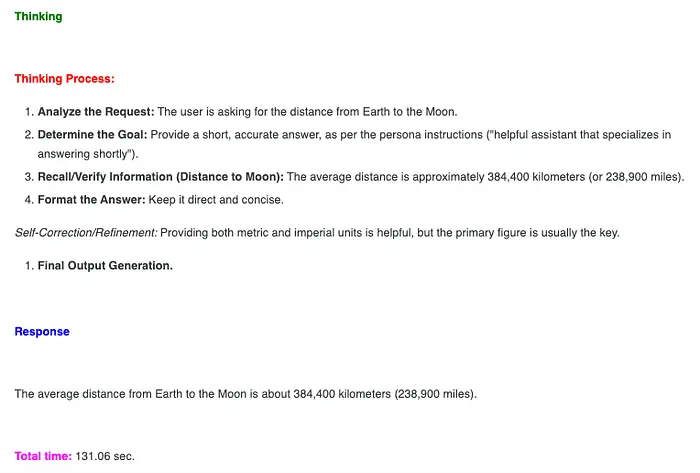
仅文本输入、思考、响应和推理总时间 — 图片由作者提供
### 3.3 图像数据
下图被呈现给模型进行推理。

海滩上的牛 — [来自 Google 的测试图像](https://storage.googleapis.com/keras-cv/models/paligemma/cow%5Fbeach%5F1.png?ref=hubwiz.com)
多模态输入的代码如下:
```
image_url = "https://storage.googleapis.com/keras-cv/models/paligemma/cow_beach_1.png"
image = Image.open(requests.get(image_url, stream=True).raw).convert("RGB")
messages = [
{"role": "system", "content": "You are a helpful assistant that specializes in answering shortly to any question."},
{
"role": "user",
"content": [
{"type": "image", "image": image},
{"type": "text", "text": "What you can see in this image?"}
]
}
]
s_time = time()
text = processor.apply_chat_template(
messages,
tokenize=False,
add_generation_prompt=True,
enable_thinking=True
)
inputs = processor(
text=text,
images=image,
return_tensors="pt"
).to(model.device)
input_len = inputs["input_ids"].shape[-1]
with torch.inference_mode():
outputs = model.generate(**inputs, max_new_tokens=512)
response = processor.decode(outputs[0][input_len:], skip_special_tokens=False)
output = processor.parse_response(response)
e_time = time()
total_time = round(e_time - s_time, 2)
print(output)
print(f"Total time: {total_time}")
```
思考、响应和在 Kaggle CPU 上的总执行时间如下图所示。
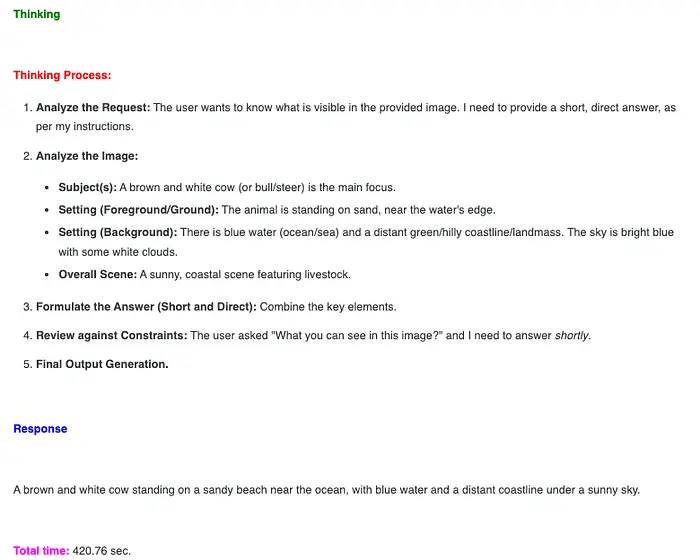
多模态(文本和图像)输入、思考、响应和总执行时间
在这种情况下,CPU 上的执行时间约为 8 分钟,对于实际应用来说太慢了。
### 3.4 声音实验
首先,我们下载样本声音数据。以下是执行此任务的代码:
```
def download_audio_data(url):
"""
Download audio data
Args
url: url for the audio data
Returns
the name of the local saved audio file
"""
r = requests.get(url, stream=True)
r.raise_for_status()
with tempfile.NamedTemporaryFile(delete=False, suffix=".wav") as f:
for chunk in r.iter_content(chunk_size=8192):
f.write(chunk)
return f.name
audio_url = "https://raw.githubusercontent.com/google-gemma/cookbook/refs/heads/main/Demos/sample-data/journal1.wav"
audio_path = download_audio_data(audio_url)
```
在笔记本中,我们使用 Markdown、HTML 显示一个声音播放器,如下所示:
```
def cstr(str_text, color='black'):
"""
Html styling for widgets
Args
str_text: text to disply
color: color to display the text
Returns
Formated text/label
"""
return "{}".format(color, str_text)
def play_sound(sound_path="",
text="Test",
color="green"):
"""
Display a sound play widget
Args
sound_path: path to the sound file
text: text to display
color: color for text to display
Returns
None
"""
display(HTML(cstr(text, color)))
display(ipd.Audio(sound_path))
play_sound(audio_path, text="Journal", color="blue")
```

笔记本中的声音播放器,用于来自 Google 的[声音样本](https://raw.githubusercontent.com/google-gemma/cookbook/refs/heads/main/Demos/sample-data/journal1.wav?ref=hubwiz.com)
接下来,我们对这个多模态内容(音频、文本)进行推理:
```
audio_array, sr = librosa.load(audio_path, sr=16000)
messages = [
{"role": "system", "content": "You are a helpful assistant that specializes in answering shortly to any question."},
{
"role": "user",
"content": [
{"type": "audio", "audio": audio_array},
{"type": "text", "text": "Transcribe the following audio exactly. Only output transcription."}
]
}
]
s_time = time()
text = processor.apply_chat_template(
messages,
tokenize=False,
add_generation_prompt=True,
enable_thinking=True
)
inputs = processor(
text=text,
audio=audio_array,
return_tensors="pt"
).to(model.device)
input_len = inputs["input_ids"].shape[-1]
with torch.inference_mode():
outputs = model.generate(**inputs, max_new_tokens=128)
response = processor.decode(outputs[0][input_len:], skip_special_tokens=False)
output = processor.parse_response(response)
e_time = time()
total_time = round(e_time - s_time, 2)
print(output)
print(f"Total time: {total_time}")
```
思考过程、输出和这个多模态输入的总执行时间如下图所示。
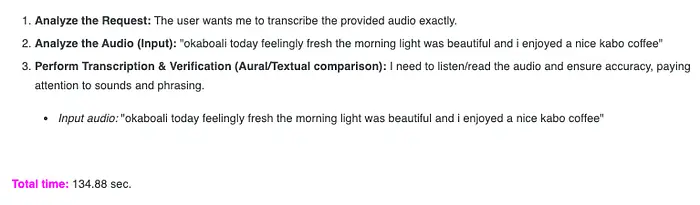
多模态(音频和文本)输入、响应和总执行时间 — 图片由作者提供
模型准确地解释了音频样本。
### 3.5 实验结果总结
下图总结了笔记本中三个实验的结果:

文本、图像、音频输入 — 速度、质量和实用性 — 图片由作者提供
## 4、最终想法
在 CPU 上运行 Gemma 4 E2B 有点像走进未来——只是还不是最舒适的版本。
体验无可否认地令人印象深刻。一个相对较小的模型,在本地运行且没有任何 GPU 加速,可以处理推理任务、处理多模态输入,并生成连贯的响应。不久之前,这还需要专用硬件、复杂的基础设施,或 者强大的云 API。现在,它可以装进一个笔记本里。
然而,摩擦仍然存在。
延迟破坏了交互的流畅感。生成响应需要耐心。在现代 GPU 设置上感觉即时完成的任务变成了深思熟虑的、几乎是批处理的过程。你可以清楚地看到潜力——但你也可以在每次交互中感受到限制。
使这个实验有意义的不仅仅是它能运行,而是它所发出的信号。
我们正进入一个本地 AI 不再是利基实验的阶段。模型变得越来越小、越来越高效,越来越能够运行在日常硬件上。"可能"和"实用"之间的差距正在迅速缩小。
今天,仅使用 CPU 的推理处于中间状态:功能强大到足以用于实验、私人工作流和离线场景——但还不足以用于实时的面向用户的应用。
但这个边界正在移动。
如果保持当前的发展轨迹,问题可能很快就会从我们能否在本地运行模型转变为*为什么我们还要依赖外部基础设施*。对于许多 AI 任务来说,需要 GPU——甚至云——可能开始感觉不再像 一个要求,而更像一种便利。
现在,在 CPU 上运行 Gemma 4 是对未来的一瞥:虽然不完全轻松,但也不再遥不可及。
---
原文链接:[Running Gemma 4 E2B on CPU: Is Local AI Finally Practical?](https://pub.towardsai.net/running-gemma-4-e2b-on-cpu-is-local-ai-finally-practical-3939583764f7?ref=hubwiz.com)
汇智网翻译整理,标明出处