a2ajava:A2UI协议的java实现
Angular和Java的A2UI完整工作演示:简单至极,零复杂度
博途PLC工程智能体 | AI智能体博途网关 | 梯形图转SCL | 自然语言生成梯形图 | 自然语言生成SCL | 逆向生成程序块文档 | 梯形图在线查看 | 博途编程文档MCP | AI模型价格对比 | AI工具导航 | ONNX模型库 | Vibe Coding教程 | PLC在线仿真器 | Tripo 3D | Meshy AI
A2UI(Agent-to-User Interface,代理到用户界面)是Google开发的一种革命性协议,它使AI代理能够动态渲染丰富的交互式用户界面。与返回静态JSON数据的传统REST API不同,A2UI允许AI代理即时生成完整的UI体验,在智能后端服务和现代前端应用之间架起无缝的桥梁。
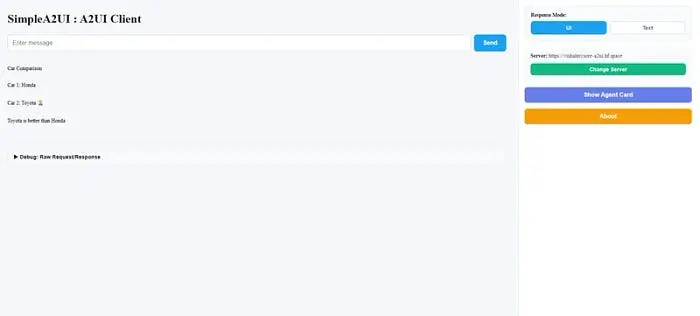
完整的演示部署在 https://vishalmysore.github.io/simplea2ui/
你可以使用以下查询:
- Compare Honda and Toyota for me?
- What Food does Vishal like to eat?
- Can you book a restaruant for me? I need to eat food I am very hungry
1、什么是A2UI协议?
A2UI v0.8是一个规范,定义了AI代理如何将结构化UI组件传递给客户端应用程序。代理无需在前端硬编码UI逻辑,而是可以根据上下文、用户输入和应用状态来决定呈现什么样的界面。
核心特性:
- 动态UI生成:代理根据业务逻辑以编程方式创建UI组件
- 基于组件的架构:使用标准UI组件(Text、TextField、Button、Column等)
- 数据模型绑定:UI组件与后端数据模型之间的双向数据绑定
- 动作处理:按钮通过上下文数据触发后端动作
- 协议灵活性:同时支持富UI渲染和纯文本响应
2、服务端实现:A2AJava框架
本项目使用 a2ajava(Actions for AI Java)实现A2UI协议,这是一个强大的框架:
- 自动将Java方法暴露为AI可调用的动作
- 提供注解驱动的代理和动作定义
- 与Spring Boot集成,支持企业级应用
- 支持多种回调类型,包括A2UI、文本和自定义协议
3、核心组件
3.1 代理定义
代理使用 @Agent 注解定义,并带有描述性元数据:
@Service
@Agent(groupName = "compareCar", groupDescription = "compare 2 cars")
@Slf4j
public class CompareCarService implements A2UIDisplay {
    private ThreadLocal<ActionCallback> callback = new ThreadLocal<>();
    // ... implementation
}
3.2 动作方法
动作是使用 @Action 注解的Java方法,可由AI系统调用:
@Action(description = "compare 2 cars")
public Object compareCar(String car1, String car2) {
    log.info("Comparing cars: {} vs {}", car1, car2);
    String betterCar = determineBetterCar(car1, car2);
    // Dual-mode support: UI or text response
    if(isUICallback(callback)) {
        return createComparisonUI(car1, car2, betterCar, result);
    } else {
        return "Text-based response: " + betterCar + " is better";
    }
}
3.3 双模式协议支持
该框架通过智能回调检测支持文本和UI两种协议:
- 文本模式:当直接调用或通过基于文本的AI系统调用时,返回纯字符串响应
- UI模式:当使用A2UI回调调用时,返回结构化的组件树
// Detection logic
if(isUICallback(callback)) {
    // Return A2UI component structure
    return buildA2UIMessage(surfaceId, rootId, components);
} else {
    // Return plain text
    return "Simple text response";
}
4、A2UI组件结构
4.1 组件目录
该协议定义了标准组件:
- Text:显示静态或动态文本内容
- TextField:带有数据模型绑定的输入字段
- Button:带有动作回调的交互式按钮
- Column:用于垂直排列的布局容器
4.2 数据模型格式(A2UI v0.8规范)
数据模型使用邻接表格式进行高效状态管理:
{
  "dataModelUpdate": {
    "contents": [
      {
        "key": "form",
        "valueMap": [
          {
            "key": "name",
            "valueString": ""
          },
          {
            "key": "email",
            "valueString": ""
          }
        ]
      }
    ],
    "surfaceId": "user_form"
  }
}
4.3 TextField组件
TextField使用 text 属性绑定到数据模型路径:
{
  "component": {
    "TextField": {
      "label": { "literalString": "Person's Name" },
      "text": { "path": "/form/name" }
    }
  },
  "id": "name_input"
}
4.4 带上下文的按钮
按钮通过 context 数组指定要发送的数据:
{
  "component": {
    "Button": {
      "action": {
        "name": "whatThisPersonFavFood",
        "context": [
          {
            "key": "name",
            "value": { "path": "/form/name" }
          }
        ]
      },
      "child": "submit_button_text"
    }
  },
  "id": "submit_button"
}
5、实现示例
5.1 带表单提交的简单服务
@Service
@Agent(groupName = "whatThisPersonFavFood",
       groupDescription = "Provide persons name and find what they like")
public class SimpleService implements A2UIDisplay {
@Action(description = "Get the favourite food of a person")
    public Object whatThisPersonFavFood(String name) {
        String favFood = lookupFavoriteFood(name);
        if(callback != null && callback.getType().equals(CallBackType.A2UI.name())) {
            return createFavoriteFoodUI(name, favFood);
        } else {
            return favFood;
        }
    }
    private Map<String, Object> createFavoriteFoodUI(String name, String favFood) {
        // Create UI components
        List<Map<String, Object>> components = new ArrayList<>();
        // Add title
        components.add(createTextComponent("title", "Favorite Food Finder", "h2"));
        // Add result display
        components.add(createTextComponent("result",
            name + "'s favorite food is: " + favFood));
        // Add form for next query
        components.add(createTextFieldComponent("name_input",
            "Person's Name", "/form/name"));
        // Add submit button with context binding
        Map<String, String> contextBindings = new HashMap<>();
        contextBindings.put("name", "/form/name");
        components.add(createButtonComponent("submit_button",
            "Find Favorite Food", "whatThisPersonFavFood", contextBindings));
        // Initialize data model
        Map<String, Object> dataModel = new HashMap<>();
        dataModel.put("/form/name", "");
        return buildA2UIMessageWithData(surfaceId, rootId, components, dataModel);
    }
}
5.2 多步骤工作流:餐厅预订
具有多个动作方法的复杂工作流:
@Service
@Agent(groupName = "restaurantBooking",
       groupDescription = "Book restaurant reservations with menu selection")
public class RestaurantBookingService implements A2UIDisplay {
@Action(description = "Book a restaurant reservation - shows form")
    public Object bookRestaurantReservation(String restaurantName) {
        if(isUICallback(callbackThreadLocal)) {
            return createReservationFormUI(restaurantName);
        }
        return "Please provide reservation details...";
    }
    @Action(description = "Confirm restaurant reservation with all details")
    public Object confirmReservation(String restaurantName, String date,
                                     String time, int numberOfPeople,
                                     String menuType, String specialRequests) {
        String confirmationNumber = generateConfirmationNumber();
        if(isUICallback(callbackThreadLocal)) {
            return createConfirmationUI(restaurantName, date, time,
                                       numberOfPeople, menuType,
                                       specialRequests, confirmationNumber);
        }
        return "Reservation confirmed! Confirmation #" + confirmationNumber;
    }
}
6、技术优势
6.1 关注点分离
- 后端控制UI逻辑和工作流
- 前端专注于渲染和用户交互
- 清晰的API边界和强类型支持
6.2 动态适应
- UI可以根据业务规则自适应,无需重新部署前端
- 在协议层面进行A/B测试
- 基于用户上下文的个性化体验
6.3 类型安全
- Java类型系统确保正确的数据结构
- 编译时验证组件层次结构
- IDE支持自动补全和重构
6.4 向后兼容
- 同一代码库支持传统的基于文本的客户端
- 对不支持的客户端进行优雅降级
- 对现代界面进行渐进增强
7、A2UIDisplay工具接口
该项目提供了一个带有辅助方法的工具接口:
public interface A2UIDisplay {
    // Create text components
    Map<String, Object> createTextComponent(String id, String text, String usageHint);
// Create input fields with data binding
    Map<String, Object> createTextFieldComponent(String id, String label, String dataPath);
    // Create buttons with action callbacks and context
    Map<String, Object> createButtonComponent(String id, String buttonText,
                                               String actionName,
                                               Map<String, String> contextBindings);
    // Create layout containers
    Map<String, Object> createRootColumn(String rootId, List<String> childIds);
    // Build complete A2UI messages
    Map<String, Object> buildA2UIMessageWithData(String surfaceId, String rootId,
                                                  List<Map<String, Object>> components,
                                                  Map<String, Object> dataModelValues);
}
8、数据流架构
请求-响应周期
- AI请求:AI系统使用参数调用动作方法
- 回调检测:服务检查回调类型(A2UI还是文本)
- 业务逻辑:执行核心功能
- 响应生成:
- A2UI:构建带有数据模型的组件树
- 文本:返回简单字符串
- 客户端渲染:前端处理A2UI消息并渲染UI
- 用户交互:用户填写表单并点击按钮
- 上下文提交:按钮动作将绑定数据发送回后端
- 下一步动作:使用新的动作方法重复循环
数据模型生命周期
1. Backend initializes data model with empty values
   └─> dataModelUpdate.contents = [{ key: "form", valueMap: [...] }]
2. Frontend binds TextField.text to data model paths
   └─> { "text": { "path": "/form/name" } }
3. User types input → Frontend updates data model in real-time
4. User clicks button → Frontend extracts context values
   └─> Button.action.context specifies which paths to send
5. Backend receives action call with populated parameters
   └─> confirmReservation(restaurantName="Joe's Diner", date="2026-01-15", ...)
9、最佳实践
1. 一致的命名
- 使用与按钮动作匹配的描述性动作名称
- 数据模型路径遵循类似REST的约定:
/resource/field
2. 错误处理
- 在动作方法中验证输入
- 在UI模式下返回用户友好的错误消息
3. 状态管理
- 在多线程环境中使用ThreadLocal存储回调
- 使用合理的默认值初始化数据模型
4. 组件层次结构
- 保持组件树扁平以提高性能
- 使用语义化的组件ID便于调试
5. 上下文绑定
- 仅将必要的数据绑定到按钮上下文
- 使用与动作方法签名匹配的显式参数名称
10、与Spring Boot集成
该框架与Spring Boot无缝集成:
@Service  // Spring managed bean
@Agent(groupName = "myAgent", groupDescription = "Agent description")
public class MyService implements A2UIDisplay {
@Autowired
    private SomeDependency dependency;  // Spring dependency injection works
    private ActionCallback callback;  // Autowired by tools4ai framework
    private AIProcessor processor;    // Autowired by tools4ai framework
    @Action(description = "Action description")
    public Object myAction(String param) {
        // Use injected dependencies
        // Access callback and processor
    }
}
11、结束语
A2UI协议代表了AI代理与用户交互方式的范式转变。通过将智能后端服务的强大功能与动态UI生成相结合,开发者可以构建高度自适应的应用程序,实时响应用户需求。
a2ajava框架使A2UI的实现变得简单直接,通过以下特性:
- 注解驱动的开发方式
- 双模式协议支持(文本和UI)
- Spring Boot集成
- 类型安全的组件生成
- 可复用的工具接口
这种架构使团队能够构建复杂的对话式UI、多步骤工作流和上下文感知应用程序,同时在业务逻辑和展示层之间保持清晰的分离。
原文链接: A2UI Protocol Guide: Build Dynamic AI Agent Interfaces with Java
汇智网翻译整理,转载请标明出处