Anydoc 跨平台文档转换器
一个开源、跨平台的文档转换器,可将 14 种文件格式在毫秒级内转换为干净的、可供 LLM 直接使用的 Markdown——支持 Node.js、Python、浏览器和 AI 智能体。
近年来,随着 LLM 能力的快速提升,AI 已经深度融入办公场景。这些场景通常涉及处理各种各样的文档格式——如 Word、PowerPoint、Excel 和 PDF——而这些格式本身并不适合 LLM 直接使用。因此,标准的做法是将它们转换为 Markdown,这使得一个高质量的文档转换器变得至关重要。
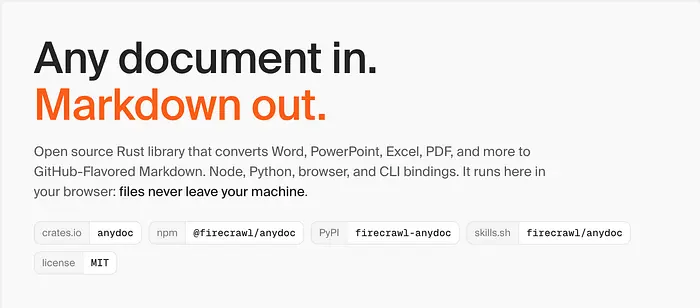
最近,Firecrawl 团队发布了"anydoc",一个强大的开源跨平台文档转换器。它可以将 Word、PowerPoint、Excel、OpenDocument、RTF、EPUB、CSV 和 PDF 等格式快速转换为干净的 Markdown 文档。
1、Anydoc 特性
- 内置 Agent Skills(智能体技能),可快速集成到各种智能体平台
- 处理速度快、跨平台,使用 Rust 构建,并提供 Node.js 和 Python 绑定
- 支持非扫描版 PDF 文档并在本地运行,无需 OCR 服务
- 基于二进制数据识别文档格式,即使文件扩展名不正确也能确保准确转换
- 支持多种文档格式之间的转换;拥有统一的文档模型和 Markdown 序列化器,确保渲染效果一致
目前 anydoc 支持以下文档类型:
- Word — .doc、.docx、.docm
- PowerPoint — .ppt、.pps、.pot、.pptx、.pptm、.ppsx、.ppsm
- Excel — .xls、.xlsx、.xlsm、.xlsb
- OpenDocument — .odt、.ods、.odp
- RTF — .rtf
- EPUB — .epub
- CSV — .csv
- PDF — .pdf
2、Anydoc 性能
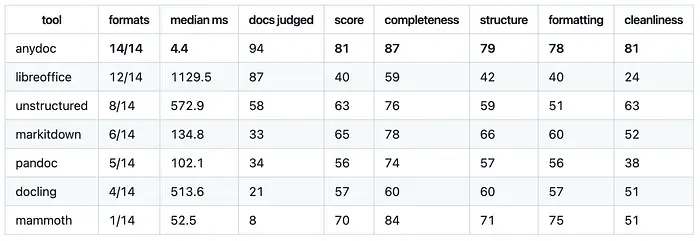
Anydoc 与六款主流转换器进行了对比测试,测试覆盖了 14 种格式的 100 份真实文档;得分范围为 0 到 100,分数越高表示性能越好。
3、Anydoc 在线演示
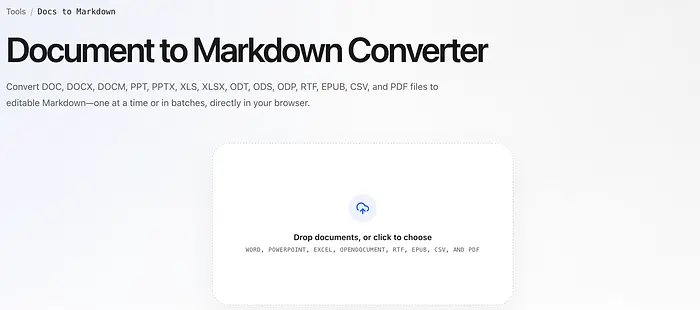
在浏览器中打开 https://batchtool.com/tools/docs-to-markdown,然后将要处理的文档拖拽到"Drop documents, or click to choose"区域即可完成转换。
4、本地部署
CLI 命令行
npx @firecrawl/anydoc report.docx               # Markdown to stdout
npx @firecrawl/anydoc slides.pptx -o slides.md  # or to a file
npx @firecrawl/anydoc - --format csv < data.csv # read stdin
Node.js
- 安装 firecrawl/anydoc 模块
npm install @firecrawl/anydoc
# Or
pnpm add @firecrawl/anydoc
- 使用 @firecrawl/anydoc 模块
import { toDocument, toMarkdown, toMarkdownBytes } from '@firecrawl/anydoc';

// From a file path:
const markdown = await toMarkdown('report.docx');

// From bytes, with the format detected from the content:
const fromBytes = await toMarkdownBytes(bytes);

// Or stop at the document model, which also carries embedded assets.
// Unsupported for `pdf`
const document = await toDocument(bytes);
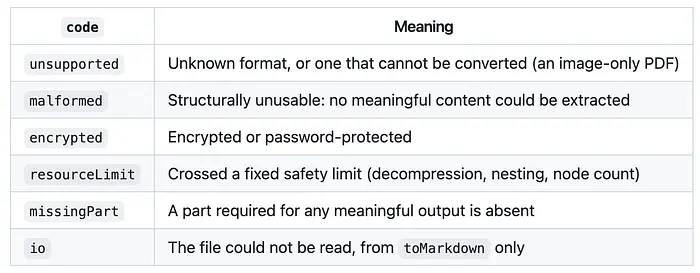
在实际的文档处理场景中,你应该使用 try…catch 语句来捕获转换过程中的错误。例如,当转换只包含图片的 PDF 文件时,会抛出错误代码为 "unsupported" 的异常。
如果你想在浏览器中使用 anydoc,则需要使用 @firecrawl/anydoc-wasm 模块。
Agent Skill(智能体技能)
如果你想在 Claude Code、Codex、Cursor 或 OpenCode 中使用 anydoc,首先需要安装内置的 anydoc Agent skill:
npx skills add firecrawl/anydoc
5、转换 PDF 文档
目前,Anydoc 不支持处理完全由图片组成的 PDF 文档;为了解决这一场景,我们可以集成 PP-OCRv6,这是 PaddlePaddle 的一个开源模型。该模型支持 50 种语言,包括简体中文、繁体中文、英语、日语,以及 46 种使用拉丁字母的语言。
对于复杂的 PDF 文档,你可以使用更强大的 PaddleOCR-VL-1.6 或 MinerU2.5-Pro 模型。
接下来,我将演示如何在 Node.js 和浏览器环境中使用 ppu-paddle-ocr 模块运行 PP-OCRv6 模型。
安装 ppu-paddle-ocr 模块。
pnpm add ppu-paddle-ocr onnxruntime-web # Browser
pnpm add ppu-paddle-ocr onnxruntime-node # Node or Bun
运行 PP-OCRv6 模型。
import { readFileSync } from "node:fs";
import { PaddleOcrService } from "ppu-paddle-ocr";

const service = new PaddleOcrService({
  debugging: {
    debug: false,
    verbose: true,
  },
});

async function main() {
  await service.initialize();

  try {
    const image = readFileSync("./assets/pp-ocrv6-models.jpg");
    const imageBuffer = image.buffer.slice(
      image.byteOffset,
      image.byteOffset + image.byteLength,
    );

    const result = await service.recognize(imageBuffer);
    console.log(result.text);
  } finally {
    await service.destroy();
  }
}

main().catch((error) => {
  console.error(error);
  process.exitCode = 1;
});
上面的示例演示了如何在 Node.js 或 Bun 中执行文本识别。如果你希望在浏览器环境中执行文本识别,则需要使用 ppu-paddle-ocr/web 导出的 PaddleOcrService。
import { PaddleOcrService } from "ppu-paddle-ocr/web";

const service = new PaddleOcrService();
await service.initialize();

const file = document.getElementById("upload").files[0];

const img = new Image();
img.src = URL.createObjectURL(file);
await new Promise((r) => (img.onload = r));

const canvas = document.createElement("canvas");
canvas.width = img.width;
canvas.height = img.height;
canvas.getContext("2d").drawImage(img, 0, 0);

const result = await service.recognize(canvas);
console.log(result.text);
6、结束语
借助 anydoc 库,我们可以轻松地在各种环境或平台上实现文档转换功能。如果你只需要处理 PDF 文档,可以使用 Firecrawl 团队开发的 pdf-inspector 库;不过它不支持基于图片的 PDF,因此你仍然需要自行集成 OCR 服务。我已经将 PP-OCRv6 Medium 模型集成到一个实际的图片翻译项目中,其识别准确率相当令人印象深刻。
原文链接: A Faster Alternative to MarkItDown, Pandoc, Docling, and Unstructured Is Here
汇智网翻译整理,转载请标明出处
这是「RAG / 数据 / 文档智能」专题的一部分。完整地图见:RAG / 数据 / 文档智能完全指南