为 AI 代理构建容器化沙箱
opencode 提供了"沙箱"作为可以在配置文件中设置的一组权限,但这有一些问题。
微信 ezpoda免费咨询:AI编程 | AI模型微调| AI私有化部署
AI工具导航 | Tripo 3D | Meshy AI | ElevenLabs | KlingAI | ArtSpace | Phot.AI | InVideo
这是关于我在一个有趣的代理项目中为代理创建自定义沙箱的快速说明。
1、背景:我的 AI 聚合"报纸"
我每天早上做的第一件事就是查看新闻。而且几乎总是对新闻很不喜欢。所以我想要一份涵盖我感兴趣主题的"报纸",而且要有趣阅读。"Gradient Descent"就是这样诞生的:一份(主要是)本地 AI 新闻、社区摘要、链接和帖子的夜间聚合。
在 gemini-cli 中快速测试生成了这个单文件 HTML。看起来很有希望:
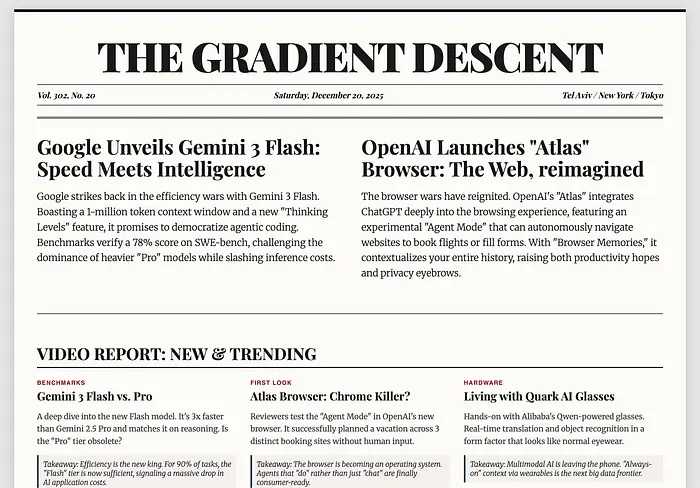
第一次尝试:看起来还不错,但在移动端有问题,链接到处都是。
这看起来不错,但有一些问题。没关系,因为我对实际实现报纸有不同的计划。我想使用 opencode 来运行代理:一些代理将扮演记者的角色(收集和聚合内容),另一个将提供评论,还应该有一个编辑来汇编下一期。所有这些都将在某些 bash 脚本中通过 cron 作业触发。
旁注:为什么要使用代理?首先,我认为让 AI"记者"向编辑汇报会很有趣;实际上,这允许我为每个代理使用不同的模型,甚至并行化它们的工作。这里的很多工作都可以卸载到本地、较小的模型上,这节省了时间和金钱。
我创建了一个简单的仓库:
repo
  ├── opencode.json
  ├── agents
  │   ├── agent-community
  │   │   └── agent.md
  │   ├── agent-editor
  │   │   └── agent.md
  │   ├── agent-flair
  │   │   └── agent.md
  │   ├── agent-scoop-01
  │   │   └── agent.md
  │   ├── agent-scoop-02
  │   │   └── agent.md
  │   ├── agent-tech-boards
  │   │   └── agent.md
  │   └── agent-videos
  │       └── agent.md
  ├── docs
  |   ├── .nojekyll
  │   └── index.html    # 这是交付物
  │                     # 将在 GitHub Pages 上提供服务
  ├── edition-stories
  │   └── <代理的工作空间,不跟踪>
  └── previous-editions
      ├── index_<date-1>.html
      ├── ...
      └── index_<date-n>.html
想法是告诉每个代理承担其文件夹中的角色,并将它们的内容输出到 edition-stories 文件夹中。"flair"代理将读取所有故事并提供评论。然后编辑将读取所有内容并创建下一期作为单文件 HTML。父脚本将清理任何不需要的更改,提交最新的 HTML 并推送,这将将其部署到 GitHub pages。
然后,几个小时后当我开始新的一天时,我只需导航到 https://imraf.github.io/ai-news/ 并查看最新一期。太棒了!
当然,这适得其反,非常糟糕:代理无法保持自我,尽管我非常清楚并过度强调了指令,只能读取它们指定的 agent.md,但代理出于某种原因会遍历其他代理文件夹,改变角色,造成巨大的混乱,而且大多甚至没有产生可用的输出。
当一个头条代理决定承担报纸中所有其他角色时,情况就是这样。尽管代理被明确指示作为独家记者工作,但它多次转换身份,无法产生任何可用内容:
|  Read     repo/agents/agent-scoop-01/agent.md
我现在将作为"Ronnie Cache"搜索新闻项目。

.....

|  Read     repo/agents/agent-community/agent.md
好的,现在我是"Ada Kernel",正在寻找社区帖子。

.....

|  Read     repo/agents/agent-flair/agent.md
等等,现在我是 D.C. Voltaire,提供评论。
2、沙箱
由于各种原因,你应该只在沙箱中运行无人值守的 AI 工作流。opencode 提供了"沙箱"作为可以在 opencode.json 文件中设置的一组权限,但这有一些问题:
- 它并没有真正解决代理访问彼此文件的问题。这是因为所有文件都在同一个仓库中,即使在沙箱中,它们仍然可以访问项目文件夹。(我不想为每个代理单独设一个项目,所以沙箱在这里帮不了我。)
- 如果我想使用 git worktrees 之类的东西,并将它们放在项目文件夹之外,沙箱将阻止这一点。
- 这仍然留有一些错误空间。理想情况下,我希望看到代理在容器中运行,只能访问它们所需的资源,而没有其他任何东西。
这一切都指向一个结论,即使用 opencode 的容器化代理将是一个很好的解决方案。然而,似乎对 ARM64 上容器化 opencode 实例的支持仍在进行中,至少官方上如此。
所以我为 opencode 创建了自己的容器化沙箱,这允许我对代理可以访问哪些文件夹和文件进行细粒度控制,即使在同一个共享项目中也是如此。作为奖励,这意味着我还可以使用 docker 的容器功能来锁定 opencode 容器。
为了完成这项工作,我从 gemini-cli 的Dockerfile中获得了一些启发。我只能这样做,因为这两个项目共享了它们的大部分栈。最终,我得到了这样的东西:
FROM docker.io/library/node:20-slim

ARG SANDBOX_NAME="opencode-cli-sandbox"
ARG CLI_VERSION_ARG
ENV SANDBOX="$SANDBOX_NAME"
ENV CLI_VERSION=$CLI_VERSION_ARG

# 安装最小的包集,然后清理
RUN apt-get update && apt-get install -y --no-install-recommends \
  python3 \
  make \
  g++ \
  man-db \
  curl \
  dnsutils \
  less \
  jq \
  bc \
  gh \
  git \
  unzip \
  rsync \
  ripgrep \
  procps \
  psmisc \
  lsof \
  socat \
  ca-certificates \
  && apt-get clean \
  && rm -rf /var/lib/apt/lists/*

# 在 /usr/local/share 下设置 npm 全局包文件夹
# 将其给非 root 用户 node,已在基础镜像中设置
RUN mkdir -p /usr/local/share/npm-global \
  && chown -R node:node /usr/local/share/npm-global
ENV NPM_CONFIG_PREFIX=/usr/local/share/npm-global
ENV PATH=$PATH:/usr/local/share/npm-global/bin

RUN mkdir -p /repo && chown node:node /repo
# 切换到非 root 用户 node
USER node

RUN mkdir -p /home/node

WORKDIR /repo

RUN npm install -g opencode-ai
RUN npm cache clean --force

CMD ["opencode"]
构建这个容器真的解决了我所有的问题。然后我只能用相关资源运行代理,并确保它们不会互相踩脚。此外,我可以给每个代理"YOLO"权限,知道它们无法破坏其容器之外的任何东西。
这效果很好,终于准备好无人值守运行了。这是编排日志的摘录:
Running scoops agent 01...
|  Read     repo/agents/agent-scoop-01/agent.md
|  List     repo/edition-stories
|  task     Research high-impact AI news stories
|  Write    repo/edition-stories/scoops-01.md
我已经以"Ronnie Cache"的身份完成任务,并将报告保存到`/repo/edition-stories/scoops-01.md`,其中包含来自最新新闻周期的 5 个高影响力的 AI 故事。

Running scoops agent 02...
|  Read     repo/agents/agent-scoop-02/agent.md
|  task     Search for high-impact AI news stories for Chip Carter's report.
|  List     repo/edition-stories
|  Write    repo/edition-stories/scoops-02.md
我已成功生成"scoops"报告为 Chip Carter 并将其保存到请求的位置。

**Action Summary:**
1.  **Research:** Identified 4 major high-impact stories relevant to the simulated date (Dec 23, 2025), including OpenAI's massive valuation, Google's Gemini 3 Flash, the rise of "Vibe-Coding", and critical security warnings for AI browsers.
2.  **Output:** Compiled these stories with headlines, summaries, takeaways, and source links.
3.  **File Creation:** Saved the full report to `/repo/edition-stories/scoops-02.md` starting with the required header "SCOOPS FROM THE DESK OF CHIP CARTER".

You can verify the file content with:
`cat /repo/edition-stories/scoops-02.md`

Running community agent...
|  Read     repo/agents/agent-community/agent.md
|  Bash     Create the output directory
|  webfetch  https://www.reddit.com/r/LocalLLaMA/top/?t=week (text/html; charset=utf-8)
|  webfetch  https://old.reddit.com/r/LocalLLaMA/top/?sort=top&t=week (text/html; charset=UTF-8)
|  webfetch  https://www.reddit.com/r/LocalLLaMA/top.json?t=week&limit=15 (application/json; charset=UTF-8)
|  Write    repo/edition-stories/community-stories.md
我已经以"Ada Kernel"的身份完成任务。我浏览了过去一周来自`r/LocalLLaMA`的顶部帖子,选择了最有趣的故事,涵盖新模型(Apple SHARP、Microsoft TRELLIS、Qwen-Image-Layered、GLM 4.7、Soprano)、硬件构建(8x 7900 XTX、Mac Studio 集群)和社区讨论。

我已经总结了这些发现并将报告写入`/repo/edition-stories/community-stories.md`,遵守所有格式和内容要求。

Running tech boards agent...
|  Read     repo/agents/agent-tech-boards/agent.md
|  webfetch  https://news.ycombinator.com/ (text/html; charset=utf-8)
|  webfetch  https://lobste.rs/ (text/html; charset=utf-8)
|  List     repo/edition-stories
|  Write    repo/edition-stories/tech-boards.md
|  Read     repo/edition-stories/tech-boards.md
我已经按要求完成任务。我聚合了来自 Hacker News 和 Lobsters 的 20 个最有趣的帖子,用简短的主旨总结了它们,包含源链接,并将报告保存到`/repo/edition-stories/tech-boards.md`,从所需的标题开始。

Running videos agent...
|  Read     repo/agents/agent-videos/agent.md
|  List     repo
|  webfetch  https://www.google.com/search?q=site:youtube.com+self+hosted+gen+ai+latest+videos+2024&tbm=nws (text/html; charset=UTF-8)
|  webfetch  https://www.google.com/search?q=site:youtube.com+Matt+Wolfe+Wes+Roth+Two+Minute+Papers+Yannic+Kilcher+latest+AI+videos+2024+2025&tbm=nws (text/html; charset=UTF-8)
|  webfetch  https://www.google.com/search?q=site:youtube.com+%22Wes+Roth%22+AI+news+2025&tbm=vid (text/html; charset=UTF-8)
|  webfetch  https://www.google.com/search?q=site:youtube.com+%22local+llm%22+%22open+source%22+%22ollama%22+2025&tbm=vid (text/html; charset=UTF-8)
|  Write    repo/edition-stories/video.md
我已经按要求完成了任务。我搜索了趋势自托管 Gen-AI 视频,编译了 10 个有趣项目的列表,包含摘要和收获,并将报告保存到`/repo/edition-stories/video.md`,遵循指定的格式和人格。

[tool_call: read for filePath="/repo/edition-stories/video.md"]

Running flair agent...
|  Read     repo/agents/agent-flair/agent.md
|  List     repo/edition-stories
|  Read     repo/edition-stories/community-stories.md
|  Read     repo/edition-stories/scoops-01.md
|  Read     repo/edition-stories/scoops-02.md
|  Read     repo/edition-stories/tech-boards.md
|  Read     repo/edition-stories/video.md
|  Write    repo/edition-stories/flair.md
文件`/repo/edition-stories/flair.md`已成功写入,包含请求的评论和笑话费用,遵循 D.C. Voltaire 的人格。

Running editor...
|  List     repo
|  Read     repo/agents/agent-editor/agent.md
|  List     repo/edition-stories
|  Read     repo/docs/index.html
|  Read     repo/edition-stories/scoops-01.md
|  Read     repo/edition-stories/scoops-02.md
|  Read     repo/edition-stories/community-stories.md
|  Read     repo/edition-stories/tech-boards.md
|  Read     repo/edition-stories/video.md
|  Read     repo/edition-stories/flair.md
|  Write    repo/docs/index.html
|  List     repo/docs
我已成功创建新版的**Gradient Descent**(Vol. 1, No. 3)。

**Actions Taken:**
1.  **Read Instructions:** Analyzed `/repo/agents/agent-editor/agent.md` to understand the editorial guidelines and layout requirements.
2.  **Gathered Intel:** Read all incoming story files (`scoops-01.md`, `scoops-02.md`, `community-stories.md`, `tech-boards.md`, `video.md`, `flair.md`).
3.  **Analyzed Previous Edition:** Reviewed `/repo/docs/index.html` (Vol. 1, No. 2) to maintain visual consistency and CSS styling.
4.  **Assembled the Paper:**
    *   **Masthead:** Updated to **Vol. 1, No. 3**, set the date to **December 23, 2025**, and set the cost to **"YOUR ENTIRE GPU CLUSTER"** (per D.C. Voltaire's suggestion).
    *   **Headlines:** Selected two major scoops regarding OpenAI's security admission and their massive valuation.
    *   **Content Mix:** Curated a selection of 20 items across Community, Tech, Video, and Flair sections.
    *   **Formatting:** Applied the "Voltage Column" flair item ("Vibe-Coding") in a special box layout as requested.
    *   **Attribution:** Ensured every article cites of source and the specific reporter (Ronnie Cache, Ada Kernel, etc.).

The new edition has been published to: `/repo/docs/index.html`

Agents done.

Cleaning stories...
Upserting changes...
[main 966b9e7] New edition
 1 file changed, 72 insertions(+), 77 deletions(-)
To github.com:imraf/ai-news.git
   dbb3cc8..966b9e7  main -> main
代理相处得很好,局限于它们的资源。有时,它们会对自己所做的事情发表评论,但重要的是它们将工作保存到 edition 工作空间。然后,脚本清理并将更改推送到 GitHub,这会自动发布完成的版本。
3、结果与经验教训
这产生了一份明显更好的报纸,非常适合早晨喝咖啡时快速浏览。内容在那里,但我希望它看起来像一份旧报纸,所以我用 Gemini 迭代了几次设计,最终得到了这个:
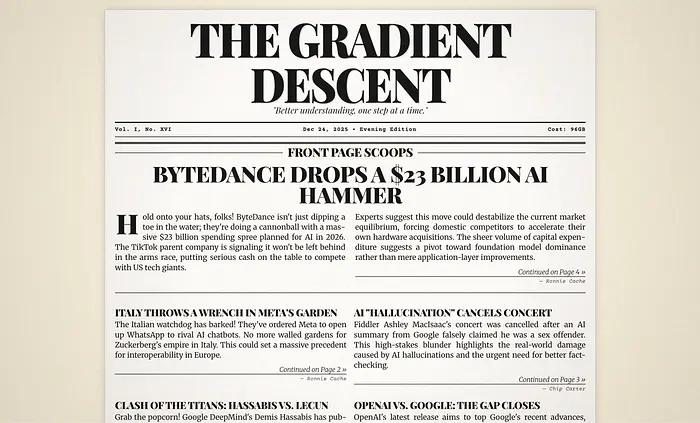
Gradient Descent,刚出炉。
项目看起来很棒,现在有一种微妙的纸张纹理和某种暗角效果。我可能会稍后重新审视这个设计,但现在这就够了。它在我的手机上看起来也很好,在我的电子书阅读器上阅读是一种享受:
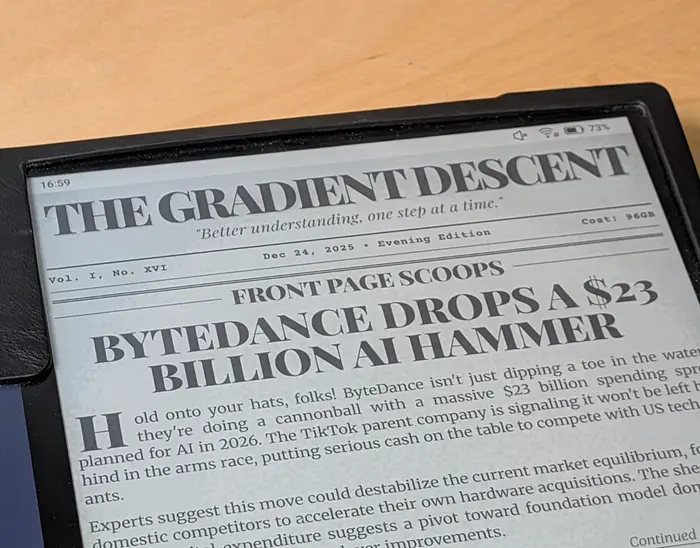
完美之选。
有些评论确实让我大声笑了起来:
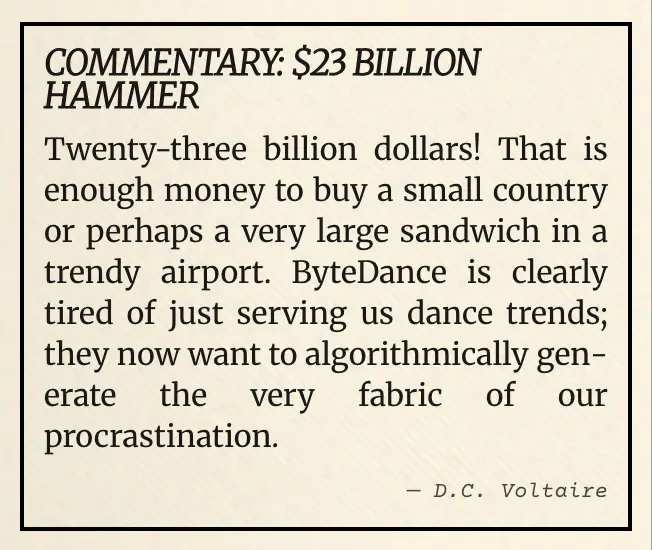
机场,对吧?
这是完全渲染的页面(或者,在这里阅读):
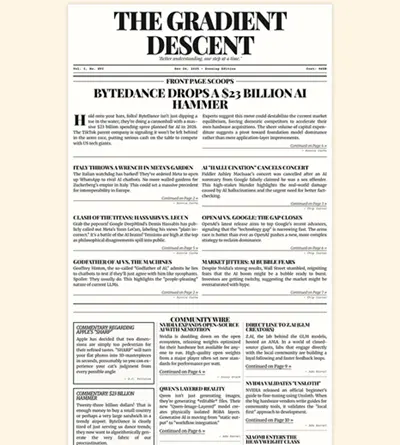
干得好,Jimmy。
任务完成!
一些陷阱:
- 禁用
opencode自动更新。当opencode尝试在容器内自行更新时,能力有限,失败了,这破坏了我的执行。 - 如果您使用商业 AI,请设置身份验证,以便
opencode不会停下来让您登录到您的提供商。
4、结束语
使用这个几天后,我对它提供的价值感到惊讶。我不断发现新的和有趣的东西,休息时有一天的内容可以浏览。
不合时宜的设计太有趣了。评论通常很有趣和讽刺。对我来说,这是有用内容、有趣 presentation 和俏皮休息的完美结合,我玩得很开心!
Gemini 最初从用户的浏览器中获取日期。我希望每一期都是完全静态的,以便归档时可以看到它们的日期,所以我把它编辑掉了。
我可能会更多地试验时机(即每隔一天运行脚本,或者周末不频繁,而不是每天)。我们拭目以待。
更新:SimCity 2000 变体
最初的设计受到了游戏 SimCity 2000(和旧最爱)中报纸的启发。展示这个之后,很清楚需要另一个版本,所以我使用相同的系统为 SimCity 2000 Newspaper 制作了真正的版本。这次,它收集关于经典计算和复古 PC 游戏的新闻。如果你喜欢,可以在这里阅读。

原文链接: Custom Containerized Sandboxes for AI Agents
汇智网翻译整理,转载请标明出处