Claude Code 综合指南
面向开发者的Claude Code实用手册,助您实现集成 MCP 和自动化钩子的 AI 辅助开发

微信 ezpoda免费咨询:AI编程 | AI模型微调| AI私有化部署 | Tripo 3D | Meshy AI
每年一月,工程团队面临的压力都会增加。更多功能、更快的发布周期和更高的可靠性目标。您的新年愿望可能是“事半功倍”,但通常这只是我们在又一次熬夜修复故障管道之前安慰自己的一句老生常谈。
2026 年,“更智能地工作”最终意味着引入智能代理。
并非用于自动补全,也并非用于提供建议,而是用于执行。
您只需用简洁的英语描述您的需求。Claude Code 会读取您的代码库,编写生产代码,运行测试,并与您的工具集成。您将减少编写样板代码的时间,将更多精力投入到架构决策中。
本指南将向您展示如何使用 Claude Code 构建实际系统:
- 处理 CSV 文件、清理杂乱数据并加载到 PostgreSQL 的数据管道
- 使用 Playwright 实现端到端流程自动化的基于浏览器的测试
- 自动防止凭证泄露的安全钩子
- 在代码发布前检测重复代码的质量门
让我们一起努力,争取今年在周五下午之前清空您的 Jira 待办事项列表。
1、基础
Claude Code 不是聊天窗口中的 Claude。它是一个驻留在终端中的智能编码工具,可以访问您的整个代码库并执行实际的开发工作流程。
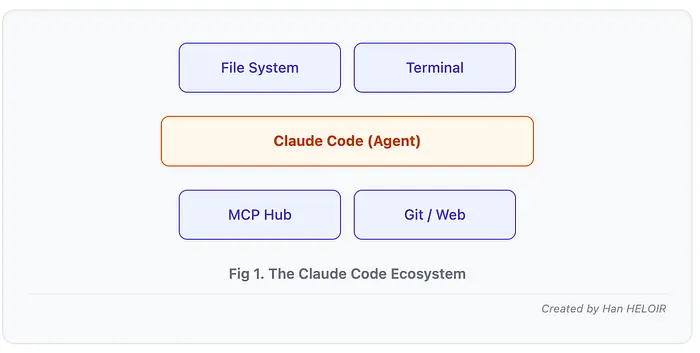
功能:
- 读写项目中的文件
- 运行 bash 命令(测试、git 操作、部署)
- 通过 CLAUDE.md 文档文件理解项目上下文
- 通过模型上下文协议 (MCP) 与外部工具集成
- 通过工具执行时触发的钩子实现工作流程自动化
独特之处:
- 上下文感知:Claude Code 会将您的 CLAUDE.md 文件(编码规范、架构文档、团队约定)加载到上下文窗口中。启动会话时,它已经了解您的技术栈、命名约定和项目结构。
- 大规模文件操作:与逐行工作的自动完成工具不同,Claude Code 可以重构整个模块、生成多文件功能,并保持代码库的一致性。
- 执行,而不仅仅是生成:Claude Code 运行测试、执行 git 命令、安装依赖项并验证自身工作。它不仅提供建议,而且实际执行。 4. 通过 MCP 连接扩展 Claude 到外部工具:使用 Playwright 实现浏览器自动化、GitHub 操作、数据库查询以及任何使用 MCP 服务器的功能。
- 使用 Hooks 实现确定性工作流:Hooks 允许您在工具执行前后注入自定义逻辑,例如安全检查、代码格式化、重复检测和自动化测试。
1.1 安装和首次会话
前提条件:
- 已安装 Python 3.10+
- Node.js 18+(适用于某些 MCP 服务器)
- Anthropic API 密钥或 Claude Pro/Max 订阅
安装 Claude Code:
# macOS/Linux
curl -fsSL https://claude.ai/install.sh | bash
# Or via Homebrew
brew install --cask claude-code
# Or via npm
npm install -g @anthropic-ai/claude-code
身份验证:
# Option 1: API key (for API users)
export ANTHROPIC_API_KEY=your-key-here

# Option 2: Browser auth (for Pro/Max users)
# Just run `claude` and follow the browser prompt
首次交互:
cd your-project
claude

# Claude Code starts in interactive mode
# Try this:
"Analyze the project structure and explain the main components"
关键命令:
# Start interactive session
claude
# One-shot command (headless mode)
claude -p "Generate unit tests for utils.py"
# Resume previous session
claude --resume
# Clear context and start fresh
/clear
# List available MCP servers
claude mcp list
# Show permissions
/permissions
1.2 了解上下文
Claude Code 拥有约 20 万个 token 的上下文窗口。启动会话时:
- 加载 .claude/CLAUDE.md 文件(项目文档)
- 读取您引用或需要的文件
- 存储对话历史记录
- 记住工具输出(测试结果、文件读取、bash 命令)
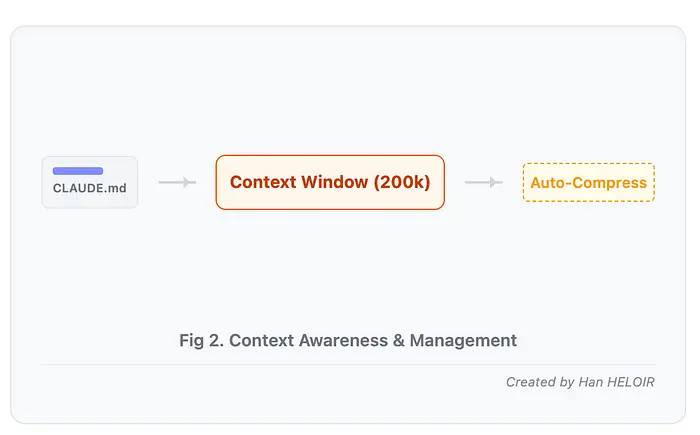
当上下文填满时,Claude 会自动压缩对话以保持工作。对于大型项目,请在功能之间使用 /clear 以保持焦点。
2、构建实际项目
现在我们开始构建。四个可用于生产环境的项目,展示了 Claude Code 在开发各个阶段的功能。
2.1 项目:数据分析和 ETL 管道
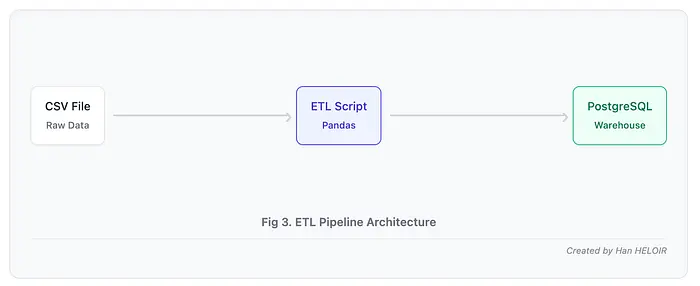
问题:您有来自多个来源的杂乱 CSV 数据。需要清理数据、聚合指标并将其加载到 PostgreSQL 中以创建仪表板。手动编写 pandas 代码既繁琐又容易出错。
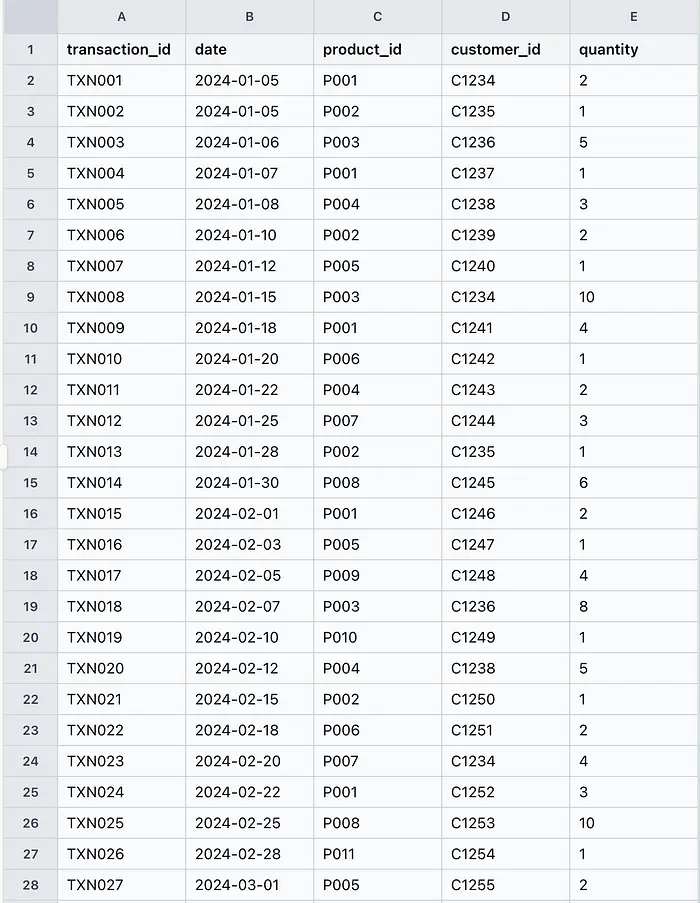
Claude 代码解决方案:请用通俗易懂的语言描述转换过程。Claude 生成完整的 ETL 管道,包含错误处理、日志记录和验证功能。
2.2 工作流程
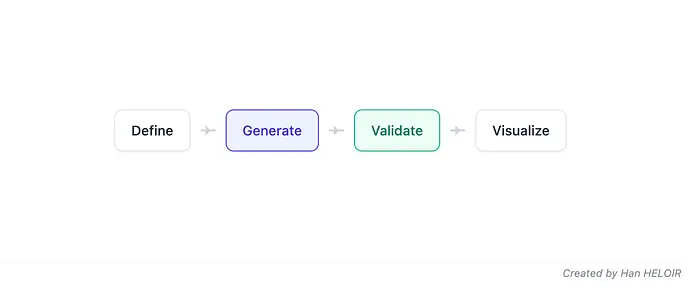
步骤 1:定义需求
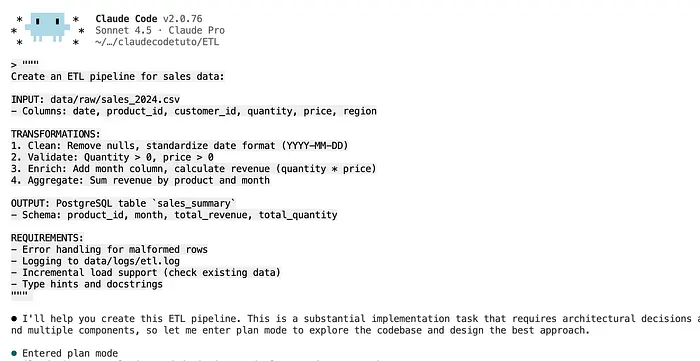
在您的 Claude Code 会话中:
"""
Create an ETL pipeline for sales data:INPUT: data/raw/sales_2024.csv
- Columns: date, product_id, customer_id, quantity, price, region
TRANSFORMATIONS:
1. Clean: Remove nulls, standardize date format (YYYY-MM-DD)
2. Validate: Quantity > 0, price > 0
3. Enrich: Add month column, calculate revenue (quantity * price)
4. Aggregate: Sum revenue by product and month
OUTPUT: PostgreSQL table `sales_summary`
- Schema: product_id, month, total_revenue, total_quantity
REQUIREMENTS:
- Error handling for malformed rows
- Logging to data/logs/etl.log
- Incremental load support (check existing data)
- Type hints and docstrings
"""
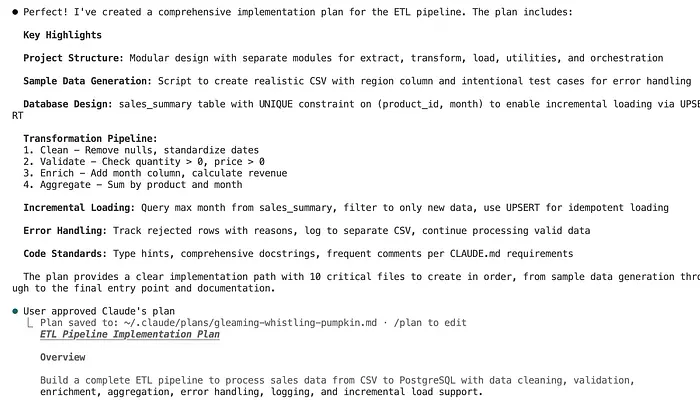
步骤 2:Claude 生成管道
Claude 创建一个完整的、可用于生产环境的管道:
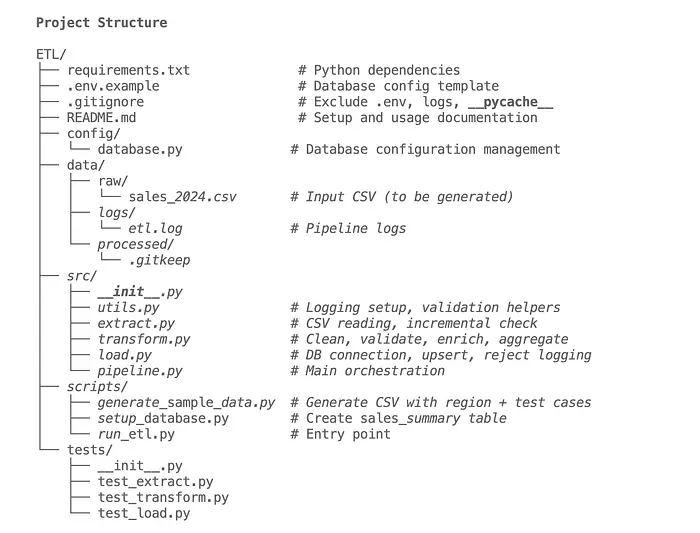
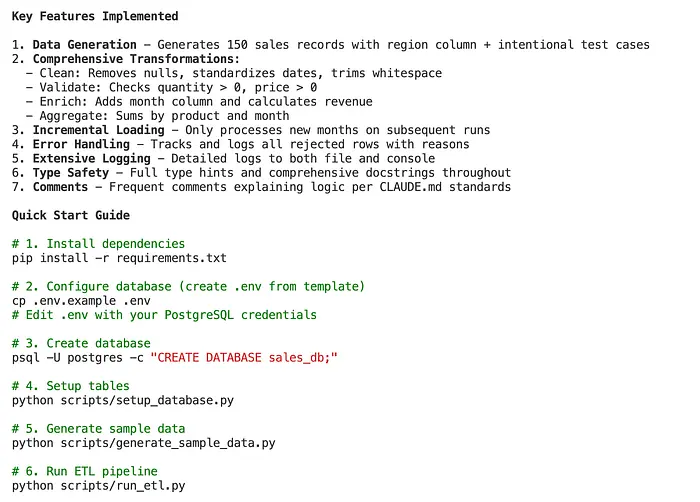
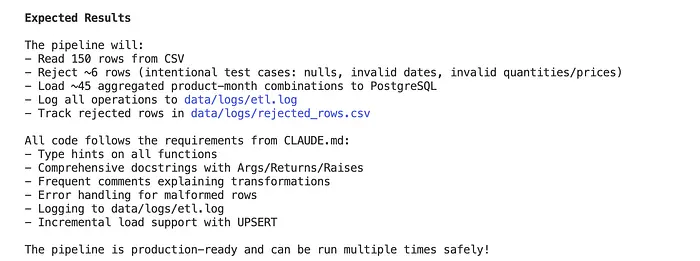
步骤 3:生成数据验证
请 Claude 添加全面的验证:
"Add data quality checks: detect duplicates, outliers in price/quantity,
validate date ranges, and create a quality report"
Claude 进入规划模式,然后提出问题:
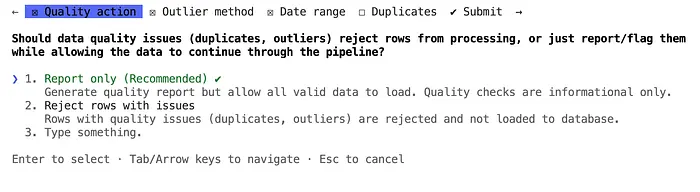
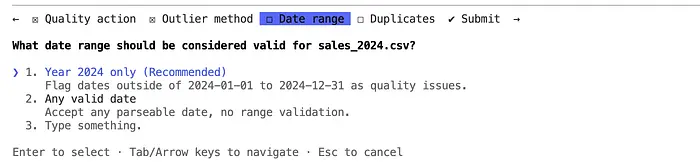
质量检查已完全集成,可以监控数据质量,同时允许加载所有有效数据!
步骤 4:可视化生成
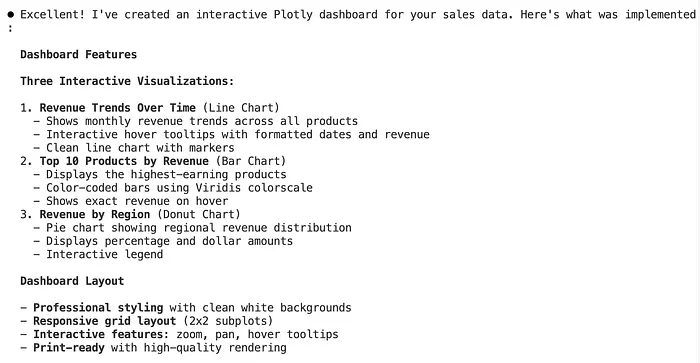
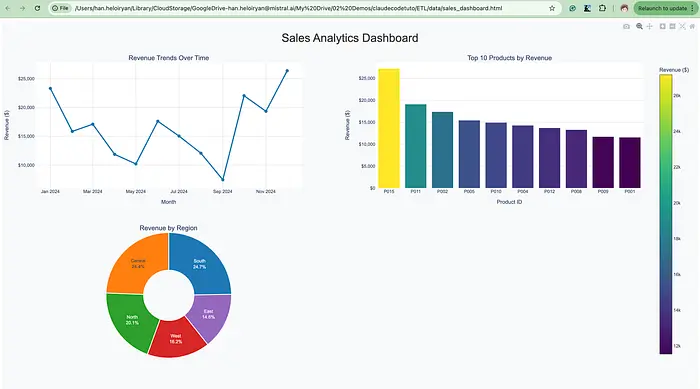
"Generate a Plotly dashboard showing:
1. Revenue trends over time
2. Top 10 products by revenue
3. Regional breakdown
Save as HTML file
Claude 为我生成了仪表板。
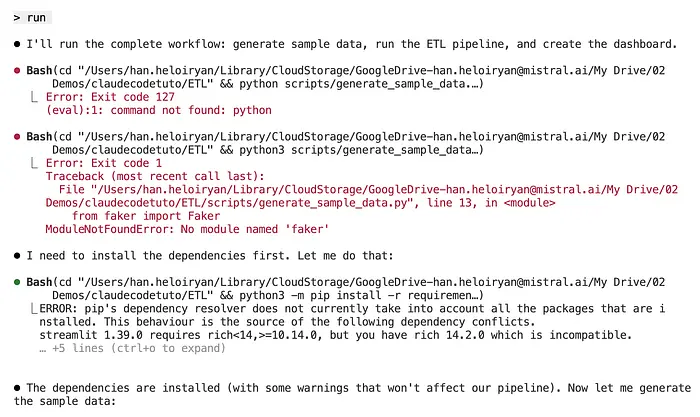
我让 Claude 运行,它像个大男孩一样解决了依赖问题。
好了,这是生成的仪表板。
要点:
- Claude 可以根据英文描述生成完整的、可用于生产环境的管道
- 默认包含错误处理、日志记录和验证
- 可轻松扩展可视化、调度(Airflow)或监控功能
- 用途:CSV 处理、API 数据导入、数据库迁移、报告生成
3、与 MCP 的高级集成
您已经使用 Claude Code 构建了完整的项目。现在,我们将使用模型上下文协议 (MCP) 将其功能扩展到内置工具之外。
3.1 了解 MCP:集成层
MCP 解决的问题:
- 使用 MCP 之前,连接将 AI 工具连接到外部服务简直是一场噩梦:
- 每个工具(Claude、ChatGPT、Copilot)都需要自定义集成
- 每个服务(GitHub、数据库、浏览器)都有不同的 API
- 结果:N×M 集成难题——N 个工具 × M 个服务 = 混乱
MCP 解决方案:统一协议,通用连接:
- MCP 服务器:开放各项功能(Playwright = 浏览器自动化,GitHub = 代码库操作)
- MCP 客户端:Claude Code 等 AI 工具可以连接到任何 MCP 服务器
- MCP 协议:标准化的 JSON-RPC 2.0 通信
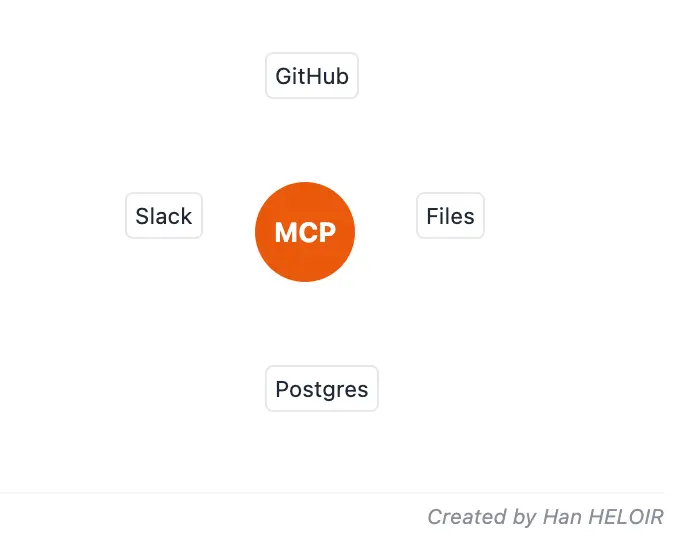
架构:
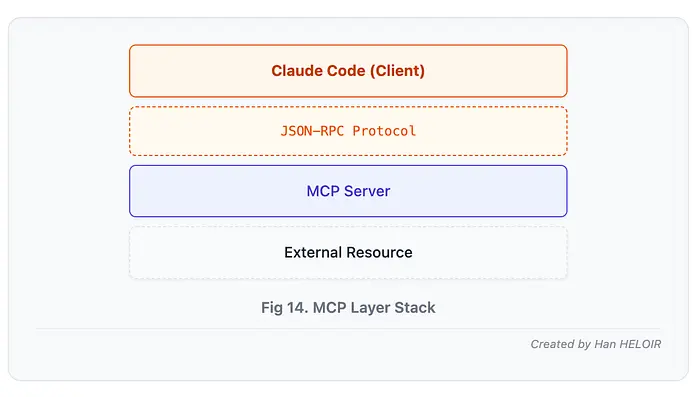
可用的 MCP 生态系统:
社区已构建了 1000 多个 MCP 服务器。主要服务器包括:
- Playwright(微软)——浏览器自动化、测试
- Puppeteer——另一种浏览器自动化工具
- GitHub——代码库操作、PR、问题
- PostgreSQL/MySQL——直接数据库操作
- Google Drive——文档管理
- Slack/Discord——团队沟通
- Filesystem——高级文件管理操作
- Brave Search — 网络搜索集成
- Sequential Thinking — 复杂推理任务
3.2 MCP 设置:安装服务器
安装 MCP 服务器:
# Install Playwright MCP
claude mcp add playwright -s local npx '@playwright/mcp@latest'
# Install GitHub MCP
claude mcp add github -s local npx '@modelcontextprotocol/server-github'
# Verify installation
claude mcp list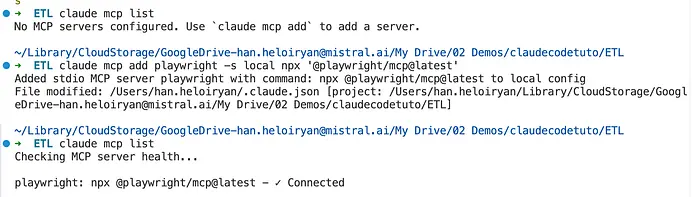
Claude Code 将 MCP 配置存储在 .claude/settings.json 中:
{
  "mcpServers": {
    "playwright": {
      "command": "npx",
      "args": ["@playwright/mcp@latest"]
    },
    "github": {
      "command": "npx",
      "args": ["@modelcontextprotocol/server-github"],
      "env": {
        "GITHUB_TOKEN": "your-github-token"
      }
    },
    "postgres": {
      "command": "npx",
      "args": ["@modelcontextprotocol/server-postgres"],
      "env": {
        "DATABASE_URL": "postgresql://user:pass@localhost/dbname"
      }
    }
  }
}
作用域:
MCP 服务器可以安装在不同的作用域:
# User scope (all projects)
claude mcp add playwright -s user npx '@playwright/mcp@latest'
# Project scope (current project only)
claude mcp add playwright -s local npx '@playwright/mcp@latest'
现在让我们看看三个 MCP 服务器的实际应用。
3.3 MCP 集成:Playwright 浏览器自动化
用例:自动化项目 2 中任务管理应用程序前端的端到端测试。
Playwright MCP 与手动 Playwright 的区别:
- Claude 使用浏览器生成测试,而不仅仅是编写代码
- 捕获辅助功能树,便于 LLM 理解(无需屏幕截图)
- 实时验证和调试
- 自然语言 → 可执行测试
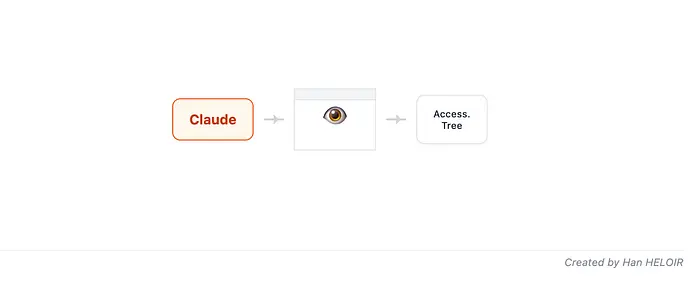
端到端测试生成工作流程
步骤 1:安装 Playwright MCP
claude mcp add playwright -s local npx '@playwright/mcp@latest'
步骤 2:交互式测试创建
在 Claude 代码中:
"""
Use Playwright MCP to create E2E test for task creation:SCENARIO:
1. Navigate to http://localhost:8501 (Streamlit app)
2. Login with test@example.com / testpass123
3. Create a new task "Write documentation"
4. Verify task appears in task list
5. Mark task as complete
6. Verify task shows as completed
Generate pytest test file from this flow.
Include assertions and proper waits.
"""
Claude 使用 Playwright MCP 来:
- 打开浏览器(您可以看到!)
- 导航并与应用程序交互
- 捕获每个步骤的辅助功能树
- 根据观察到的内容生成测试代码
生成的测试:
# tests/e2e/test_task_flow.py (excerpt - full in GitHub)
import pytest
from playwright.sync_api import Page, expect
@pytest.fixture
def authenticated_page(page: Page):
    """Navigate and login"""
    page.goto("http://localhost:8501")

    # Fill login form
    page.get_by_label("Email").fill("test@example.com")
    page.get_by_label("Password").fill("testpass123")
    page.get_by_role("button", name="Login").click()

    # Wait for dashboard
    expect(page.get_by_role("heading", name="My Tasks")).to_be_visible()

    return page
def test_create_and_complete_task(authenticated_page: Page):
    """Test complete task creation and completion workflow"""
    page = authenticated_page

    # Create task
    page.get_by_placeholder("Task title").fill("Write documentation")
    page.get_by_placeholder("Description").fill("Complete API docs")
    page.get_by_role("button", name="Add Task").click()

    # Verify task appears
    task_card = page.locator('text="Write documentation"').locator('..')
    expect(task_card).to_be_visible()
    expect(task_card.get_by_text("Complete API docs")).to_be_visible()

    # Mark as complete
    task_card.get_by_role("checkbox", name="Complete").check()

    # Verify completed state
    expect(task_card).to_have_class(re.compile(r"completed"))

    # Verify in completed filter
    page.get_by_label("Show completed").check()
    expect(page.locator('text="Write documentation"')).to_be_visible()
def test_task_filtering(authenticated_page: Page):
    """Test task filtering by status and tags"""
    # Full implementation in GitHub
    pass
def test_error_handling(authenticated_page: Page):
    """Test app handles errors gracefully"""
    # Try creating task with empty title
    # Verify error message appears
    # Full implementation in GitHub
    pas
步骤 3:视觉回归测试
"Use Playwright MCP to create visual regression tests:
- Capture screenshots of main pages
- Compare against baseline images
- Detect UI changes
- Generate comparison report"
python:
# tests/e2e/test_visual_regression.py (excerpt)
def test_task_list_screenshot(authenticated_page: Page):
    """Capture and compare task list screenshot"""
    page = authenticated_page

    # Navigate to specific state
    page.goto("http://localhost:8501")
    page.wait_for_load_state("networkidle")

    # Take screenshot
    page.screenshot(path="screenshots/task-list-current.png")

    # Compare with baseline (using pixelmatch or similar)
    # Full comparison logic in GitHub
运行 Playwright 测试:
# Run all E2E tests
pytest tests/e2e/
# Run with browser visible (headed mode)
pytest tests/e2e/ --headed
# Run in specific browser
pytest tests/e2e/ --browser chromium
pytest tests/e2e/ --browser firefox
# Generate Playwright report
pytest tests/e2e/ --html=report.html
要点:
- Playwright MCP 支持使用 Claude 进行交互式测试创建
- 开发过程中浏览器可见,便于调试
- 辅助功能树方法比基于屏幕截图的工具更可靠
- 可与 Project 3 中的 pytest 无缝集成
- 轻松扩展:多浏览器测试、移动视口、网络拦截
4、使用 Hooks 实现自动化
您已经构建了项目并集成了外部工具。现在,我们添加最后一层:Hooks——在工具执行事件发生时运行的确定性自动化。
了解 Hooks:事件驱动自动化
4.1 什么是 Hooks?
Hooks 是脚本,它在 Claude Code 工作流程的特定节点自动运行:
- Claude 使用工具之前(工具前钩子)
- Claude 完成工具操作之后(工具后钩子)
- 用户提交提示时
- Claude 停止响应时
- 会话开始或结束时
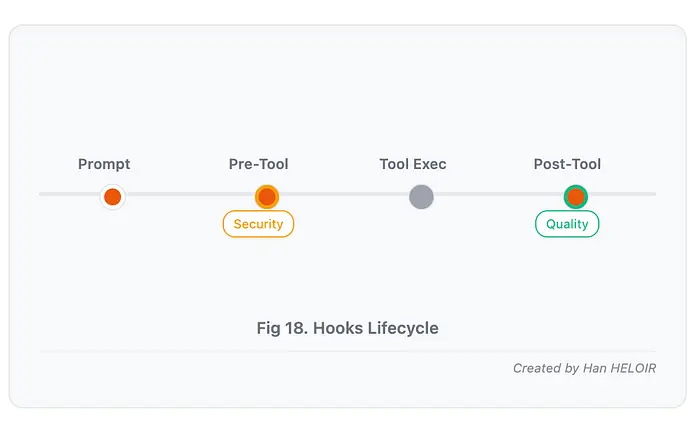
钩子为何重要:
- 如果没有钩子,你只能告诉 Claude:“读取敏感文件前记得检查。” 使用钩子,你可以强制执行:“每次都自动阻止任何读取 .env 文件的尝试。”
- 钩子将建议转化为自动化的、可重复的策略。
4.2 工具前钩子:安全性和验证
用例:防止 Claude 读取敏感文件和执行危险命令。
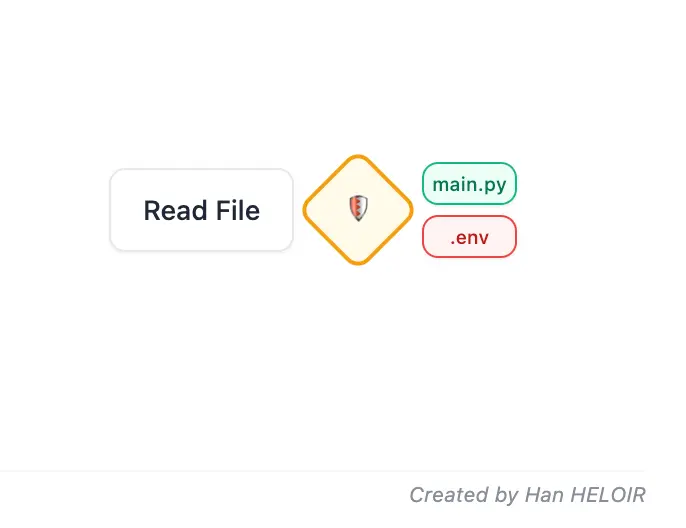
安全钩子实现
步骤 1:创建钩子配置
// .claude/settings.json
{
  "hooks": {
    "PreToolUse": [
      {
        "name": "Security Validator",
        "matcher": "Read|Bash",
        "hooks": [
          {
            "type": "command",
            "command": "python .claude/hooks/pre_tool_security.py"
          }
        ]
      }
    ]
  }
}
步骤 2:实现安全钩子
# .claude/hooks/pre_tool_security.py
"""Pre-tool security hook: Block access to sensitive files and dangerous commands"""

import sys
import json
import re
def validate_file_access(tool_input: dict) -> bool:
    """Check if file access should be blocked"""
    file_path = tool_input.get('file_path', '')

    # Blocked patterns
    sensitive_patterns = [
        r'\.env$',
        r'\.env\.',
        r'credentials',
        r'secrets',
        r'\.pem$',
        r'\.key$',
        r'id_rsa',
        r'\.ssh/',
        r'config\.json$',  # If contains secrets
        r'\.aws/credentials',
    ]

    for pattern in sensitive_patterns:
        if re.search(pattern, file_path, re.IGNORECASE):
            return False  # Block access

    return True  # Allow access
def validate_bash_command(tool_input: dict) -> bool:
    """Check if bash command should be blocked"""
    command = tool_input.get('command', '')

    # Dangerous patterns
    dangerous_patterns = [
        r'rm\s+-rf\s+/',  # rm -rf /
        r'sudo\s+rm',  # sudo rm
        r'chmod\s+777',  # Overly permissive
        r'>\s*/etc/',  # Writing to system directories
        r'curl.*\|\s*bash',  # Pipe to bash (risky)
        r'eval\s+',  # Eval with untrusted input
        r'dd\s+if=.*of=/dev/',  # Disk operations
    ]

    for pattern in dangerous_patterns:
        if re.search(pattern, command, re.IGNORECASE):
            return False  # Block command

    return True  # Allow command
def main():
    """Main hook execution"""
    try:
        # Read tool input from stdin
        input_data = json.loads(sys.stdin.read())

        tool_name = input_data.get('tool_name', '')
        tool_input = input_data.get('tool_input', {})

        # Validate based on tool type
        if tool_name == 'Read':
            if not validate_file_access(tool_input):
                # Block execution
                print(
                    f"BLOCKED: Access to sensitive file denied: {tool_input.get('file_path')}",
                    file=sys.stderr
                )
                sys.exit(2)  # Exit code 2 blocks tool execution

        elif tool_name == 'Bash':
            if not validate_bash_command(tool_input):
                # Block execution
                print(
                    f"BLOCKED: Dangerous command blocked: {tool_input.get('command')}",
                    file=sys.stderr
                )
                sys.exit(2)

        # If we reach here, allow execution
        sys.exit(0)

    except Exception as e:
        # On error, fail safe (block)
        print(f"Security hook error: {e}", file=sys.stderr)
        sys.exit(2)
if __name__ == '__main__':
    main()
工作原理:
- Claude 尝试读取 .env 文件
- 预工具钩子拦截读取工具调用
- 钩子检查文件路径是否符合阻塞模式
- 匹配 .env$ 模式 → 退出代码 2
- Claude 收到错误:“BLOCKED:拒绝访问敏感文件:.env”
- 读取操作永远不会执行
- Claude 知道不要再次尝试
测试钩子:
# In Claude Code session:
"Read the .env file and show me the database credentials"
# Claude's response:
# "I attempted to read .env but the security hook blocked it.
# This file contains sensitive credentials and cannot be accessed.
# Can you provide the information you need another way?"
4.3 工具后钩子:质量和重复检测
用例:Claude 写入或编辑文件后,检查代码库中是否已存在类似代码,以防止重复。
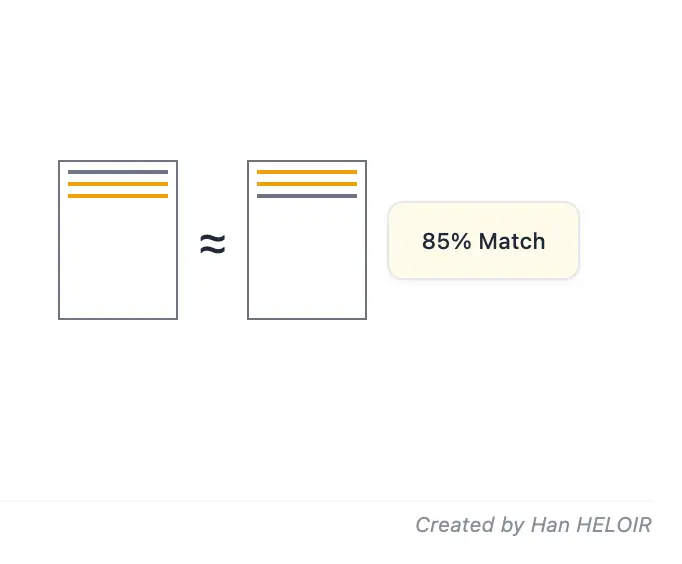
重复检测钩子
步骤 1:配置钩子
// .claude/settings.json (add to hooks section)
{
  "hooks": {
    "PostToolUse": [
      {
        "name": "Duplicate Code Detector",
        "matcher": "Write|Edit",
        "hooks": [
          {
            "type": "command",
            "command": "python .claude/hooks/post_tool_duplicates.py"
          }
        ]
      }
    ]
  }
}
步骤 2:实现重复代码检测
# .claude/hooks/post_tool_duplicates.py
"""Post-tool hook: Detect code duplication after file modifications"""
import sys
import json
import os
from pathlib import Path
from difflib import SequenceMatcher
from typing import List, Dict
def normalize_code(code: str) -> str:
    """Normalize code for comparison (remove comments, whitespace)"""
    lines = []
    for line in code.splitlines():
        # Remove Python comments
        line = line.split('#')[0].strip()
        # Remove empty lines
        if line:
            lines.append(line)
    return '\n'.join(lines)
def similarity_ratio(code1: str, code2: str) -> float:
    """Calculate similarity ratio between two code snippets"""
    norm1 = normalize_code(code1)
    norm2 = normalize_code(code2)
    return SequenceMatcher(None, norm1, norm2).ratio()
def find_similar_code(
    file_path: str,
    content: str,
    threshold: float = 0.7
) -> List[Dict[str, any]]:
    """Find similar code in other files"""
    similar_files = []
    project_root = Path.cwd()

    # Search Python files in project
    for py_file in project_root.rglob('*.py'):
        # Skip the modified file itself
        if str(py_file) == file_path:
            continue

        # Skip test files (they often have similar structure)
        if 'test' in str(py_file):
            continue

        try:
            with open(py_file, 'r', encoding='utf-8') as f:
                existing_content = f.read()

            # Calculate similarity
            ratio = similarity_ratio(content, existing_content)

            if ratio >= threshold:
                similar_files.append({
                    'path': str(py_file.relative_to(project_root)),
                    'similarity': ratio
                })

        except Exception:
            # Skip files that can't be read
            continue

    return sorted(similar_files, key=lambda x: x['similarity'], reverse=True)
def extract_functions(content: str) -> List[str]:
    """Extract function definitions for granular comparison"""
    # Simple function extraction (could use AST for better accuracy)
    functions = []
    current_func = []
    in_function = False

    for line in content.splitlines():
        if line.strip().startswith('def '):
            in_function = True
            current_func = [line]
        elif in_function:
            if line and not line[0].isspace():
                # Function ended
                functions.append('\n'.join(current_func))
                current_func = []
                in_function = False
            else:
                current_func.append(line)

    if current_func:
        functions.append('\n'.join(current_func))

    return functions
def main():
    """Main hook execution"""
    try:
        # Read tool output from stdin
        input_data = json.loads(sys.stdin.read())

        tool_name = input_data.get('tool_name', '')
        tool_input = input_data.get('tool_input', {})

        # Only process Write/Edit operations
        if tool_name not in ['Write', 'Edit']:
            sys.exit(0)

        file_path = tool_input.get('file_path', '')
        content = tool_input.get('content', '') or tool_input.get('new_str', '')

        # Skip if no content
        if not content or len(content) < 100:  # Skip very small files
            sys.exit(0)

        # Find similar files
        similar_files = find_similar_code(file_path, content, threshold=0.7)

        if similar_files:
            # Alert Claude about potential duplication
            message = f"\n⚠️  DUPLICATION DETECTED in {file_path}:\n\n"

            for similar in similar_files[:3]:  # Show top 3
                message += f"  - {similar['path']} ({similar['similarity']:.0%} similar)\n"

            message += "\nConsider refactoring to reuse existing code or creating a shared utility.\n"

            # Output to stderr (Claude sees this)
            print(message, file=sys.stderr)

        # Always allow operation (we're just warning)
        sys.exit(0)

    except Exception as e:
        # Log error but don't block operation
        print(f"Duplicate detection error: {e}", file=sys.stderr)
        sys.exit(0)
if __name__ == '__main__':
    main()
工作原理:
- Claude 写入新文件 backend/utils/validators.py
- 写入完成后,后置钩子运行
- 钩子扫描代码库以查找相似代码
- 发现 backend/auth/validators.py 与现有文件有 85% 的相似度
- 通过 stderr 向 Claude 输出警告
- Claude 看到:“⚠️ 检测到重复代码……请考虑重构以重用现有代码”
- Claude 可以建议将其合并到一个共享模块中
示例操作:
# In Claude Code:
"Create a new file backend/utils/email_validator.py with email validation logic"

# Claude writes the file, then hook runs:
# Hook output (Claude sees this):
"""
⚠️  DUPLICATION DETECTED in backend/utils/email_validator.py:
  - backend/auth/validators.py (89% similar)
  - backend/api/validation.py (72% similar)
Consider refactoring to reuse existing code or creating a shared utility.
"""
# Claude responds:
# "I've created the email validator, but the duplication hook found very
# similar code in backend/auth/validators.py (89% similar).
# Should I refactor both files to use a shared validation module instead?"原文链接:The Complete Claude Code Guide for Your New Year Resolution: Code Smarter in 2026
汇智网翻译整理,转载请标明出处