Docling+视觉AI增强
我用我的视觉解析器增强了 Docling,以实现视觉增强的解析和 RAG 分块
微信 ezpoda免费咨询:AI编程 | AI模型微调| AI私有化部署
AI工具导航 | Tripo 3D | Meshy AI | ElevenLabs | KlingAI | ArtSpace | Phot.AI | InVideo
商业和学术文档通常包含多个图表,解析器经常忽略这些图表,导致信息丢失。在本文中,我们开发了一个视觉解析器,它使用 Docling 提取清晰的文本、表格和文档结构,然后使用视觉模型为图表(图表、图表、信息图)生成图像解释,并将这些解释放置在解析文本的正确位置,并附带丰富的元数据用于检索和引用。该解析器还生成视觉增强的 RAG 分块。
1、简介
文档解析是将文档转换为结构化、机器可读格式的过程。解析对于使用大型语言模型(LLM)处理数据非常重要,这些模型期望干净、结构化且具有上下文的输入。
如果不对复杂布局、图像、字段、段落、表格和元数据进行预处理,LLM 就无法有效地直接对它们进行推理。
使用多个解析库(例如 Docling、PyMuPD、pdfplumber、unstructured)和专用解析模型(例如 IBM Granite、GLM-4.5V、PaddleOCR-VL)将丰富格式的文件转换为机器可读格式。
IBM Docling 在文档解析方面显示出卓越的性能。但是,它无法解释文档中的图像(例如,图表、图表、图表等),这会导致丢失文档中的丰富信息。
专用解析模型不仅计算量大,需要高端 GPU,而且它们也未能解释图像并提取复杂布局的正确布局。
我在上一篇文章中通过创建一个视觉解析器解决了这个问题,该解析器将 PDF 的每一页转换为图像,将图像发送到多模态 LLM,并执行提取后清理以改进表格布局。
这个视觉解析器是我们的生成式 AI 工具包(GAIK 工具包)的构建模块之一。虽然这个解析器显示出令人印象深刻的性能,但对于较大的文档,将每一页转换为图像并将其发送到 LLM 进行解释可能会很昂贵。
Docling 确实支持一些视觉 LLM,但它们需要在本地运行,这又需要基于 GPU 的硬件。此外,我无法找到良好的性能来进行准确的布局提取和图像解释。
在本文中,我们将构建一个解析器,用视觉解析功能增强 Docling。该解析器解决了"如何有效处理包含文本和视觉信息(图表、图表、照片、信息图)的文档"的问题。
我们将创建一个视觉 RAG 解析器(VisionRAGParser),它是一个 Docling 优先的解析器,为解析和 RAG 应用程序添加了图像理解功能。
所以想法是:
- 使用 Docling 在一次遍历中提取清晰的文本、表格和文档结构(标题、部分、来源)。
- 遍历 Docling 提取的文档项以收集每个图像及其来源,以便每个图像在源中保持其位置上下文。
- 使用我们的自定义视觉模型(
VisionParser)生成图像解释。 - (可选)创建一个 Markdown 版本,其中图像被描述替换,并生成带有图像描述和其他元数据的 RAG 就绪分块。
总体而言,本文中开发的视觉 RAG 解析器(VisionRagParser)是 Docling 解析器和我们的自定义视觉解析器(VisionParser)的组合。
VisionRagParser = Docling 解析器 + VisionParser
Vision RAG 解析器的完整代码可在 GAIK 的工具包 仓库 此链接中找到。示例用法代码可 在此处找到。使用 Vision RAG 解析器创建的分块的示例 RAG 工作流程可在 此链接 中找到,并且在文章末尾也有演示。
视觉 RAG 解析器也可以作为 Python 包安装:
pip install gaik[vision-rag-parser]
同样,如果您想在不克隆整个仓库的情况下运行 RAG 工作流程示例,可以将其作为 Python 包安装。
pip install gaik[rag-workflow]
让我们开始吧。
2、Vision RAG 解析器
VisionRagParser 使用 Docling 从 PDF 中提取可靠的文本、表格和文档结构,然后通过将文档的图表、图表和图表发送到 VisionParser 来生成图像解释,从而增强该提取的内容。Docling 还支持导出图表和带有嵌入图像的 Markdown,这非常符合此工作流程。
该类提供了一个简单的接口,返回适合向量存储的视觉增强分块。它运行以下管道:
- Docling 转换
- 从 Docling 的文档项中收集图像
- 对每个提取的图像进行视觉推理(
VisionParser)以生成图像解释,并将这些解释嵌入到正确的位置。 - 使用 Docling 提取的结构和来源处理定位。图像解释按页码分组,并且仅附加到属于同一页的分块。
- 将输出返回为带有页面内容加上元数据(如来源、页码和标题)的 LangChain
Document对象,这使分块可以直接在 RAG 管道中使用。
以下是 VisionRagParser 的结构。
class VisionRagParser:


"""结合 Docling 结构分析和视觉模型解释的 RAG 解析器。


此解析器使用:


- Docling:快速文本提取和文档结构分析


- Vision Parser:AI 驱动的图像、图表和图表解释


"""


def __init__(


self,


*,


vision_config: OpenAIConfig | dict,


enable_ocr: bool = True,


ocr_engine: str = "tesseract_cli",


enable_table_structure: bool = True,


enable_formula_enrichment: bool = True,


num_threads: int = 4,


verbose: bool = True,


save_markdown: bool = False,


vision_prompt: Optional[str] = None,


) -> None:


"""使用 Docling 和 Vision 模型配置初始化 VisionRagParser。"""


...


def convert_doc_to_chunks_with_vision(


self,


pdf_path: str,


*,


output_path: Optional[str] = None,


return_markdown: bool = False,


) -> list[Document] | tuple[str, list[Document]]:


"""主入口点:将 PDF 转换为带有 AI 生成图像描述的 RAG 分块。"""


...


def _convert_with_vision(


self, pdf_path: str


) -> tuple[Any, str, dict[int, list[str]]]:


"""内部方法:处理 PDF 并生成视觉增强的 markdown。"""


...


def _maybe_save_markdown(


self, markdown_text: str, output_path: Optional[str]


) -> None:


"""如果启用 save_markdown,则有条件地将 markdown 输出保存到文件。"""


...


def _collect_images(self, doc) -> list[dict[str, Any]]:


"""从 Docling 文档中提取所有图像及其页码位置。"""


...


def _describe_images(


self, images_with_positions: list[dict[str, Any]]


) -> tuple[dict[int, str], dict[int, list[str]]]:


"""将图像发送到视觉模型并收集 AI 生成的描述。"""


...


def _pil_to_bytes(self, image_obj) -> bytes:


"""将 PIL 图像或类似图像的对象转换为 PNG 字节以进行 API 传输。"""


...


@staticmethod


def _as_pil_image(image_obj):


"""将各种图像对象类型转换为 PIL 图像格式。"""


...


def _replace_images_with_descriptions(


self, markdown_text: str, descriptions: dict[int, str]


) -> str:


"""用 AI 生成的文本描述替换 markdown 中的 base64 编码图像。"""


...


@staticmethod


def _default_vision_prompt() -> str:


"""提供针对图表、图表和信息图优化的默认提示。"""


...


def parse_doc_to_chunks_with_vision(


pdf_path: str, vision_config: OpenAIConfig | dict


) -> list[Document]:


"""便捷函数:快速将 PDF 转换为视觉增强的 RAG 分块。"""


...
3、初始化:连接 Docling 和视觉解析器
构造函数参数反映了两个引擎:用于提取的 Docling 设置,以及用于图像解释的视觉配置和提示。
def __init__(


self,


*,


vision_config: OpenAIConfig | dict,


enable_ocr: bool = False,


ocr_engine: str = "tesseract_cli",


enable_table_structure: bool = True,


enable_formula_enrichment: bool = False,


num_threads: int = 4,


verbose: bool = True,


save_markdown: bool = False,


vision_prompt: Optional[str] = None, # 用于视觉解析器获取图像解释的提示


) -> None:


...
以下是 Docling 管道。
pipeline_kwargs = {


"do_ocr": enable_ocr,


"do_table_structure": enable_table_structure,


"generate_picture_images": True,  # 必须为 True 才能提取图像


"generate_page_images": False,


"do_formula_enrichment": enable_formula_enrichment,


"table_structure_options": TableStructureOptions(


kind="docling_tableformer",


do_cell_matching=True,


) if enable_table_structure else None,


"accelerator_options": AcceleratorOptions(


num_threads=num_threads,


device=device,


),


}
参数 generate_picture_images 需要设置为 True,因为我们需要 Docling 保留图像,以便我们可以对它们运行视觉解析器。
以下是我们的自定义视觉解析器(VisionParser),它将分析图像并返回它们的解释。
self.vision_parser = VisionParser(


openai_config=vision_config,


custom_prompt=vision_prompt or self._default_vision_prompt(),


use_context=False,  # 我们通过 Docling 结构处理上下文


max_tokens=2048,


temperature=0.0,


)
4、主管道
convert_doc_to_chunks_with_vision 方法是 VisionRagParser 的主要入口点。它编排从文档输入到视觉增强 RAG 分块的完整管道,在单个调用中处理文档转换、图像分析和分块生成。
它返回一个带有元数据的 LangChain Document 对象列表,或者如果 return_markdown=True 则返回一个元组 (markdown_text, chunks)
def convert_doc_to_chunks_with_vision(


self,


pdf_path: str,


*,


output_path: Optional[str] = None,


return_markdown: bool = False,


) -> list[Document] | tuple[str, list[Document]]:
有关 convert_doc_to_chunks_with_vision. 中使用的所有方法的完整实现,请参阅 GitHub 代码
5、管道工作流程
该函数执行四个阶段的管道:
第一阶段:视觉增强转换
在此阶段,方法 convert_doc_to_chunks_with_vision 首先调用方法 _convert_with_vision,,该方法使用 Docling 解析文档以提取文本、表格和文档结构。从 Docling 的文档项中收集所有图像。
然后,方法 _convert_with_vision 调用另一个方法 _describe_images,该方法使用 VisionParser 生成图像解释。嵌入的 base64 图像标记在导出的 Markdown 中被这些解释替换。
方法 _convert_with_vision 返回 Docling 转换结果以及增强的 Markdown 和按页码索引的图像描述映射,以便后续的分块附加。
result, markdown_text, descriptions_by_page = self._convert_with_vision(pdf_path)
_describe_images 方法中的 VisionParser 使用以下提示生成平衡的图像解释。但是,它可以根据用例进行修改。
def _default_vision_prompt() -> str:


"""针对图表、图表和信息图优化的默认提示。"""


return (


"Analyze this image from a document and provide a concise interpretation.\n\n"


"**If this is a CHART, GRAPH, or DATA VISUALIZATION:**\n"


"1. State the title and subtitle if visible\n"


"2. Provide a concise interpretation with key insights."
"The key insights should be sufficient to answer any question.\n\n"


"**If this is a DIAGRAM or INFOGRAPHIC:**\n"


"1. Provide a concise interpretation with key insights. "
"The key insights should be sufficient to answer any question.\n\n"


"**If this is a PHOTOGRAPH or ILLUSTRATION:**\n"


"1. Briefly mention what is shown\n\n"


"**Format your response as:**\n"
"[Type]: [Title/Description]\n"
"- Key insight 1\n"
"- Key insight 2 (optional)\n\n"
"Keep the response short and focused."
)
第二阶段:分层分块
随后,convert_doc_to_chunks_with_vision 方法将 Docling 文档传递给 HierarchicalChunker,后者根据文档的结构(部分、段落、标题)智能地分割文档,而不是任意的字符限制。这保持了每个分块的语义连贯性。
chunker = HierarchicalChunker()


for chunk in chunker.chunk(doc):


# 处理每个分块
第三阶段:分块增强和元数据提取
分块后,convert_doc_to_chunks_with_vision 为分层分块器生成的每个分块提取元数据。此元数据包括文档名称、来自来源信息的页码,以及来自文档结构元数据的标题。然后,它为每个分块分配顺序分块 ID。
如果分块的页面包含任何图像,则该页面的所有描述都会附加到 [IMAGE DESCRIPTIONS] 部分下的分块文本中。这确保了视觉上下文与文本内容一起可用。
if page_num is not None and page_num in descriptions_by_page:


desc_block = "\n\n[IMAGE DESCRIPTIONS]\n" + "\n\n".join(


descriptions_by_page[page_num]


)


chunk_text = f"{chunk_text}{desc_block}"
每个分块都包装在 LangChain Document 对象中,并带有元数据,这些元数据支持用于引用的来源跟踪、检索中的页级过滤、基于标题的上下文理解,以及分块排序和去重。
metadata = {


"source": pdf_path,


"document_name": filename,


"page_number": page_num if page_num is not None else "Unknown",


"heading": heading,


"chunk_id": chunk_id,


}


langchain_docs.append(Document(page_content=chunk_text, metadata=metadata))
convert_doc_to_chunks_with_vision 方法返回与向量数据库和 RAG 框架兼容的 LangChain Document 对象。每个文档包含:
- page_content:附加了图像描述(如果适用)的分块文本
- metadata:包含来源、文档名称、页码、标题和分块 ID 的字典
如果 return_markdown=True,函数返回一个元组 (markdown_text, langchain_docs),其中 markdown 文本提供了带有嵌入视觉描述的文档的完整表示。
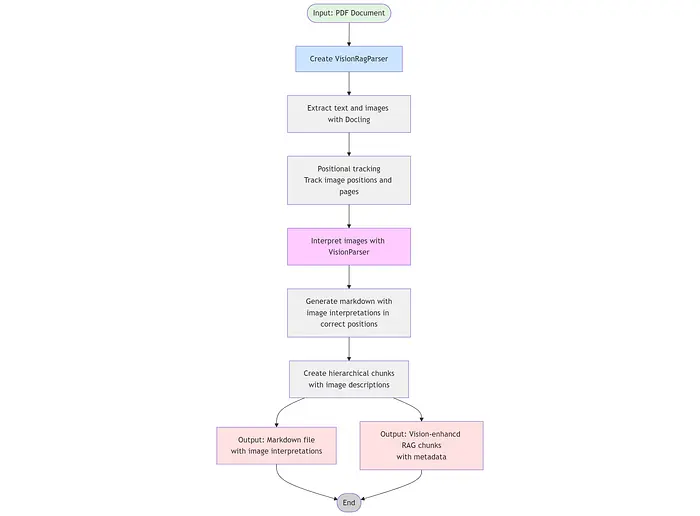
整体方法/函数调用顺序如下:
convert_doc_to_chunks_with_vision


├── _convert_with_vision


│   ├── self.converter.convert (Docling)


│   ├── _collect_images


│   │   └── doc.iterate_items (Docling)


│   ├── _describe_images


│   │   └── for each image:


│   │       ├── _pil_to_bytes


│   │       │   └── _as_pil_image


│   │       └── vision_parser._parse_image (VisionParser)


│   ├── result.document.export_to_markdown (Docling)


│   └── _replace_images_with_descriptions


├── _maybe_save_markdown


└── HierarchicalChunker.chunk (Docling)
整体函数调用流程如下图所示。
6、示例用法
此示例显示如何使用 VisionRagParser。它在导入解析器之前从 .env 文件加载环境变量。此文件应包含您的 OpenAI 或 Azure OpenAI 凭据:
# 对于 OpenAI


OPENAI_API_KEY=sk-...


# 对于 Azure OpenAI


AZURE_OPENAI_API_KEY=your-key


AZURE_OPENAI_ENDPOINT=https://your-resource.openai.azure.com/


AZURE_OPENAI_API_VERSION=your_openai_api_version
get_openai_config 是来自 GAIK 工具包的辅助函数,它读取环境变量并从 config.py 创建配置对象。
vision_config = get_openai_config(use_azure=True)
对于 Azure OpenAI,设置 use_azure=True,对于标准 OpenAI API,设置 use_azure=False(或省略)。您也可以创建自己的 config.py.
该示例使用 save_markdown=True 初始化 VisionRagParser 以保存 markdown 文件,并使用 enable_table_structure=True 进行准确的表格布局提取。可以通过在 VisionRagParser 中为视觉模型(图像解释)设置 prompt = "…" 来使用不同的提示。
"""在 PDF 上运行 VisionRagParser 的最小示例。"""
from __future__ import annotations


import sys


from pathlib import Path


# 在导入 gaik 模块之前从 .env 文件加载环境变量


from dotenv import load_dotenv


load_dotenv(Path(__file__).parent.parent.parent / ".env")


# 将 src 目录添加到路径以导入模块(无需 pip 安装)


sys.path.insert(0, str(Path(__file__).parent.parent.parent.parent / "src"))


from gaik.building_blocks.RAG.rag_parser_vision import VisionRagParser


from gaik.building_blocks.config import get_openai_config


def main() -> None:


print("VISION ENHANCED RAG PARSER:\n")


sample_pdf = Path(__file__).parent.parent / "parsers" / "sample_report.pdf"


vision_config = get_openai_config(use_azure=True)


parser = VisionRagParser(


vision_config=vision_config,


verbose=True,


save_markdown=True,


enable_ocr=False,


enable_table_structure=True,


enable_formula_enrichment=False


)


print("\nConverting to markdown and chunks...")


markdown_output = sample_pdf.with_name(f"{sample_pdf.stem}_vision.md")


_markdown, chunks = parser.convert_doc_to_chunks_with_vision(


str(sample_pdf), output_path=str(markdown_output), return_markdown=True


)


if __name__ == "__main__":


main()
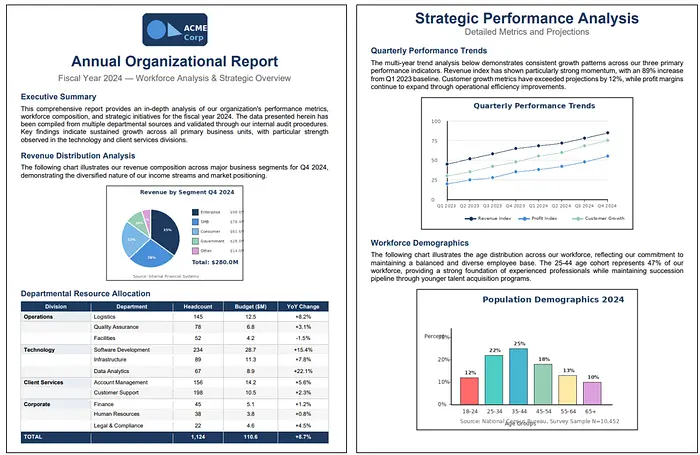
我使用以下 2 页示例文档进行测试。该文档包含图表/图表和分层表格。
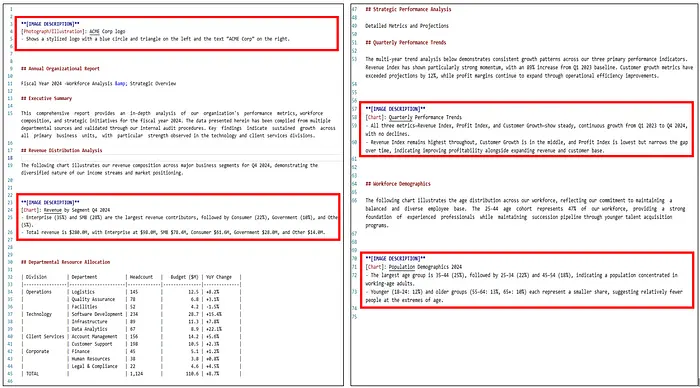
以下 markdown 输出是由视觉 RAG 解析器示例生成的。红色矩形显示图像解释。请注意,VisionParser 的提示可以修改以生成更长、更具解释性的解释。
7、在 RAG 管道上测试视觉增强分块
让我们在来自 GAIK 工具包仓库的自定义 RAG 管道上测试视觉 RAG 解析器。该管道集成了 RAG 组件,包括视觉 RAG 解析器、嵌入器、向量存储、检索器和答案生成器,形成一个紧凑的低代码管道。这些 RAG 组件可在此链接中找到。
使用这些组件的 RAG 工作流程可在此链接中找到。我们针对上述显示的同一文档运行以下 RAG 工作流程示例。
"""在示例 PDF 上运行 RAGWorkflow 的最小示例。"""
from __future__ import annotations


import sys


from pathlib import Path


# 在导入 gaik 模块之前从 .env 文件加载环境变量


from dotenv import load_dotenv


load_dotenv(Path(__file__).parent.parent.parent / ".env")


# 将 src 目录添加到路径以导入模块(无需 pip 安装)


sys.path.insert(0, str(Path(__file__).parent.parent.parent.parent / "src"))


from gaik.software_components.RAG_workflow import RAGWorkflow


def main() -> None:


sample_pdf = "sample_report.pdf"


workflow = RAGWorkflow(


persist=True,


persist_path=str(Path(__file__).parent / "chroma_store"),


citations=True,


conversation_history=True,


)


print("Indexing document...")


workflow.index_documents([sample_pdf])


print("Ready. Type 'exit' to quit.")


while True:


query = input("\nQuestion: ").strip()


if query.lower() == "exit":


break


result = workflow.ask(query, stream=False)


print("\nAnswer:")


print(result.answer)


if __name__ == "__main__":


main()
以下是一些问题的结果。所有这些问题都与图像和表格有关。
Question: What is amount of the revenue of the government segment?


Answer: The revenue for the Government segment is **$28.0M** in Q4 2024. [sample_report, page 1]


---


Question: What is the combined revenue of Enterprise and SMB?


Answer: The combined revenue of Enterprise and SMB is **$176.4M** ($98.0M + $78.4M) in Q4 2024. [sample_report, page 1]


---


Question: What is the trend of customer growth?


Answer: Customer growth shows steady, continuous growth from Q1 2023 to Q4 2024, with no declines over the period. It remains between the higher Revenue Index and the lower but accelerating Profit Index, indicating a consistently expanding customer base alongside revenue and profit improvements. [sample_report, page 2]


---


Question: What is the largest age group in the population demographics?


Answer: The largest age group in the population demographics is 35–44, representing 25% of the population. [sample_report, page 2]


---


Question: What is the smallest age group in the population demographics?


Answer: The smallest age group in the population demographics is the 65+ group at 10% of the population. [sample_report, page 2]


---


Question: What is the YoY change in human resources?


Answer: The year-over-year (YoY) change in Human Resources is **+0.8%**. [sample_report, page 1]
RAG 管道准确回答了所有与图像和表格有关的问题。
8、潜在增强
- 将跨越多个页面的相关图表(例如,连续图表或拆分表格)合并为一个连贯的解释
- 根据检测到的图像类型(财务图表、科学图表、仪表板)动态调整提示,以提高相关性和精度
- 对低价值图像(例如,徽标或装饰元素)跳过视觉推理
原文链接: How I Enhanced Docling's Image Interpretation Capabilities for Parsing
汇智网翻译整理,转载请标明出处