从氛围编码到氛围工程 (实用指南)
这篇文章是我从 Vibe Coding 转向 Vibe Engineering 的方式 —— 我用于 AI 优先开发的简单流程以及一系列启用它的技术。
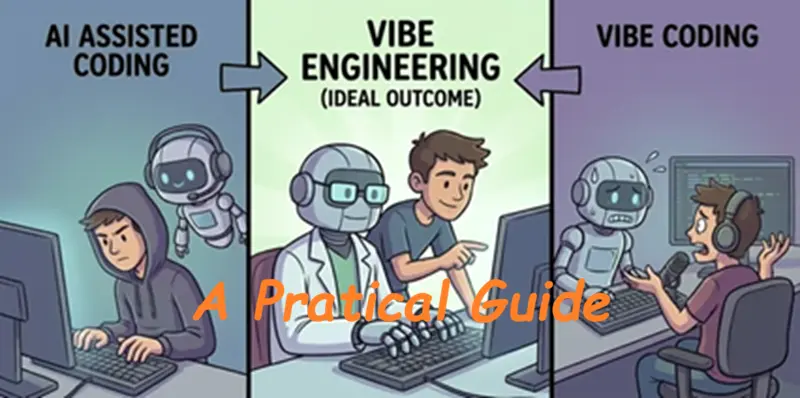
我曾让 LLM 在几分钟内为我编写整个功能,也曾让它们生成数千行无法使用的垃圾代码。区别通常不在于模型,而在于我是像对待老虎机一样对待它,还是像对待工程师同事一样对待它。
简而言之,几天前,我使用 OpenCode 为 Puppypal 添加了一个功能,Puppypal 是我正在构建的一个幼犬训练应用程序,旨在更好地抚养我们的幼犬 Bubbles。我用几句话描述了我想要的东西,它在代码中进行了大约十几次更改,并宣布它已完成任务。
通过使用 LLM 代理(如 OpenCode 或 Claude Code),我意识到如果我将代理视为协作者,给它一个系统、一个要遵循的程序以及它所需的所有必要信息,它实际上可以交付非常高质量的软件。
因此,这篇文章是我从 Vibe Coding 转向 Vibe Engineering 的方式 —— 我用于 AI 优先开发的简单流程以及一系列启用它的技术。我希望在读完这篇文章后,你也想尝试一下。
1、Vibe Engineering
那么,我们如何从 Vibe Coding 转向看起来像正经工程的东西呢?
当我在这里说“Vibe Coding”时,我的意思是向你的代理抛出松散、未指定的请求,并希望它能猜出你的意思。有时这很有效,但通常会留给你脆弱的代码和半成品功能。
所谓“Vibe Engineering”,我的意思是像对待另一位工程师一样与你的代理合作:商定目标,分享背景,写下计划,并在让它接触代码库之前设置护栏。
大多数人都会同意,在没有仔细考虑如何实现它或它对代码质量、架构或可维护性有什么影响的情况下描述你想要的最终结果,是一个坏主意。
这相当于软件工程中没有任何计划就直接跳进一个陌生的代码库,并说“没问题,我会即兴发挥”。这种方法在没有 AI 的情况下会失败,而在有 AI 的情况下,它会失败得更快、更惨。
为了遏制这种风险,你必须像对待初级开发人员一样对待你的 LLM 代理,他非常擅长遵循指示,但也拥有你代码库的 root 访问权限。
你不会给初级开发人员一个模糊的一行工单,没有文档,也没有测试,然后当他们交付一些脆弱的东西时感到惊讶。你会给他们关于产品和架构的背景信息,对你想要的更改的清晰描述,也许还有一个你们共同商定的计划,并为他们真的不应该做的事情建立护栏,比如访问你的生产数据库。
这同样适用于代理。如果你希望它们在你的代码库中处理非微不足道的任务,你需要提高与它们合作的标准。
2、AI 开发的级别
在深入流程之前,设定一个基准会有所帮助:我们要讨论的是什么级别的 AI 辅助?
在过去的几年里,我在所有这些级别上都进行过开发,我几乎所有时间都在使用代理(如 OpenCode 或 Claude Code)。对我来说,它们在自主和控制之间取得了很好的平衡,并解决了我所有的需求。
第 1 级:基础
这是传统的编码方式。你使用常用的工具编写、调试和管理一切。我将所有“非 LLM”和基本的 AI 工作流归为此类,包括 Tab 自动补全。
在这一层中,工具只查看直接的上下文,如当前行或函数,并建议你可能要输入的内容。像 Tabnine、标准自动补全和智能重构功能都属于这一类。
第 2 级:在聊天中复制粘贴
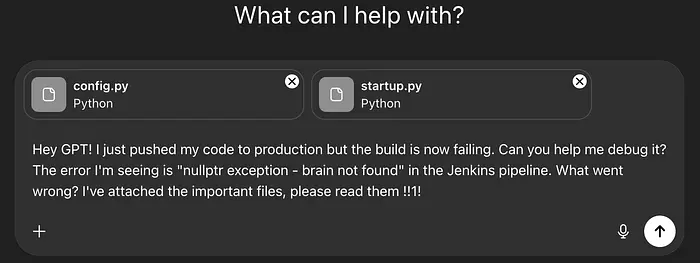
这是我们在聊天窗口中与 LLM 进行的第一次真正的“互动”,我们第一次尝到了它们的能力。我记得第一次使用 ChatGPT 时起鸡皮疙瘩的感觉,但这种炒作很快就平息了。
你复制文件或片段并用自然语言寻求帮助,但模型无法访问你的系统,所以它只能告诉你该做什么(编辑这个函数,运行这个命令),并且只能读取你事先为它整理的内容。这适用于小问题,但一旦你的项目变大,循环就会变得乏味。
第 3 级:指导代理
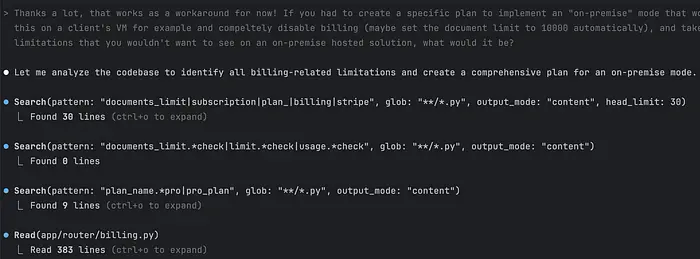
现在事情变得有趣了。代理可以与你的 IDE 集成,独立运行或存在于你的终端中,但最重要的是它们可以读取它们运行所在文件夹中的任何内容,并在整个代码库中进行更改。
如果你给代理一个任务,它会阅读并写下它的待办事项列表,尝试理解你的代码,实现新的业务逻辑,审查它自己的代码,优化现有函数,并向你总结它做了什么。太棒了。
这是我大部分时间使用的级别。像 Claude Code、Codex CLI、OpenCode 等工具都存在于终端中,让你在卸载繁重工作的同时保持控制。
第 4 级:放手工程
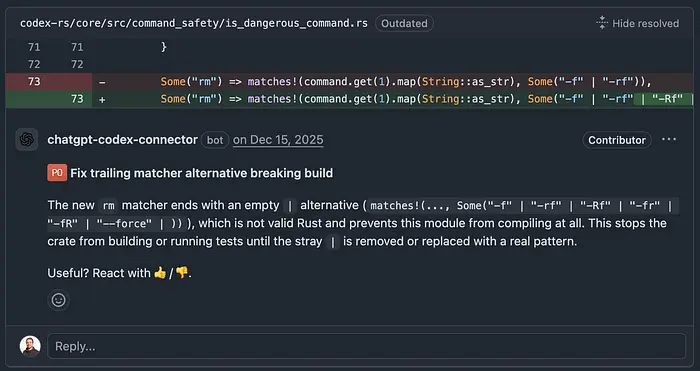
这里的想法是你给代理一个高层目标,它处理一切:分解计划、编写代码、测试、迭代和打开 PR。它还可以扮演自主 PR 审查员的角色。也许有多个代理为这个目标工作,也许只有一个,但你不做任何编排,只进行最少的高层决策交互。这是像 Devin 或 GitHub 的自主代理等工具存在的地方。我还没有在我大部分工作中采用这一级别,因为我关心质量和可维护性的项目仍然需要我在循环中。
3、工程流程
从核心上讲,AI 优先开发是关于给代理正确的信息和一系列要执行的指令。代理遵循这些指令,根据需要使用工具,并在认为任务完成时返回响应。
理解这一点是正确使用代理的第一步,但我们也必须考虑代理工作需要什么样的信息。
这是系统概览
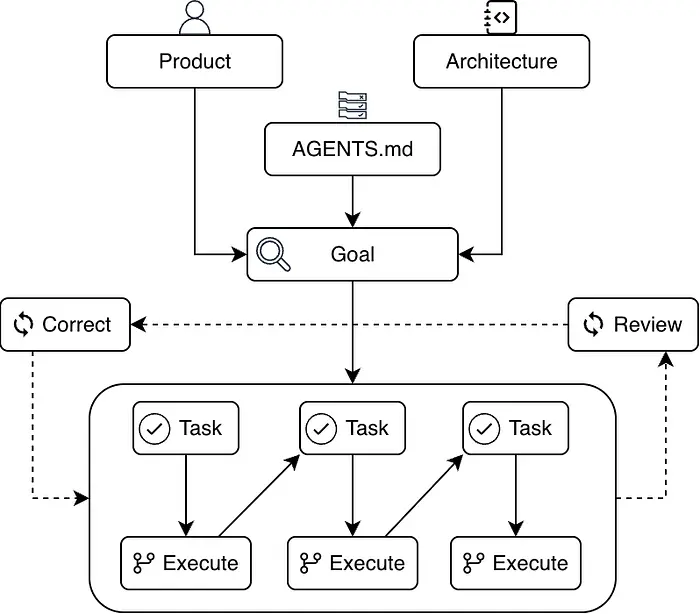
在你的代码库中,你有 3 个关键文件解释你的应用程序做什么以及它是为谁构建的 —— 你的 product,它在技术层面上是如何做的 —— 你的 architecture,以及 你的代理如何 在你的代码库中工作。
有了这些信息,你给你的代理 目标,它将其分解为一系列 任务,然后 执行 这些任务。当它完成一个任务或目标时,你要求它 审查 自己的工作,识别问题并纠正它们。
3.1 定义你的产品
首先,你会写下你正在解决什么问题,用户是谁,以及你的目标是什么。它不需要很广泛,但它应该给代理软件的业务背景,以便当它处理它时,它的推理将基于该背景。
对于 Puppypal,product.md 文档如下所示:
## Pitch
Puppypal is a local-first mobile companion app that helps puppy owners raise a confident, well-adjusted dog by providing age-appropriate daily routines, milestone-based adventures with encouraging gamification, and an in-app training guide.## Users
- First-time puppy owners: Want clear, confidence-building guidance and an easy way to track progress.
- Experienced owners with a new puppy: Want structure, flexibility, and better tracking than ad-hoc notes.
## Problem
Puppy owners often don't know what to prioritize at each age, how to socialize systematically, or how to balance exercise limits with developmental needs.
Missing early socialization opportunities (especially in the first months) and inconsistent routines can lead to avoidable behavior challenges later.
Our Solution: Provide a gentle daily plan that adapts to the puppy's exact age, makes progress visible and motivating (puppy points, levels, mastery), and includes a searchable training guide with contextual tips.
### Core Features
- **Multi-puppy profiles:** Track multiple puppies on one device with clean separation of their data.
- **Today view + selected date:** Today defaults to the current day; Journey can set a selected date so users can review/log past days with the same UI.
- **Daily routines (habits):** Session-based logging (multiple entries per day) for walk/play/training/rest and count-based logging for potty.
- **Adventures (milestones):** Reflection-based logging (confident/wary/scared), retry gently flow, mastery progression, and mastery badges.
- **Puppy points + leveling:** Global progression system that celebrates growth and reinforces consistency.
- **Auto-fill planning:** Automatically populate the selected day with age-appropriate required habits and a configurable number of suggested adventures.
- **Milestones dashboard:** Visual progress across milestone categories, with drill-down into activities.
- **Journey history:** Calendar-based history and progress over time.
- **Training guide:** Searchable guide content, including a "Current Age Guidelines" view.
- **Customization:** Create custom activities and enable optional milestone modules.
- **Backup & restore:** Export/import device data as an unencrypted file via the platform-native share/export flow.

### Advanced Features
- **Full localization:** Everything user-visible is localized (EN/FR/NL), including guide content and built-in activity names/categories.
- **Notifications:** Local reminders (potty, daily check-in, retry) with per-puppy settings.
简单地写下来并在代理处理你的项目时传递给它会增加很多价值,因为代理所做的更改将考虑到业务背景。
3.2 定义你的架构
定义技术要求、决策和约束。它可以是任何与你的应用程序构建方式相关的内容 —— 你的应用程序是为哪些平台构建的,使用了什么编程语言,使用了什么数据库和框架,它托管在哪里等。
与产品背景类似,你希望你的代理始终基于你应用程序的技术背景。如果缺少该背景,它很可能会编写不兼容或偏离你代码的更改,仅仅因为它没有关于它是如何构建的信息。
对于 Puppypal,architecture.md 文件如下所示:
# Architecture
This document captures the architecture and technical stack for Puppypal.
## Platforms
- Mobile: iOS + Android
- Runtime: React Native via Expo
- Product stance: local-first, offline-capable (no accounts/sync in v1)
## Language
- TypeScript
## UI & Navigation
- UI framework: React Native
- Navigation: React Navigation (bottom tabs + stack/modals)
- Styling: NativeWind
- Icons: `lucide-react-native` to match the mockup style
- SVG: `react-native-svg`
## State Management
- Global store: Zustand
- Store responsibilities: orchestration only (UI calls store actions; UI does not talk to SQLite directly)
## Persistence
- Database: SQLite via `expo-sqlite`
- ORM/query layer: Drizzle ORM (SQLite + Expo integration)
- Full-text search: SQLite FTS5 (via raw SQL where needed)
- Identifiers: use string IDs everywhere (UUID for custom records)
- Derived data policy: do not persist per-day or total points; compute from session logs
- Migrations: migration files checked into the repo; small, focused, reversible changes
3.3 定义 AGENTS.md
在项目根目录下有一个写得很好的 AGENTS.md 文件,对于指导你的代理如何在你的代码库中工作大有帮助。
这是一个专门用于代理特定指导、限制和说明的文件。这是你希望你的代理在每一个请求中都知道的设计信息。
它通常包含项目的简短描述、软件架构概述、你希望它遵守的任何编码约定,以及一些特定于代理的护栏。你还可以用它来写下你的代理必须始终知道、应用和考虑的其他任何事情。在这方面,它可能与你的架构或产品文档有些重叠,但这也没关系。
对于 Puppypal,AGENTS.md 文件如下:
# Puppypal
This repo contains **Puppypal**: a local-first **puppy growth companion** mobile app.
## Prime Directives
1. Always write unit tests for any code you modify or introduce
2. Always use proper typing
3. Always run make check after code changes with escalated permissions that you request from the user
4. Create self-documenting code with proper docstrings
## What the app does
- Guides puppy owners through age-appropriate daily routines (habits) and milestone-based adventures.
- Tracks progress with puppy-points, mastery, and a lightweight leveling system.
- Provides a searchable in-app training guide (offline, bundled content).
- Works entirely offline (no accounts, no cloud sync).
More extensive product documentation at: `agents/product.md`
### Mobile app location
- Expo app lives in `mobile/`
- Run locally: `cd mobile && npm start`
### Architecture (layered)
The production app follows the layered structure from `agents/documentation/architecture.md`:
- `domain/`: pure business logic only (no React, no SQLite)
- `data/`: repositories + SQLite/Drizzle integration
- `store/`: global orchestration state (Zustand)
- `ui/`: screens/components, no direct DB access
- `navigation/`: React Navigation setup (tabs + stack/modals)
- `app/`: app bootstrap (providers, splash/fonts, global config)
- `tests/`: app tests (unit, integration)
More extensive architecture documentation at: `agents/architecture.md`
...
我经常更新 AGENTS.md,并且我依赖它来提供代理在处理任何任务之前需要知道的信息。这也使我自己对项目的心理模型保持最新。
3.4 设定目标
你现在已经设置了 产品、架构 和在代码库中工作的 指南 的上下文。是时候开始实施了。
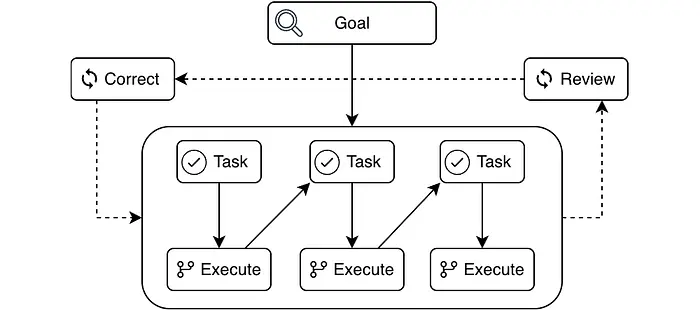
为了让你的代理实现你想要的,你需要指定它的目标。有多种方法可以做到这一点,但你的结构越好,你给代理的相关信息越多,结果就越好。
有不同的方法来实现收集该信息和指定该目标的过程,最著名和最近的一个是规范驱动开发 (Spec-Driven Development, SDD)。我实际上经常通过 Agent OS 使用它,尽管我已经根据自己的需要对其进行了调整。
根据我的经验,使用规范作为描述代理目标的方式适合我想要处理的大多数复杂任务。例如,在 Puppypal 中,我想将一些 React web 视图迁移到 Expo 移动应用程序。
我这样开始:
Replace the placeholder Today screen with the real layout from the mockup
并与代理迭代,直到我们得出该任务的 spec.md:
# Specification: Today View — React Native UI Parity from Mockup
## Goal
Implement the Today view in React Native (Expo) so it matches the mockup preview's layout and interactions, backed by a mocked/in-memory store so the screen is non-throwaway and ready to swap onto real domain + persistence later.
## User Stories
- As a puppy owner, I want Today to show the selected day's routine (habits, adventures, and summary) so I can follow and log my puppy's daily activities.
- As a developer, I want the Today UI built from reusable components and a stable UI-facing store contract so we can replace mocked data with real repositories without rewriting the screen.
- As a multilingual user, I want all UI chrome text in Today localized (en/fr/nl) so the app never shows untranslated interface strings.
## Specific Requirements
**Mockup-to-RN screen map**
- Treat `agents/documentation/mockups/mockup-preview/src/` as the source of truth for Today layout + interactions.
- Implement a RN Today screen to replace the existing placeholder under `mobile/src/ui/screens/` (e.g., `mobile/src/ui/screens/TodayScreen.tsx` or similar), matching the mockup structure: selected-date header, guideline chips, daily summary, habits strip, and adventures list.
- Colocate Today-specific components under a feature folder, for example: `mobile/src/ui/features/today/*` (e.g., `TodayHeader.tsx`, `GuidelineChips.tsx`, `HabitStrip.tsx`, `AdventureList.tsx`).
**Reusable UI component architecture**
- Compose Today from small, reusable components: `Card`, `IconButton`, `Chip`, `SectionHeader`, `ListRow`, `EmptyState`, and a modal sheet/page layout.
- Prefer feature-local components for view-specific pieces and keep truly shared primitives in `mobile/src/ui/components/`.
- Use theme tokens and typography from `mobile/src/ui/theme/*` for colors/spacing/fonts; avoid hardcoding values in Today components.
- Ensure touch targets are finger-friendly (~44px) and add `accessibilityLabel` to icon-only controls in Today header and habit controls.
**In-memory UI store contract**
- Expose Today-facing state/actions via the global in-memory store (Zustand) used across the app; keep mock data import behind a seed/adapter layer.
- Required UI state for Today:
  - `activePuppyId` (string)
  - `selectedDate` (ISO date string)
  - `todayPlanItems` (list of habit/adventure descriptors for the selected date)
  - `habitSessions` (records of logged habit sessions for the selected date)
  - `adventureAttempts` (attempts/reflections for adventures listed in Today)
- Required UI actions for Today:
  - `selectPuppy(id)`
  - `setSelectedDate(date)`
  - `toggleHabitSession(habitId, options?)` (start/stop or mark complete; opens duration/potty flows when needed)
  - `logPottyEvent(sessionId, details)`
  - `addAdventureToDate(activityId, date)` / `removeAdventureFromDate(activityId, date)`
  - `updateAdventureReflection(adventureAttemptId, reflectionText)`
  - `openModal(modalName, payload)` / `closeModal()`
- Keep computed/derived values (e.g., daily summary totals, mastery markers, in-today flags) in selectors to avoid duplication across Today components.
...
这非常广泛且信息量很大,因此虽然 SDD 是一个了不起的工具,但它不一定是你抛给代理的每个任务的最佳方法。也许你只是想简单地更改按钮的颜色,那么你可能只想默认对其进行 Vibe Coding。但是当你处理复杂的更改时,SDD 是一种非常可靠的方法。
作为经验法则,当通常需要一点深入分析或理解,或者它影响多个层或代码文件(如业务逻辑),或者涉及数据模型并涉及编写迁移时,我会将目标制定为规范。
3.5 将其分解为任务
在你的代理开始朝着目标努力之前的最后一步是将规范分解为具体任务列表。一个好的任务足够具体,代理可以专注地完成它,但仍然足够高层,以至于本身就有意义。
一个任务例如是编写一个实现某些业务逻辑的函数,但编写该函数的一行代码不是任务。
对于上面的 spec.md,这是 task.md 分解的样子:
# Task List: Today View
## Overview
Implement the Today screen and its directly related store and modal flows so the Today tab matches the mockup preview in layout and core interactions. This file lists all tasks in sequence.
- [ ] Verify minimal dependency surface and ensure no new unapproved native deps are required; if a native dep is needed, install via `npx expo install`.
- [ ] Ensure `import 'react-native-gesture-handler';` is present in `mobile/index.ts` only if gesture-driven interactions are necessary.
- [ ] Add or extend `mobile/src/store/useAppStore.ts` to expose Today-facing state/actions: `activePuppyId`, `selectedDate`/`dateKey`, `todayPlanItems`, `habitSessions`, `adventureAttempts`, and actions `setSelectedDate`, `selectPuppy`, `toggleHabitSession`/`startHabitSession`/`stopHabitSession`, `logPottyEvent`, `addActivityToDate`, `removeActivityFromDate`, `updateAdventureReflection`, `openModal`, `closeModal`.
- [ ] Add `mobile/src/store/types.ts` entries if needed for Today view-model stability (puppy, habit, activity, session, attempt types).
...
- [ ] Implement `mobile/src/ui/screens/HabitDurationScreen.tsx` modal: capture duration, notes, potty details, and update `habitSessions` in store; ensure keyboard-safe layout.
- [ ] Implement `mobile/src/ui/screens/AddActivityScreen.tsx` modal: minimal search/add flow (use `fuse.js` if available) and add-to-date action.
- [ ] Implement `mobile/src/ui/screens/CustomActivityScreen.tsx` modal: simple form to create and add a custom activity to selected date (use `react-hook-form` if available, otherwise a controlled form).
- [ ] Implement `mobile/src/ui/screens/ActivityDetailScreen.tsx` modal: show activity details and allow adding/editing reflection; updates should be visible in Today after close.
- [ ] Register modal routes in `mobile/src/navigation/RootNavigator.tsx` and types in `mobile/src/navigation/types.ts` only if the existing navigation does not already expose these modals; prefer reusing current modal registration.
- [ ] Wire all Today UI interactions to the store actions/selectors (date navigation, puppy switch, habit session updates, add/remove activity, reflection updates) and ensure per-puppy isolation.
## Verification Commands
- `cd mobile && npm run typecheck`
- Manual: start app (`cd mobile && npm start`) and run the manual smoke checks listed above.
## Notes
- Default interaction rule: duration/potty habits open the Habit Duration modal; simple check-off habits toggle completion inline.
- Use `date-fns` `format(date, 'yyyy-MM-dd')` for `dateKey` to avoid timezone off-by-one issues.
- Do not import mockup preview assets directly; place any required fixture images under `mobile/assets/mockup/` and resolve with a static `getImageSource` helper.
当要求你的代理生成此计划时,有很多重要的事情需要它考虑 —— 它期望为每个步骤编辑的代码,它可以重用哪些现有代码,它将如何验证其更改是否有效且未破坏事物,等等。这些也是你作为开发人员会问自己的问题,强迫代理思考它们通常会使其交付的质量更高。
3.6 验证和纠正
对我来说,这可以说是这个流程中最重要的部分。代理和人类一样,很少能一下子想出完美的解决方案。定义目标,将其分解为任务,最重要的是实施更改是容易出错的,推动你的代理检查它所做的事情,并在发现问题时纠正它是非常重要的。
这是一个反馈循环:
- 一个代理开始实施任务
- 它在编辑期间运行测试和 linter 并修复故障
- 它完成任务并请求 审查
- 另一个代理 阅读已实施的内容并识别 问题
- 主代理 阅读识别出的问题并 解决 它们
- 重复 直到没有发现关键问题
如果你仍然不相信自动化测试和其他自动化检查很重要,我希望这能推动你为你的 AI 代理正确设置它们。
3.7 审查
我们还没有到可以简单地将一切留给代理的地步,所以一旦任务完成,你要进行最后审查。因为代理一直在验证和纠正其工作,所以这种审查通常比你审查它的“初稿”要轻松得多,但你仍然必须验证更改。它可能错误地实现了一些业务逻辑,也许规范中有些东西不清楚,也许它错过了一个 bug,你永远不知道。
4、尝试一下
如果你已经在玩代理,或者你有兴趣尝试你读到的内容,我鼓励你挑选一个你关心的小项目,并尝试对几个规范端到端地使用本文中的流程:
- 安装并设置 OpenCode 和 Agent OS
- 为你的项目设置 git 仓库
- 要求你的代理运行
plan-product.md来创建你的产品和技术栈文档 - 当你有一个具体的更改想法时,要求你的代理运行
shape-spec来塑造你的第一个规范,然后在你对自己描述的目标感到满意后运行write-spec - 使用
create-tasks创建任务列表,并使用implement-tasks启动实施 - 在新的 OpenCode 窗口中(或通过标记主聊天中的
@general代理),要求它审查当前的 git 更改并将发现分为重要和次要发现。 - 将审查传递给你的主代理,并重复直到没有发现重要问题或你对结果感到满意
我每天都在工作中使用这个流程。
5、前方的路
我不认为只有一种正确的 AI 辅助开发方式。不同的团队和代码库将需要不同的方法,而且使用 AI 开发确实有一个学习曲线。
对我来说,应用本文中描述的工作流改变了我对编码代理的期望。它提供了可靠的结果,适用于多种问题,并且非常适合我的日常工作和我的副业项目。
这些方法都不能取代基础知识;它们依赖于基础知识。领域知识、产品意识和工程工艺仍然占据大部分比重。代理帮助你更快地行动并探索更多选项,但它们依靠这些基础来做任何有用的事情。如果你不知道自己在做什么,你怎么能自动化你的工艺呢?
原文链接: A Practical Guide to Vibe Engineering
汇智网翻译整理,转载请标明出处