ROS 2 Composition简明教程
ROS 2 Composition:使用ROS 2组件进行进程内通信的开发指南。
微信 ezpoda免费咨询:AI编程 | AI模型微调| AI私有化部署
AI工具导航 | ONNX模型库 | Tripo 3D | Meshy AI | ElevenLabs | KlingAI | ArtSpace | Phot.AI | InVideo
在传统的ROS 2开发中,每个节点作为单独的OS进程运行。启动五个节点意味着五个独立的进程,每个进程都有自己的内存空间——它们之间的每条消息都要跨越进程边界。这种方式安全且相互隔离,但代价也不小:序列化、反序列化和进程间通信(IPC)都会增加延迟和CPU开销。
ROS 2 Composition通过在名为组件容器(Component Container)的单个进程中加载多个节点来解决这个问题。加载到同一容器中的节点通过进程内消息传递(intra-process messaging)进行通信——这意味着数据以指针形式传递,而不是序列化和复制。最终结果是,位于同一进程中的节点之间实现了近乎零延迟的通信。
传统方式(多进程):
[Node A] --序列化→ IPC --反序列化→ [Node B]

组合方式(单进程):
[Component A] --指针→ [Component B]
1、为什么你应该关注?
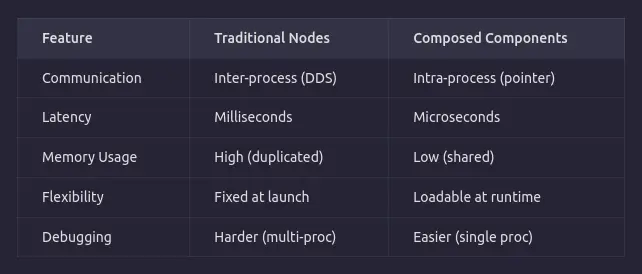
进程内通信消除了序列化和复制的开销。对于高频数据流(如相机图像、激光雷达点云),这种优化可能是关键路径。
还有强大的运行时灵活性优势:你可以动态地加载和卸载组件,而无需重新编译或重启整个系统。这对于正常运行时间至关重要的生产级机器人系统来说非常宝贵。
1.1 ROS 2组件的剖析
ROS 2组件本质上是一个继承自rclcpp::Node的类,并使用rclcpp_components宏注册为插件。就这么简单。没有特殊的基类,也没有复杂的接口。
组件容器(rclcpp_components::ComponentManager)通过pluginlib在运行时发现和加载这些插件。
1.2 何时应该使用Composition?
使用Composition的场景:
- 节点紧密耦合且交换高频数据(相机、激光雷达、IMU)
- 节点间延迟是硬性要求
- 你需要运行时灵活性来加载/卸载行为
- 你正在构建具有资源限制的生产系统
避免使用Composition的场景:
- 节点需要严格的进程隔离(一个节点崩溃不应导致其他节点崩溃)
- 你正在原型开发,简单性比性能更重要
- 节点来自不同的团队/包,所有权不明确
2、动手实践:Hello World发布者组件
我们将创建一个包,其中包含一个简单的HelloWorldPublisher组件,每秒发布一次问候消息。
第1步:创建包
ros2 pkg create --build-type ament_cmake hello_world_composition \
--dependencies rclcpp rclcpp_components std_msgs
第2步:编写组件
创建src/hello_world_publisher.cpp:
#include <rclcpp/rclcpp.hpp>
#include <std_msgs/msg/string.hpp>
#include <rclcpp_components/register_node_macro.hpp>

namespace hello_world_composition
{
class HelloWorldPublisher : public rclcpp::Node
{
public:
  // 构造函数必须接受rclcpp::NodeOptions
  explicit HelloWorldPublisher(const rclcpp::NodeOptions & options)
  : Node("hello_world_publisher", options), count_(0)
  {
    publisher_ = this->create_publisher<std_msgs::msg::String>("hello_topic", 10);
    timer_ = this->create_wall_timer(
      std::chrono::seconds(1),
      [this]() {
        auto message = std_msgs::msg::String();
        message.data = "Hello, World! Count: " + std::to_string(count_++);
        RCLCPP_INFO(this->get_logger(), "Publishing: '%s'", message.data.c_str());
        publisher_->publish(message);
      }
    );
    RCLCPP_INFO(this->get_logger(), "HelloWorldPublisher component initialized!");
  }

private:
  rclcpp::Publisher<std_msgs::msg::String>::SharedPtr publisher_;
  rclcpp::TimerBase::SharedPtr timer_;
  size_t count_;
};
} // namespace hello_world_composition

// 这个宏将类注册为ROS 2插件
RCLCPP_COMPONENTS_REGISTER_NODE(hello_world_composition::HelloWorldPublisher)
核心要点:RCLCPP_COMPONENTS_REGISTER_NODE宏使其成为一个组件。它将类注册到pluginlib系统,使用容器查找和加载时所需的完全限定名称。NodeOptions构造函数是强制的——这是容器向节点传递配置的方式。
第3步:配置CMakeLists.txt
cmake_minimum_required(VERSION 3.8)
project(hello_world_composition)

find_package(ament_cmake REQUIRED)
find_package(rclcpp REQUIRED)
find_package(rclcpp_components REQUIRED)
find_package(std_msgs REQUIRED)

# 将组件构建为共享库(不是可执行文件)
add_library(hello_world_publisher SHARED
  src/hello_world_publisher.cpp
)

target_include_directories(hello_world_publisher PUBLIC
  $<BUILD_INTERFACE:${CMAKE_CURRENT_SOURCE_DIR}/include>
  $<INSTALL_INTERFACE:include>
)

ament_target_dependencies(hello_world_publisher
  rclcpp
  rclcpp_components
  std_msgs
)

# 注册组件,以便容器可以发现它
rclcpp_components_register_nodes(hello_world_publisher
  "hello_world_composition::HelloWorldPublisher"
)

install(TARGETS hello_world_publisher
  ARCHIVE DESTINATION lib
  LIBRARY DESTINATION lib
  RUNTIME DESTINATION bin
)

ament_package()
**为什么是共享库?**组件容器使用dlopen()(动态加载)在运行时加载你的组件。这需要.so共享库,而不是独立的可执行文件。
第4步:配置package.xml
<?xml version="1.0"?>
<package format="3">
  <name>hello_world_composition</name>
  <version>0.0.1</version>
  <description>Hello World ROS 2 Composition Example</description>
  <maintainer email="you@example.com">Your Name</maintainer>
  <license>Apache-2.0</license>

  <buildtool_depend>ament_cmake</buildtool_depend>

  <depend>rclcpp</depend>
  <depend>rclcpp_components</depend>
  <depend>std_msgs</depend>

  <export>
    <build_type>ament_cmake</build_type>
  </export>
</package>
第5步:构建
cd ~/your_ws
colcon build --packages-select hello_world_composition
source install/setup.bash
3、运行组件
方法1:手动(CLI)—— 最适合开发
在终端1中,启动一个空的组件容器:
ros2 run rclcpp_components component_container
在终端2中,将组件加载到该容器中:
ros2 component load /ComponentManager \
hello_world_composition \
hello_world_composition::HelloWorldPublisher
你应该立即在终端1中看到发布者开始记录日志。检查主题:
ros2 topic echo /hello_topic
方法2:启动文件—— 最适合生产
创建launch/composition.launch.py:
from launch import LaunchDescription
from launch_ros.actions import ComposableNodeContainer
from launch_ros.descriptions import ComposableNode

def generate_launch_description():
    container = ComposableNodeContainer(
        name='hello_container',
        namespace='',
        package='rclcpp_components',
        executable='component_container',
        composable_node_descriptions=[
            ComposableNode(
                package='hello_world_composition',
                plugin='hello_world_composition::HelloWorldPublisher',
                name='hello_world_publisher',
            ),
        ],
        output='screen',
    )
    return LaunchDescription([container])
然后运行:
ros2 launch hello_world_composition composition.launch.py
4、检查运行中的容器
Composition的最佳特性之一是运行时内省(runtime introspection)。当你的容器正在运行时:
# 列出所有已加载的组件
ros2 component list
# 输出:
# /ComponentManager
#   1  /hello_world_publisher

# 卸载组件(通过ID)
ros2 component unload /ComponentManager 1
你可以将多个组件加载到同一个容器中:
ros2 component load /ComponentManager my_pkg my_pkg::MySubscriber
ros2 component load /ComponentManager my_pkg my_pkg::MyProcessor
5、更大的图景
ROS 2 Composition是生产级机器人的基础架构模式。在实际系统中,你可能会有:
component_container_mt(多线程容器)
├── CameraPublisher(发布/image_raw)
├── ImagePreprocessor(订阅/image_raw,发布/image_processed)
└── MLInferenceNode(订阅/image_processed,发布/detections)
这三个节点在进程内通信,图像数据以指针形式传递。整个从相机到推理的管道运行时几乎没有IPC开销——这在多进程架构中根本不可能实现。
6、结束语
ROS 2 Composition不仅仅是一种优化——它是一种设计模式,迫使你思考节点边界、数据所有权和系统架构。一旦你开始以组件的方式思考,你会发现你的系统变得更加模块化、性能更高,也更容易理解。
原文链接: ROS 2 Composition: Building Efficient Robotics Systems
汇智网翻译整理,转载请标明出处