Fincept Terminal: 开源彭博终端
一年 24,000 美元的订阅费,现在免费了。这到底意味着什么。
在我们继续之前,先给你一个数字。24,000 美元。
这是 Bloomberg Terminal 每年的费用。每个席位。每年。对冲基金、投资银行、基金经理们眼睛都不眨一下就付了这笔钱,只为获得实时金融数据、分析工具和图表功能,让他们比其他人更有优势。
几十年来,这个价格就是护城河。不是数据本身。而是对数据的访问权。是整理数据、可视化数据、让数据变得可操作的软件。
现在,这道护城河被炸开了一个洞。
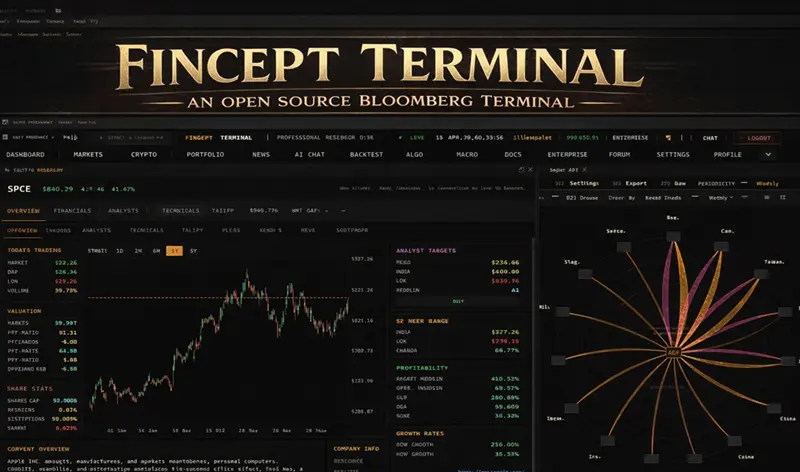
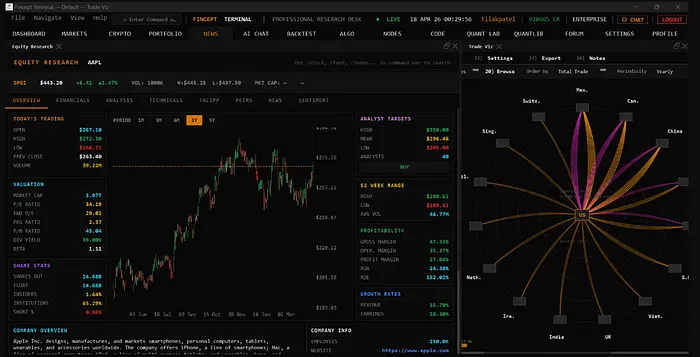
Fincept Terminal v4 是一个完全开源的原生桌面应用,旨在提供 Bloomberg 级别的金融分析功能,完全免费,完全在你的本地机器上运行。没有订阅费,没有 API 费用,也不依赖云端。只需克隆、构建、使用。
我们来聊聊它是什么、如何工作,以及如何今天就把它跑起来。
1、Fincept Terminal 到底是什么?
在安装之前,值得先了解一下它在技术上为什么令人印象深刻,因为它不是那种套着 Bloomberg 外壳的网页应用。
Fincept Terminal 使用 C++20 构建 UI,基于 Qt6,并使用嵌入式 Python 作为其分析层。这种组合是经过深思熟虑的,意义重大。
这样想:
┌─────────────────────────────────────────────────────┐
│                  FINCEPT TERMINAL                   │
│                                                     │
│  ┌─────────────┐     ┌─────────────────────────┐   │
│  │  C++20 Core │────▶│   Qt6 UI / Rendering    │   │
│  │  (speed,    │     │   (charts, dashboards,  │   │
│  │   memory)   │     │    native widgets)      │   │
│  └─────────────┘     └─────────────────────────┘   │
│         │                                           │
│         ▼                                           │
│  ┌──────────────────────┐                          │
│  │  Embedded Python 3.11│                          │
│  │  (analytics, quant   │                          │
│  │   models, CFA-level  │                          │
│  │   calculations)      │                          │
│  └──────────────────────┘                          │
│         │                                           │
│         ▼                                           │
│  ┌──────────────────────┐                          │
│  │  100+ Data Connectors│                          │
│  │  Yahoo Finance, SEC, │                          │
│  │  World Bank, and more│                          │
│  └──────────────────────┘                          │
└─────────────────────────────────────────────────────┘
大多数现代金融工具都基于 Electron 构建,本质上就是一个包着桌面应用外壳的 Chrome 浏览器。这就是为什么 Robinhood 的桌面客户端或许多交易平台感觉又慢又吃内存。它们底层运行的是一个网页浏览器。
Fincept 完全跳过了这些。它编译成一个单一的原生二进制文件。没有 Node.js。没有 JavaScript 打包器。没有浏览器运行时。只有一个直接与你的操作系统对话的二进制文件,这意味着它启动快、运行快,而且不会因为显示一个 K 线图就吃掉 2GB 内存。
2、数据层:"100+ 个连接器"到底意味着什么
Bloomberg 每年收费 24,000 美元的原因不是软件。而是数据管道。Bloomberg 雇佣了数千人来维护来自每个交易所、每个央行、每次财报发布、每份经济报告的实时数据流。
Fincept 采取了不同的方法:它连接到公开可用的数据源,这些对任何人都是免费开放的,但几乎没有人好好整合过。来看看它底层是怎么工作的:
# 这是 Fincept 的 Python 层在你查询股票时发出的请求
# 数据来源:Yahoo Finance

import yfinance as yf
def get_stock_overview(ticker: str) -> dict:
    stock = yf.Ticker(ticker)
    info = stock.info
    return {
        "name":           info.get("longName", "N/A"),
        "price":          info.get("currentPrice", "N/A"),
        "market_cap":     info.get("marketCap", "N/A"),
        "pe_ratio":       info.get("trailingPE", "N/A"),
        "52w_high":       info.get("fiftyTwoWeekHigh", "N/A"),
        "52w_low":        info.get("fiftyTwoWeekLow", "N/A"),
        "revenue":        info.get("totalRevenue", "N/A"),
        "profit_margin":  info.get("profitMargins", "N/A"),
        "analyst_target": info.get("targetMeanPrice", "N/A"),
    }
overview = get_stock_overview("AAPL")
for key, val in overview.items():
    print(f"{key:20} {val}")
Fincept 不只是展示这些数据。它还在上面运行 CFA 级别的分析,也就是特许金融分析师用来构建投资论点的量化模型。现金流折现模型、投资组合风险指标、行业相关性矩阵。
这就是嵌入式 Python 在做的事情:运行那些散户投资者需要在电子表格里花几个小时才能搭建好的金融计算,在几秒钟内完成,背后是一个原生桌面 UI。
3、安装:三条路,同一个终点
我们来把它跑起来。你有三个选择,从简单到复杂排序。
路径 1:下载安装包
如果你只想在五分钟内看到它运行,直接从 GitHub releases 页面下载对应平台的预构建安装包:github.com/Fincept-Corporation/FinceptTerminal。
| Platform              | File                                  | What to do                                 |
| --------------------- | ------------------------------------- | ------------------------------------------ |
| Windows               | FinceptTerminal-Windows-x64-setup.exe | Run installer → launch FinceptTerminal.exe |
| Linux                 | FinceptTerminal-Linux-x64.run         | chmod +x → run                             |
| macOS (Apple Silicon) | FinceptTerminal-macOS-arm64.dmg       | Open DMG → drag to Applications            |
就这些。不需要安装依赖。不需要配置编译器。二进制文件已经构建好了。
路径 2:使用 setup 脚本从源码构建
如果你想了解自己在运行什么,或者想为项目做贡献,那就自己构建。仓库里包含了一个一键 setup 脚本,它会处理所有事情:编译器检查、CMake、Qt6、Python、构建和启动。
# Step 1: Clone the repo
git clone https://github.com/Fincept-Corporation/FinceptTerminal.git
cd FinceptTerminal

# Step 2: Make the setup script executable
chmod +x setup.sh
# Step 3: Run it - this installs dependencies and builds the app
./setup.sh
./setup.sh 命令大致按以下顺序执行:
# What setup.sh is doing under the hood (simplified)

check_compiler_version()    # Needs GCC 12.3+ or Apple Clang 15.0+
install_cmake_3_27_7()      # Exact version - not 3.28, not 3.26
install_qt_6_8_3()          # Exact version - this matters
install_python_3_11_9()     # Embedded runtime for analytics
run_cmake_configure()       # cmake --preset linux-release / macos-release
run_cmake_build()           # Compiles the C++20 source
launch_app()                # Opens FinceptTerminal
有一点需要注意:版本锁定非常严格。 项目使用精确的依赖版本:CMake 3.27.7、Qt 6.8.3 和 Python 3.11.9。这不是吹毛求疵。而是因为 C++ 构建对库版本之间的 ABI 差异非常敏感,而维护者们已经精确测试过这些组合。如果你偏离了,构建可能会静默地生成一个不稳定的二进制文件。
路径 3:完全手动构建
如果你想要完全的控制权,或者你在 Windows 上(setup 脚本不适用),这里是完整的手动构建流程。一旦安装了前置条件,只需要两个命令。
前置条件:
- CMake 3.27.7* Ninja 1.11.1
- Qt 6.8.3 (via Qt Online Installer)
- Python 3.11.9
- Compiler: MSVC 19.38 (Windows) / GCC 12.3 (Linux) / Apple Clang 15.0 (macOS)
构建:
# ── Linux ──────────────────────────────────────────────────────
git clone https://github.com/Fincept-Corporation/FinceptTerminal.git
cd FinceptTerminal/fincept-qt

# Configure (one-time)
cmake -B build/linux-release -G Ninja \
  -DCMAKE_BUILD_TYPE=Release \
  -DCMAKE_PREFIX_PATH="$HOME/Qt/6.8.3/gcc_64"
# Compile
cmake --build build/linux-release
# Run
./build/linux-release/FinceptTerminal

# ── macOS ──────────────────────────────────────────────────────
cmake -B build/macos-release -G Ninja \
  -DCMAKE_BUILD_TYPE=Release \
  -DCMAKE_OSX_DEPLOYMENT_TARGET=11.0 \
  -DCMAKE_PREFIX_PATH="$HOME/Qt/6.8.3/macos"
cmake --build build/macos-release
./build/macos-release/FinceptTerminal

# ── Windows (PowerShell) ───────────────────────────────────────
cmake -B build/win-release -G Ninja `
  -DCMAKE_BUILD_TYPE=Release `
  -DCMAKE_PREFIX_PATH="C:/Qt/6.8.3/msvc2022_64"
cmake --build build/win-release
.\build\win-release\FinceptTerminal.exe
配置步骤只需要运行一次,或者当你修改 CMakeLists.txt 时。之后,你只需要 cmake --build 来拉取新的更改。
故障排查:你实际会遇到的三类错误
我来帮你省掉 Google 的时间。
Error 1: "Could not find Qt6 6.8.3"
# Wrong — points to wrong version
-DCMAKE_PREFIX_PATH="$HOME/Qt/6.5.2/gcc_64"

# Right - must be exactly 6.8.3
-DCMAKE_PREFIX_PATH="$HOME/Qt/6.8.3/gcc_64"
路径必须指向精确的 6.8.3。不是 6.5。不是 6.6。不是 6.9。
Error 2: MSVC version error (Windows)
# Check your MSVC version
cl /?

# You need: MSVC 19.38 (Visual Studio 2022 version 17.8 or later)
# If you're on VS 2019 or earlier, update Visual Studio first
Error 3: Broken build after changing a source file
# Nuclear option — delete the build directory and start clean
rm -rf build/linux-release/

# Then re-configure and re-build
cmake -B build/linux-release -G Ninja ...
cmake --build build/linux-release
还有一个 FINCEPT_ALLOW_QT_DRIFT=ON 标志,如果你卡在不同的 Qt 6.x 小版本上,想在本地测试的话可以用,但永远不要用于发布版本。
4、你实际会得到什么
一旦运行起来,Fincept Terminal v4 涵盖以下内容:
Financial Analysis
├── Equity Research
│   ├── Fundamental analysis (P/E, DCF, EV/EBITDA)
│   ├── Technical analysis (via TA-Lib integration)
│   └── Cross-source sentiment (Reddit, X, Polymarket)*
├── Portfolio Analytics
│   ├── Risk metrics (Sharpe ratio, Beta, VaR)
│   ├── Correlation matrices
│   └── Sector allocation visualization
├── Macro Data
│   ├── World Bank economic indicators
│   ├── SEC EDGAR filings (real-time)
│   └── Central bank data feeds
└── CFA Curriculum Coverage
    └── Full Level I–III quantitative analytics

*Requires optional Adanos Market Sentiment connection.
 Without it, everything else works exactly as normal.
CFA 课程覆盖值得停下来想一想。CFA(Chartered Financial Analyst)资格是投资管理领域的黄金标准。通过全部三个级别,大多数人需要四年时间。该课程中的量化模型,那些用于公司估值、风险评估和投资组合构建的模型,已经被内置到 Fincept 的 Python 分析模块中。
这不算什么。
5、更大的图景:这种转变到底意味着什么
一个模式正在每一个昂贵、信息密集的行业中上演:
# The information moat, explained in three lines

def old_world(has_expensive_subscription):
    return "can analyze markets" if has_expensive_subscription else "can't"
def new_world(knows_where_to_look):
    return "can analyze markets"  # Everyone can, now
Bloomberg 的护城河从来不是数据。它聚合的大部分数据在技术上都是公开的,SEC 文件、交易所数据流、政府统计数据。护城河是软件,是把数据组装起来、标准化、并在可用界面中呈现出来的软件。现在,那道软件护城河已经消失了。
同样的模式也发生在:
- Encyclopedia Britannica → Wikipedia
- Stock photo agencies → Unsplash + Pexels
- Adobe Creative Suite → Figma + Canva + open-source alternatives
- Enterprise CRM → self-hosted ERPs
在每种情况下,最昂贵的都不是获取原材料。而是获取有组织、可用的信息。一旦有人构建了开源的组织层,该类别的价格就会崩溃到零。
金融数据刚刚迎来了它的 Wikipedia 时刻。
原文链接: Someone Just Open-Sourced a Bloomberg Terminal. Here's How to Install It in 10 Minutes.
汇智网翻译整理,转载请标明出处