PaddleOCR-VL-1.6
这个开源模型刚刚达到了96.33 SOTA,仅用0.9B参数就碾压了Gemini 3 Pro和Qwen3-VL-235B。
AI模型价格对比 | AI工具导航 | ONNX模型库 | Vibe Coding教程 | PLC在线仿真器 | Tripo 3D | Meshy AI | ElevenLabs | KlingAI | ArtSpace | Phot.AI | InVideo
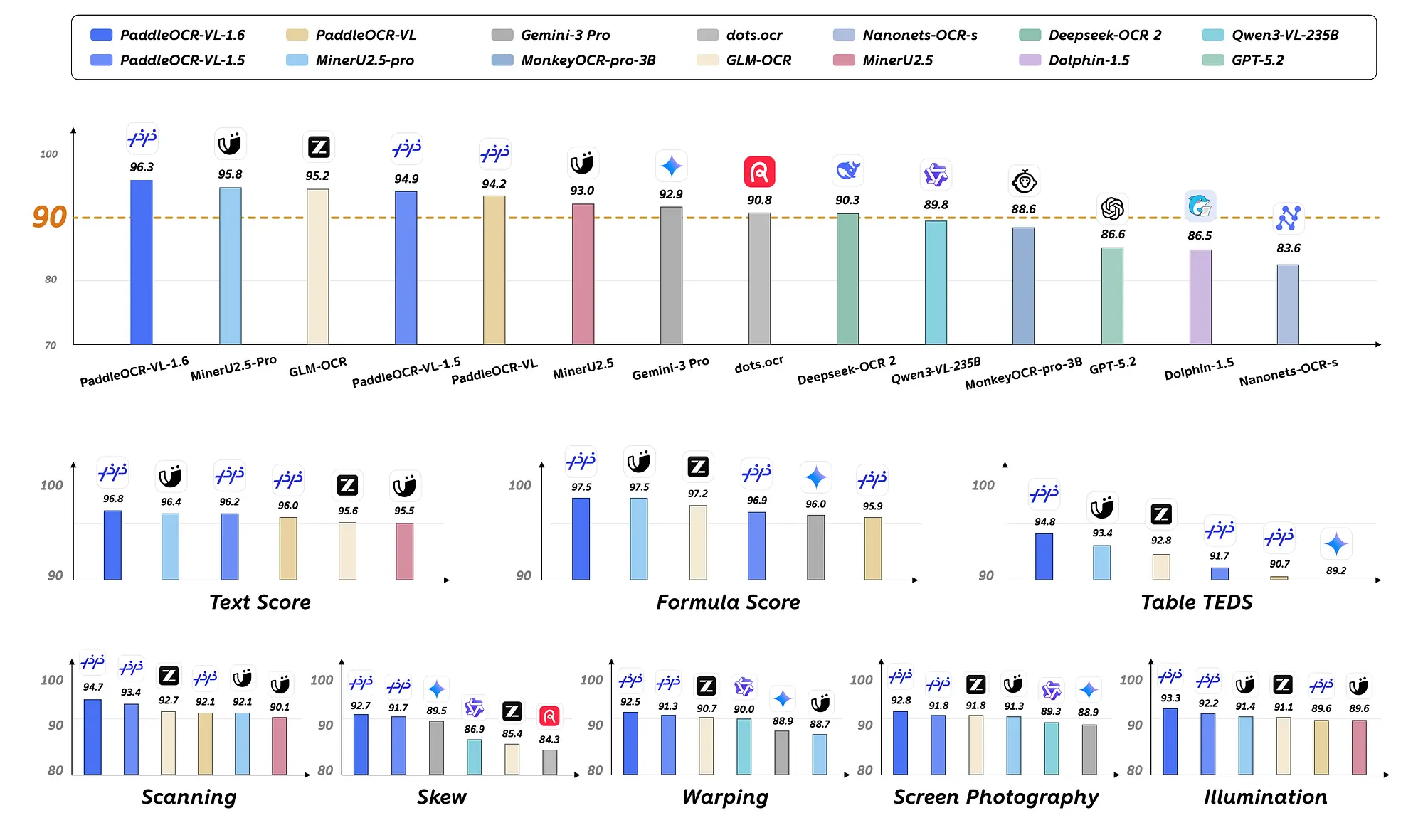
最近,PaddlePaddle团队发布了最新的文档解析模型——PaddleOCR-VL-1.6。这个0.9B参数的模型是PaddleOCR-VL-1.5的升级版。它在OmniDocBench v1.6上取得了96.33的最高分,超越了1.2B参数的MinerU2.5-Pro模型的95.69分,并在OmniDocBench v1.5和Real5-OmniDocBench上创造了新纪录。
1、PaddleOCR-VL-1.6 特性
- 支持文本行定位和识别,还支持印章识别。
- 在文本、公式和表格方面实现了新的SOTA精度,性能卓越。
- 支持不规则形状定位,在文档倾斜、扭曲等情况下仍能实现准确的多边形检测。
- 支持跨页表格自动合并和跨页段落标题识别,解决了处理长文档时内容碎片化的问题。
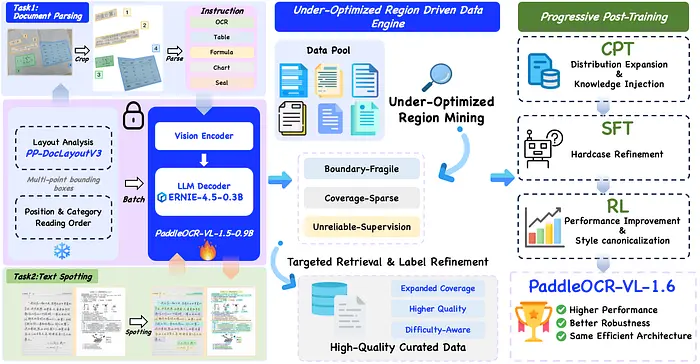
2、PaddleOCR-VL-1.6 架构
3、PaddleOCR-VL-1.6 演示
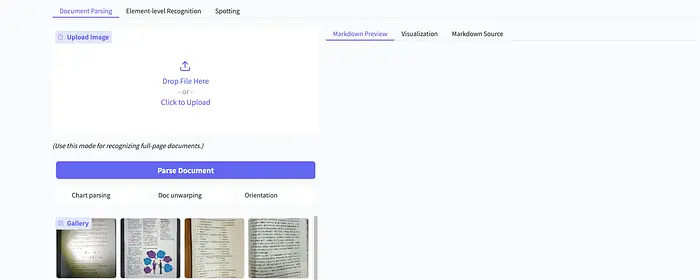
在浏览器中访问 https://huggingface.co/spaces/PaddlePaddle/PaddleOCR-VL-1.6_Online_Demo,上传本地图片或选择现有示例图片,然后点击页面上的"解析文档"按钮,即可体验PaddleOCR-VL-1.6模型提供的文档解析功能。
4、本地部署
官方PaddleOCR-VL-1.6文档详细介绍了如何使用PaddlePaddle和CUDA运行模型。接下来,我将介绍如何在macOS上使用mlx-vlm本地部署PaddleOCR-VL-1.6模型。
配置虚拟环境
python3 -m venv .venv
source .venv/bin/activate
安装mlx-vlm
pip install mlx-vlm
下载模型
这里我们使用hf download命令将Hugging Face在线模型下载到指定的本地目录。
hf download PaddlePaddle/PaddleOCR-VL-1.6 --local-dir model/PaddleOCR-VL-1.6
运行PaddleOCR-VL-1.6模型
from mlx_vlm import load, generate
from mlx_vlm.prompt_utils import apply_chat_template

model, processor = load("model/PaddleOCR-VL-1.6")

image = ["ocr.png"]
prompt = "OCR:"

formatted_prompt = apply_chat_template(
    processor,
    model.config,
    prompt,
    num_images=len(image),
)

result = generate(
    model=model,
    processor=processor,
    prompt=formatted_prompt,
    image=image,
    max_tokens=512,
    temperature=0.0,
)
print(result.text)
PaddleOCR-VL-1.6模型支持Basic OCR、表格识别、公式识别和图表理解等任务。在上面的代码中,我们使用prompt参数将当前任务设置为OCR。你可以将prompt参数的值设置为"Table Recognition:"(表格识别)、"Formula Recognition:"(公式识别)或"Chart Recognition:"(图表识别)等。
5、OCR
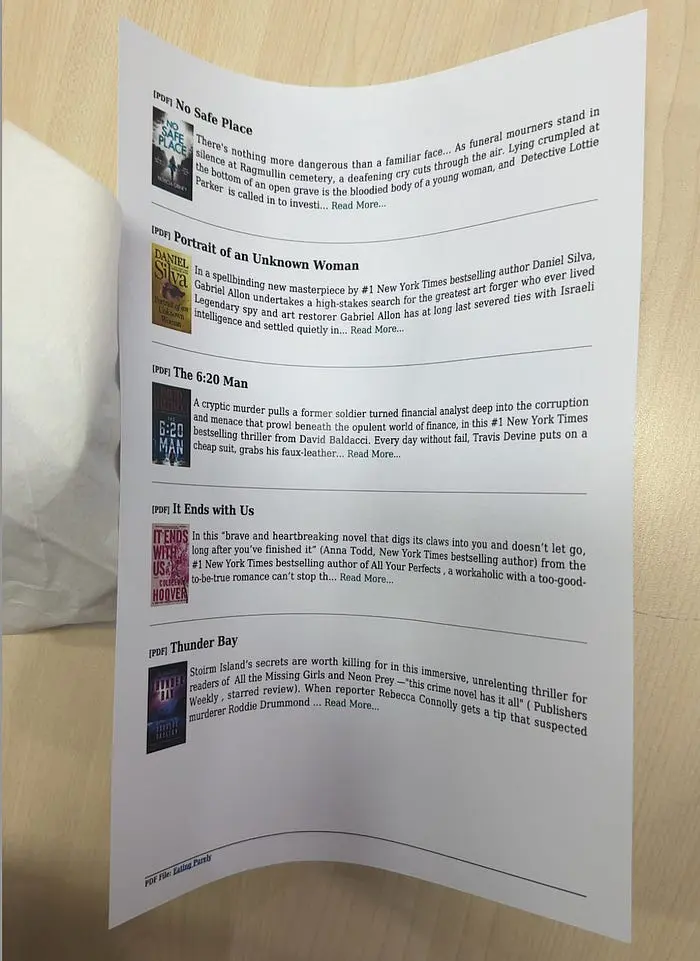
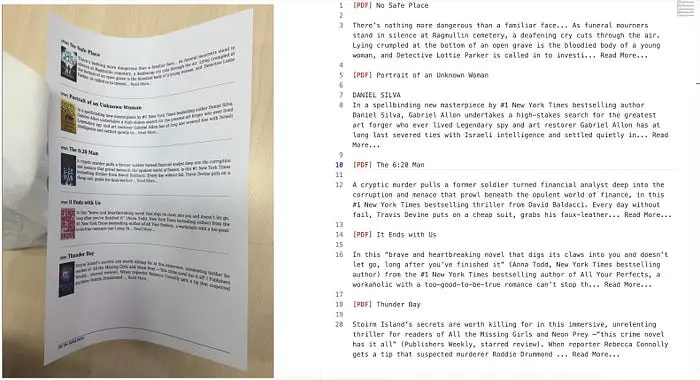
prompt = "OCR:"
输入图片:
结果:
6、公式识别
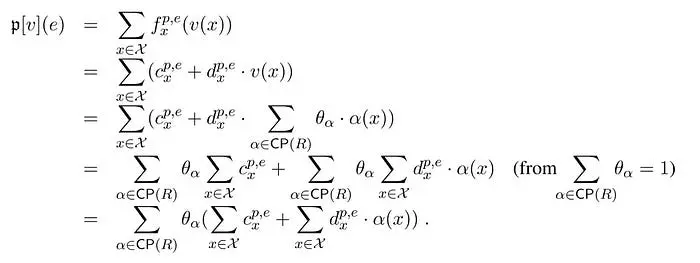
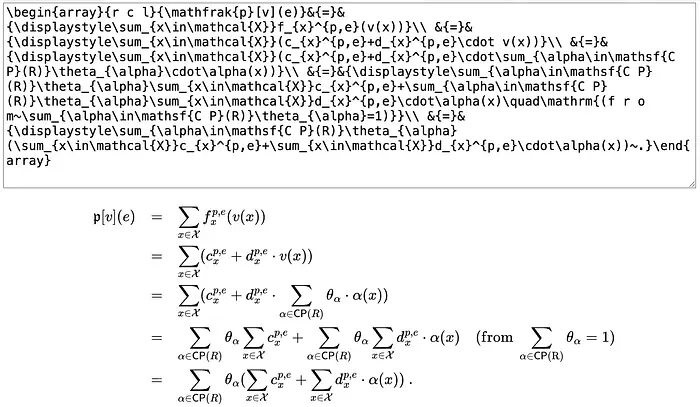
prompt = "Formula Recognition:"
输入图片:
结果:
7、表格识别
from html import escape
from pathlib import Path

FCEL = "<fcel>"
LCEL = "<lcel>"
NL = "<nl>"
UCEL = "<ucel>"
ECEL = "<ecel>"
DEFAULT_IMAGE_PATH = "complex-table.jpg"
DEFAULT_MODEL_PATH = "model/PaddleOCR-VL-1.6"
DEFAULT_OUTPUT_PATH = "table.html"
DEFAULT_PROMPT = "Table Recognition:"

def _new_cell(text: str = "", kind: str = "cell") -> dict[str, str | int]:
    return {"kind": kind, "text": text.strip(), "colspan": 1, "rowspan": 1}

def _parse_cells(row: str) -> list[dict[str, str | int]]:
    """解析PaddleOCR-VL表格标记为单元格和合并标记。"""
    row = row.strip()
    cells = []
    index = 0

    while index < len(row):
        if row.startswith(FCEL, index):
            index += len(FCEL)
            next_index = len(row)
            for token in (FCEL, LCEL, UCEL, ECEL):
                token_index = row.find(token, index)
                if token_index != -1:
                    next_index = min(next_index, token_index)
            cells.append(_new_cell(row[index:next_index]))
            index = next_index
        elif row.startswith(LCEL, index):
            if cells:
                cells[-1]["colspan"] += 1
            index += len(LCEL)
        elif row.startswith(UCEL, index):
            cells.append(_new_cell(kind="up"))
            index += len(UCEL)
        elif row.startswith(ECEL, index):
            cells.append(_new_cell())
            index += len(ECEL)
        else:
            next_index = len(row)
            for token in (FCEL, LCEL, UCEL, ECEL):
                token_index = row.find(token, index)
                if token_index != -1:
                    next_index = min(next_index, token_index)
            text = row[index:next_index].strip()
            if text:
                cells.append(_new_cell(text))
            index = next_index

    return cells

def paddle_table_to_html(text: str) -> str:
    rows = [row for row in text.strip().split(NL) if row.strip()]
    if not rows:
        return "<table></table>"

    parsed_rows = [_parse_cells(row) for row in rows]
    header = parsed_rows[0]
    body_rows = parsed_rows[1:]

    rowspan_by_col = {}
    last_cell_by_col = {}
    html_rows = []

    for cells in body_rows:
        row_index = len(html_rows)
        html_rows.append([])

        col_index = 0
        for cell in cells:
            colspan = int(cell["colspan"])
            if cell["kind"] == "up":
                for covered_col in range(col_index, col_index + colspan):
                    if covered_col in rowspan_by_col:
                        rowspan_by_col[covered_col] += 1
                col_index += colspan
                continue

            for covered_col in range(col_index, col_index + colspan):
                if covered_col in last_cell_by_col:
                    last_row_index, last_cell_index = last_cell_by_col[covered_col]
                    html_rows[last_row_index][last_cell_index]["rowspan"] = (
                        rowspan_by_col.pop(covered_col, 1)
                    )

            last_cell_by_col[col_index] = (
                row_index, len(html_rows[row_index]))
            html_rows[row_index].append(
                {"text": cell["text"], "colspan": colspan, "rowspan": 1}
            )
            for covered_col in range(col_index, col_index + colspan):
                last_cell_by_col[covered_col] = (
                    row_index, len(html_rows[row_index]) - 1
                )
                rowspan_by_col[covered_col] = 1
            col_index += colspan
8、结束语
PaddleOCR-VL-1.6以0.9B的参数量达到了96.33的SOTA性能,在文档解析领域取得了突破性进展。它证明了小型高效模型也能在文档解析任务中达到甚至超越大型商业模型的表现。通过mlx-vlm,开发者可以轻松地在本地部署和使用该模型,为文档处理工作流提供了强大而便捷的解决方案。
原文链接:This Document Parser Model Just Killed Commercial OCR and VLM: 96.33 SOTA, 0.9B and Open Source
汇智网翻译整理,转载请标明出处