CPU实测Gemma 4 E2B
测试 Google DeepMind 最新的开放模型在无 GPU 配置下的表现——性能、限制和实际可用性。
当 Google DeepMind 发布 Gemma 4 时,它承诺了一些大胆的目标: 最先进的推理模型可以在本地运行——即使在普通硬件上。
但有一个问题。大多数演示仍然假设使用 GPU、高 VRAM优化的推理栈。所以我提出了一个简单的问题:
👉 Gemma 4 真的可以仅在 CPU 上运行吗——并且仍然可用?
为了找出答案,我在 Kaggle 笔记本中运行了一系列实验,使用 Gemma 4 E2B 模型——完全没有 GPU 加速。
本文将介绍设置过程获得的性能、限制,以及仅使用 CPU 的 AI 在今天是否现实。
1、为什么 Gemma 4 很重要
Gemma 4 不仅仅是一个普通的开放模型。
它代表了一种向可访问的本地优先 AI的转变:高达 256K token 上下文窗口、多模态能力(文本 + 图像 + 更 多)。它专为边缘设备和笔记本电脑设计。从许可角度来看,它在 Apache 2.0 下拥有开放权重(对开发者来说意义重大)。
最重要的是:E2B 等较小的变体针对本地运行进行了明确优化。 但"优化"不一定意味着"在 CPU 上运行快速"。
2、实验设置
我使用了这个笔记本:
环境
- Kaggle 笔记本(CPU 运行时,30 GB,8 核心)
- 无 GPU / 无 TPU
- 标准 Python + 推理栈
模型
- Gemma 4 E2B(指令微调版本)
- ~2.3B 活跃参数(高效架构)
目标
实验的目标是在 CPU 上测试 Gemma 4:E2B 模型(非量化):运行推理、测量响应能力,并评估可用性(不仅仅是"它能运行")。
关键限制:CPU 推理
在 CPU 上运行 LLM 与在 GPU 上运行有本质不同。没有并行张量核心。内存带宽成为瓶颈。Token 生成是顺序的。即使是优化过的模型也会受到影响。参考值:CPU 推理可能比 GPU 慢 5-10 倍。 所以真正的问题不是:"它能运行吗?"而是:"它可用吗?"
3、Gemma 4 的多模态实验
在 Kaggle 笔记本中,我对 Gemma 4:E2B(非量化)在 CPU 上进行了 3 种不同的实验:
- 仅文本输入
- 文本和图像输入
- 文本和声音输入
3.1 初始设置
在开始实验之前,我们需要初始化处理器和模型。我们使用 transformers 框架:
MODEL_PATH = kagglehub.model_download("google/gemma-4/transformers/gemma-4-e2b-it")

processor = AutoProcessor.from_pretrained(MODEL_PATH)
model = AutoModelForCausalLM.from_pretrained(
    MODEL_PATH,
    dtype=torch.bfloat16,
    device_map="auto"
)
3.2 仅文本测试
下一个代码片段展示了完整的 LLM 推理工作流程。它格式化聊天风格的提示,将其转换为张量,在 CPU 上运行模型生成响应,解码和分析生成的输出,并测量总执行时间。
messages = [
    {"role": "system", "content": "You are a helpful assistant that specializes in answering shortly to any question."},
    {"role": "user", "content": "What is the distance from Earth to the Moon?"},
]

s_time = time()
text = processor.apply_chat_template(
    messages,
    tokenize=False,
    add_generation_prompt=True,
    enable_thinking=True
)
inputs = processor(text=text, return_tensors="pt").to(model.device)
input_len = inputs["input_ids"].shape[-1]


outputs = model.generate(**inputs, max_new_tokens=1024)
response = processor.decode(outputs[0][input_len:], skip_special_tokens=False)

processor.parse_response(response)
e_time = time()
total_time = round(e_time - s_time, 2)
print(f"Total time: {total_time}")
Gemma 4 的输出是 Markdown 格式。为了整齐地显示它,我们引入几个辅助函数:
def colorize_text(text):
    for word, color in zip(["Thinking", "Thinking Process", "Response", "Total time"], ["blue", "red", "green", "magenta"]):
        text = text.replace(f"{word}:", f"\n\n**<font color='{color}'>{word}:</font>**")
    return text

def display_response(output, total_time):
    if output.get("thinking"):
        display(Markdown(f"<font color='green'>**Thinking**</font>"))
        display(Markdown(colorize_text(output["thinking"])))
    if output.get("content"):
        display(Markdown(f"<font color='blue'>**Response**</font>"))
        display(Markdown(output["content"]))
    display(Markdown(colorize_text(f"Total time: {total_time} sec.")))
下图显示了使用输入提示"What is the distance from Earth to the Moon?"运行推理的结果。
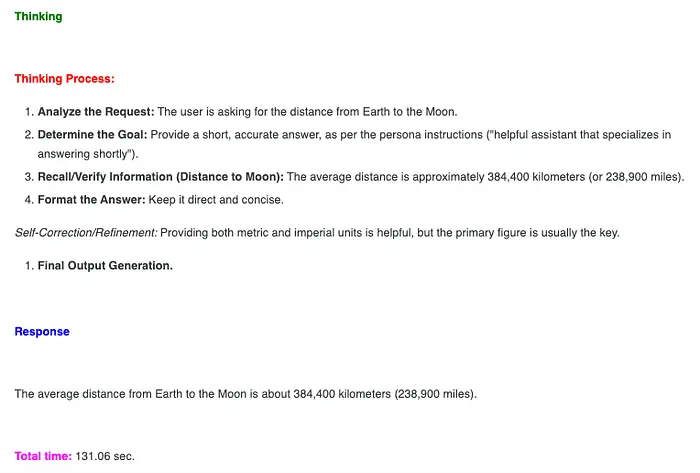
仅文本输入、思考、响应和推理总时间 — 图片由作者提供
3.3 图像数据
下图被呈现给模型进行推理。

多模态输入的代码如下:
image_url = "https://storage.googleapis.com/keras-cv/models/paligemma/cow_beach_1.png"
image = Image.open(requests.get(image_url, stream=True).raw).convert("RGB")

messages = [
    {"role": "system", "content": "You are a helpful assistant that specializes in answering shortly to any question."},
    {
        "role": "user",
        "content": [
            {"type": "image", "image": image},
            {"type": "text", "text": "What you can see in this image?"}
        ]
    }
]
s_time = time()

text = processor.apply_chat_template(
    messages,
    tokenize=False,
    add_generation_prompt=True,
    enable_thinking=True
)
inputs = processor(
    text=text,
    images=image,
    return_tensors="pt"
).to(model.device)

input_len = inputs["input_ids"].shape[-1]

with torch.inference_mode():
    outputs = model.generate(**inputs, max_new_tokens=512)

response = processor.decode(outputs[0][input_len:], skip_special_tokens=False)
output = processor.parse_response(response)

e_time = time()
total_time = round(e_time - s_time, 2)

print(output)
print(f"Total time: {total_time}")
思考、响应和在 Kaggle CPU 上的总执行时间如下图所示。
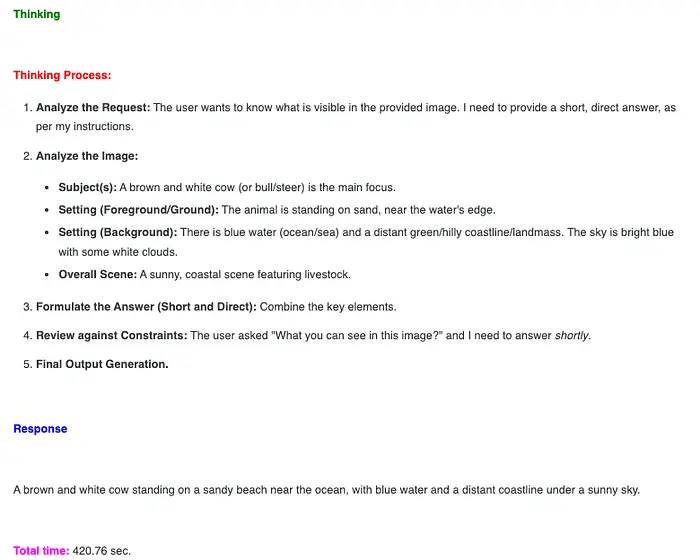
在这种情况下,CPU 上的执行时间约为 8 分钟,对于实际应用来说太慢了。
3.4 声音实验
首先,我们下载样本声音数据。以下是执行此任务的代码:
def download_audio_data(url):
    """
    Download audio data
    Args
        url: url for the audio data
    Returns
        the name of the local saved audio file
    """
    r = requests.get(url, stream=True)
    r.raise_for_status()

    with tempfile.NamedTemporaryFile(delete=False, suffix=".wav") as f:
        for chunk in r.iter_content(chunk_size=8192):
            f.write(chunk)
        return f.name

audio_url = "https://raw.githubusercontent.com/google-gemma/cookbook/refs/heads/main/Demos/sample-data/journal1.wav"
audio_path = download_audio_data(audio_url)
在笔记本中,我们使用 Markdown、HTML 显示一个声音播放器,如下所示:
def cstr(str_text, color='black'):
    """
    Html styling for widgets
    Args
        str_text: text to disply
        color: color to display the text
    Returns
        Formated text/label
    """
    return "<text style=color:{}><strong>{}<strong></text>".format(color, str_text)

def play_sound(sound_path="",
               text="Test",
               color="green"):
    """
    Display a sound play widget
    Args
        sound_path: path to the sound file
        text: text to display
        color: color for text to display
    Returns
        None
    """
    display(HTML(cstr(text, color)))
    display(ipd.Audio(sound_path))

play_sound(audio_path, text="Journal", color="blue")

接下来,我们对这个多模态内容(音频、文本)进行推理:
audio_array, sr = librosa.load(audio_path, sr=16000)

messages = [
    {"role": "system", "content": "You are a helpful assistant that specializes in answering shortly to any question."},
    {
        "role": "user",
        "content": [
            {"type": "audio", "audio": audio_array},
            {"type": "text", "text": "Transcribe the following audio exactly. Only output transcription."}
        ]
    }
]
s_time = time()

text = processor.apply_chat_template(
    messages,
    tokenize=False,
    add_generation_prompt=True,
    enable_thinking=True
)
inputs = processor(
    text=text,
    audio=audio_array,
    return_tensors="pt"
).to(model.device)

input_len = inputs["input_ids"].shape[-1]

with torch.inference_mode():
    outputs = model.generate(**inputs, max_new_tokens=128)

response = processor.decode(outputs[0][input_len:], skip_special_tokens=False)
output = processor.parse_response(response)

e_time = time()
total_time = round(e_time - s_time, 2)

print(output)
print(f"Total time: {total_time}")
思考过程、输出和这个多模态输入的总执行时间如下图所示。
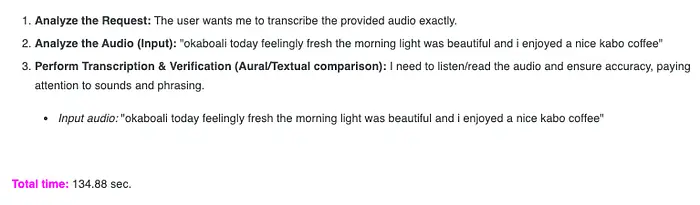
多模态(音频和文本)输入、响应和总执行时间 — 图片由作者提供
模型准确地解释了音频样本。
3.5 实验结果总结
下图总结了笔记本中三个实验的结果:

文本、图像、音频输入 — 速度、质量和实用性 — 图片由作者提供
4、最终想法
在 CPU 上运行 Gemma 4 E2B 有点像走进未来——只是还不是最舒适的版本。
体验无可否认地令人印象深刻。一个相对较小的模型,在本地运行且没有任何 GPU 加速,可以处理推理任务、处理多模态输入,并生成连贯的响应。不久之前,这还需要专用硬件、复杂的基础设施,或 者强大的云 API。现在,它可以装进一个笔记本里。
然而,摩擦仍然存在。
延迟破坏了交互的流畅感。生成响应需要耐心。在现代 GPU 设置上感觉即时完成的任务变成了深思熟虑的、几乎是批处理的过程。你可以清楚地看到潜力——但你也可以在每次交互中感受到限制。
使这个实验有意义的不仅仅是它能运行,而是它所发出的信号。
我们正进入一个本地 AI 不再是利基实验的阶段。模型变得越来越小、越来越高效,越来越能够运行在日常硬件上。"可能"和"实用"之间的差距正在迅速缩小。
今天,仅使用 CPU 的推理处于中间状态:功能强大到足以用于实验、私人工作流和离线场景——但还不足以用于实时的面向用户的应用。
但这个边界正在移动。
如果保持当前的发展轨迹,问题可能很快就会从我们能否在本地运行模型转变为为什么我们还要依赖外部基础设施。对于许多 AI 任务来说,需要 GPU——甚至云——可能开始感觉不再像 一个要求,而更像一种便利。
现在,在 CPU 上运行 Gemma 4 是对未来的一瞥:虽然不完全轻松,但也不再遥不可及。
原文链接:Running Gemma 4 E2B on CPU: Is Local AI Finally Practical?
汇智网翻译整理,标明出处