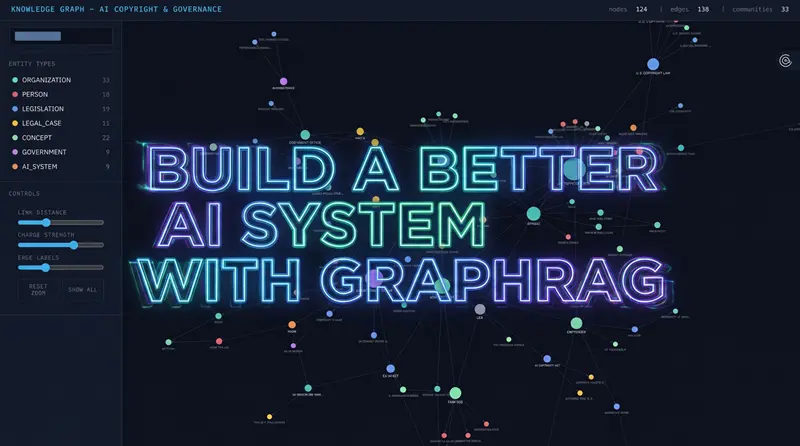
用GraphRAG构建更好的AI系统
知识图谱不仅仅是一种花哨的信息表示方式。它们是一种帮助 AI 真正基于信息进行推理的强大方法。
梯形图转SCL | 自然语言生成梯形图 | 自然语言生成SCL | 梯形图在线查看 | 博途编程文档MCP | AI模型价格对比 | AI工具导航 | ONNX模型库 | Vibe Coding教程 | PLC在线仿真器 | Tripo 3D | Meshy AI | ElevenLabs | KlingAI | ArtSpace
在今天的教程中,我们将构建一个 GraphRAG 系统来理解 AI 版权问题。这个话题非常混乱。而且我指的是最有趣的那种混乱。
就像任何复杂的话题一样,这些信息并不是整齐地集中在一个地方。它们分散在网络上发布的数百篇新闻文章、法庭文件、政策文件和各种观点评论中。
我们将构建一个系统,从 Google 实时抓取这些信息,将其转化为结构化的知识图谱,然后使用 GraphRAG 来回答任何搜索引擎或标准 AI 都无法可靠回答的问题——比如:
"哪些公司处于这些争议的中心——它们之间是如何关联的?"
到本教程结束时,你将清楚地了解:
- GraphRAG 如何工作
- 何时使用它
- 如何在你自己的真实文档数据集上构建它
我还将分享这个示例项目的代码演练——使用网络搜索 API 抓取相关文章,使用 LlamaIndex 构建知识图谱,使用 Graspologic 分析它,使用 PyVis 可视化它,最后查询这个系统。
1、标准 RAG 的问题
让我们先快速回顾一下标准 RAG(检索增强生成)的工作原理,因为理解它的局限性正是理解 GraphRAG 的关键。
在典型的 RAG 管道中,你获取文档——PDF、文章、转录文本等——将它们分割成块。每个块通过嵌入模型转换为数值向量。
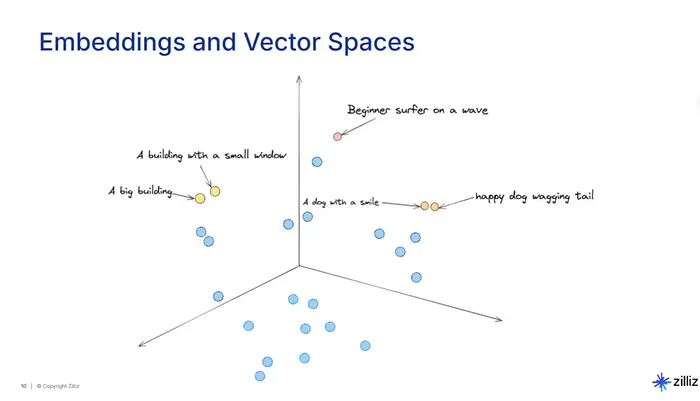
这些向量捕获了文本的含义,因此关于相似主题的块最终在向量空间中彼此靠近。
当用户提问时,系统也将该问题转换为向量,找到最接近的块,拉取这些块,并将它们作为上下文提供给 LLM。然后 LLM 根据给定的内容生成答案。
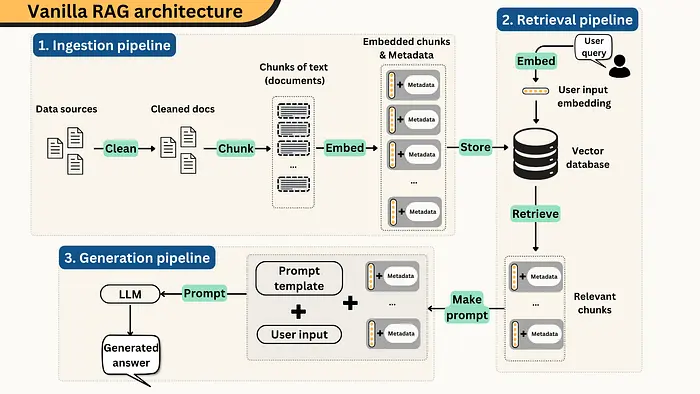
这很好,因为它允许 LLM 回答关于它从未训练过的数据的问题——你公司的内部文档、研究论文、客户工单等。
但问题来了。
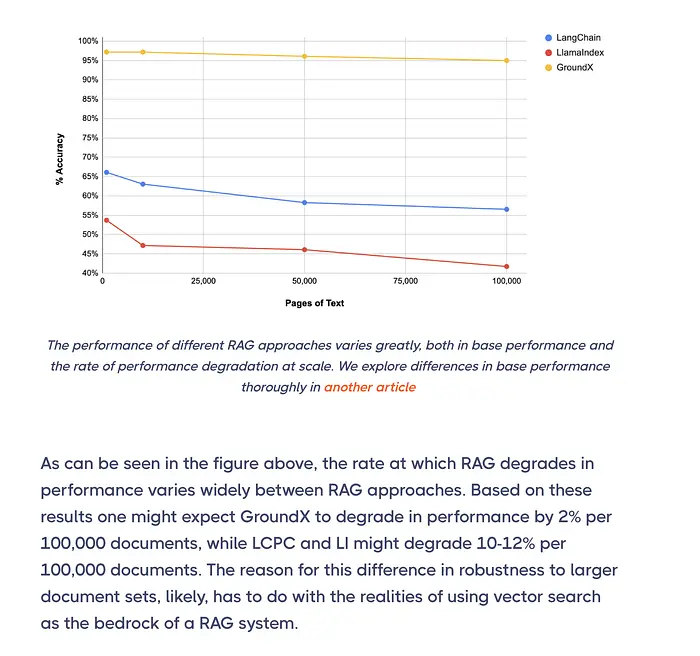
数据规模越大,准确性下降越多。
一项研究发现,向量搜索准确性在仅 10,000 页时就开始下降——在 100,000 页时准确率下降 12%。添加的文档越多,嵌入空间中的重叠就越多,系统检索正确块的难度就越大。
但扩展甚至不是主要问题。标准 RAG 还有两个更根本的盲点:
- 第一,每个块被视为孤立的片段。文档被分割和嵌入后,每个块独立存在,与周围的块以及其他文档中的相关信息断开连接。系统找到听起来像你问题的文本,但不理解这些片段如何连接形成完整的图景。
- 第二,没有跨文档推理的能力。当答案需要链接分散在多个来源中的信息时——或者当问题是关于整个数据集的,比如"数据中的主要主题是什么?"——标准 RAG 没有机制来处理。向量相似性匹配的是单个块。它不会跨块综合信息。
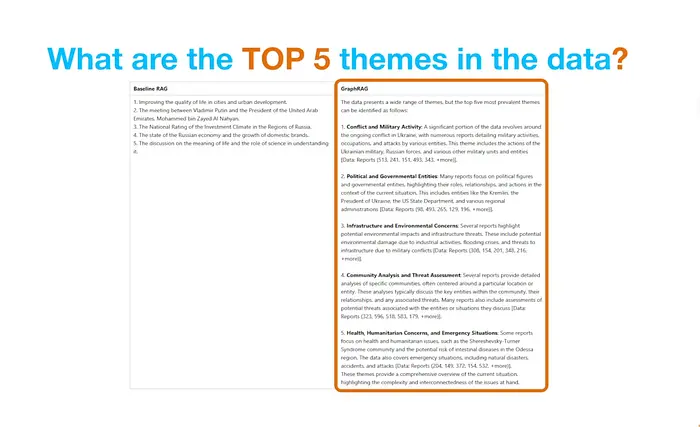
这就是 GraphRAG 要解决的问题。
2、什么是 GraphRAG?
GraphRAG 不再将你的文档视为向量空间中互不相连的块,而是在此基础上添加了一个结构层。
核心思想是:它使用 LLM 阅读每个块并提取实体——人物、公司、技术、事件、法律案例——以及它们之间的关系。这些实体成为知识图谱中的节点,它们的关系成为连接节点的边。
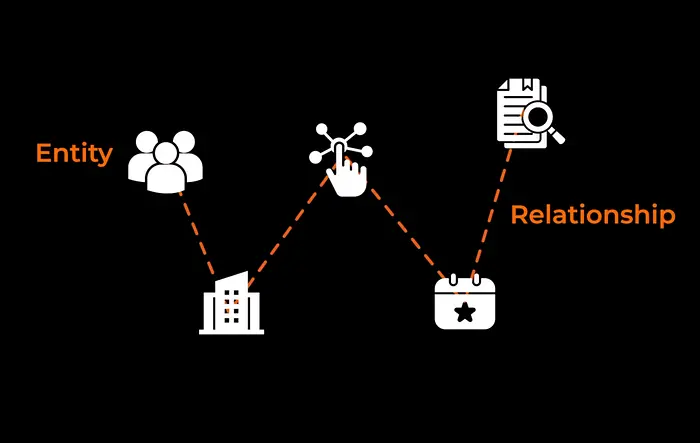
结果是整个数据集的结构化图谱,反映了信息实际上如何跨文档关联。
最初发表 GraphRAG 论文的微软研究院将此称为意义构建(sensemaking)。这是理解大量信息中的连接、模式和主题的能力,而不仅仅是检索孤立的事实。
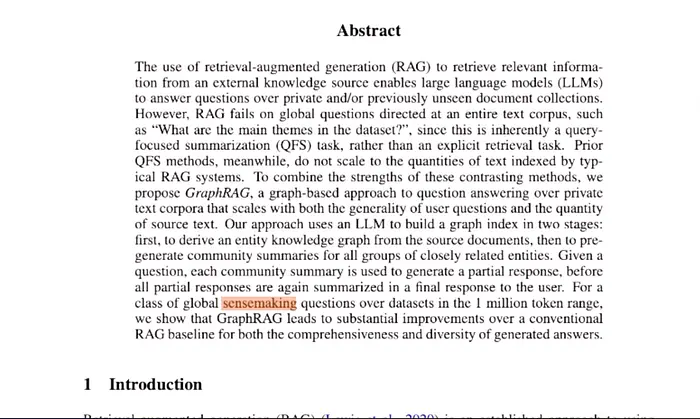
GraphRAG 不仅仅找到与你的查询匹配的文本。它在一个相互连接的实体网络上进行推理,这意味着它可以跨文档链接事实,追踪在完全不同来源中提及的事物之间的关系,并回答关于整个数据集的问题。
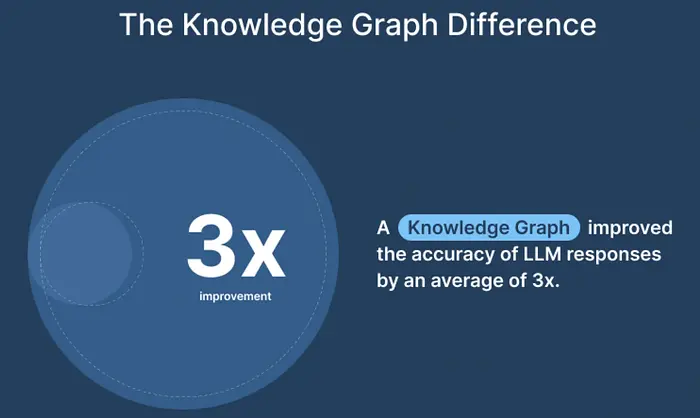
使用知识图谱也被证明可以提高 LLM 响应的准确性。
3、GraphRAG vs. Vector RAG:何时使用哪个
我想明确一点——GraphRAG 并不取代标准的向量 RAG。它们各自擅长不同的场景。
以下是需要遵循的简单规则:
在以下情况使用 GraphRAG:
- 你正在处理数百或数千个相互关联的文档
- 问题需要连接事实、追踪关系或识别模式
- 你需要宏观答案,如整个数据集的主题、趋势、摘要
- 可解释性很重要。你需要追踪系统如何得出答案
- 你处于法律、政策或研究等领域,复杂查询的准确性至关重要
在以下情况使用 Vector RAG:
- 问题是简单的直接查找:"这项法律何时通过?"或"谁提起了这个诉讼?"
- 答案存在于单个文档或块中
- 速度和成本是优先考虑因素
- 你的数据集较小,没有密集的跨文档关系
4、GraphRAG 如何工作(管道流程)
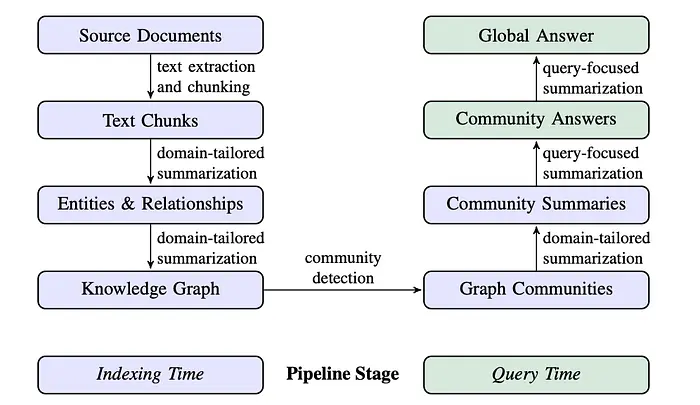
让我们深入了解 GraphRAG 的底层工作原理。有两个主要阶段:索引(构建知识图谱)和查询(从中检索)。
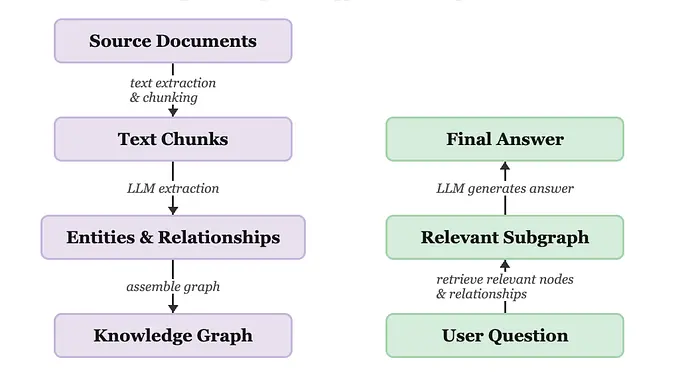
这是通用管道。本项目遵循的微软方法在通用管道基础上增加了两个额外步骤:社区检测(将相关实体分组到集群中)和社区摘要(为每个集群生成 LLM 摘要)。在查询时,查询的是这些摘要而不是原始图谱,这正是它在宏观问题上特别有效的原因。
5、项目介绍
本项目使用:
- SerpAPI 来抓取关于 AI 版权和治理的 Google 新闻文章。它提供干净、结构化的结果,无需浏览器自动化。
- LlamaIndex 用于编排。它处理从文档加载到实体提取、图谱构建和查询的整个管道。我在这里使用 LlamaIndex 是因为它有最原生的 GraphRAG 支持。
- Graspologic——微软研究院的图算法库——用于使用层次 Leiden 算法进行社区检测。这就是将相关实体分组为有意义集群的工具。
- D3.js 用于可视化。它是一个用于在浏览器中构建自定义交互式数据可视化的 JavaScript 库。我们使用它将知识图谱渲染为可以搜索、过滤和探索的动态网络。
- 对于 LLM,我使用
gpt-4o-mini进行实体提取——它更便宜且速度足够。然后使用gpt-4o进行最终答案生成,质量更重要。
无需外部图数据库——图使用 LlamaIndex 的 SimplePropertyGraphStore 存储在内存中。
6、代码演练
我们将使用 VS Code 并逐步构建。
步骤 1 — 设置和导入
首先,安装依赖并导入所有需要的内容。
我们使用 LlamaIndex 进行 GraphRAG 管道,Graspologic 进行社区检测,D3.js 进行可视化,Requests 调用 SerpAPI。
# Install dependencies
# pip install llama-index llama-index-llms-openai graspologic pandas nest-asyncio python-dotenv requests

import asyncio
import nest_asyncio
import pandas as pd
import networkx as nx
from dotenv import load_dotenv
from llama_index.core import Document, PropertyGraphIndex, Settings
from llama_index.core.graph_stores.types import (
    EntityNode, KG_NODES_KEY, KG_RELATIONS_KEY, Relation
)
from llama_index.core.graph_stores import SimplePropertyGraphStore
from llama_index.core.llms.llm import LLM
from llama_index.core.prompts import PromptTemplate
from llama_index.core.schema import TransformComponent, BaseNode
from llama_index.core.async_utils import run_jobs
from llama_index.core.query_engine import CustomQueryEngine
from llama_index.llms.openai import OpenAI
from graspologic.partition import hierarchical_leiden
# Patch the event loop so LlamaIndex async calls work inside Jupyter
nest_asyncio.apply()
# Load API keys from .env file (create one with OPENAI_API_KEY=sk-...)
load_dotenv()
步骤 2 — 配置
我们在管道的不同部分使用两个不同的模型:

# ── LLM Configuration ─────────────────────────────────────────────────────────
EXTRACTION_LLM = OpenAI(model="gpt-4o-mini", temperature=0)  # For extraction + summaries
QUERY_LLM      = OpenAI(model="gpt-4o",      temperature=0)  # For final answer synthesis

# ── Pipeline Parameters ────────────────────────────────────────────────────────
MAX_ARTICLES        = 50    # Number of articles to process
MAX_PATHS_PER_CHUNK = 20    # Max entity-relationship-entity triplets extracted per chunk
NUM_WORKERS         = 4     # Parallel workers for extraction (faster, same cost)
MAX_CLUSTER_SIZE    = 10    # Max entities per community cluster
GRAPH_OUTPUT_FILE   = "ai_copyright_graph.html"
Settings.llm = EXTRACTION_LLM
步骤 3 — 使用 SerpAPI 抓取文章
现在让我们获取数据。
我使用 SerpAPI 抓取 Google 搜索结果作为我们的数据集。SerpAPI 通过简单的 API 提供来自 Google 和其他搜索引擎的实时、结构化、干净的搜索结果。
我运行了两个查询:"AI intellectual property" 和 "copyright Generative AI"。过滤掉因付费墙或机器人保护而无法抓取的页面后,我们最终获得了 13 篇成功抓取的文章,保存到 ai_copyright_dataset.csv。
如果你想查看完整的抓取管道,包括我们如何拉取完整的文章文本和处理 YouTube 转录,请查看 GitHub 仓库 here。
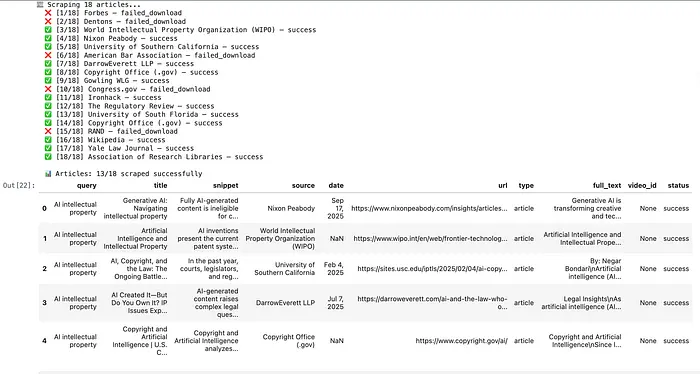
图片:抓取的文章,保存到 ai_copyright_dataset.csv
步骤 4 — 定义本体
在我们接触 LLM 之前,先定义我们的本体。本体是知识图谱的 schema。它精确控制 LLM 被允许提取哪些类型的实体和关系。
这是一个重要步骤。如果没有定义好的 schema,LLM 会:
- 为每个文档发明不同的实体类型("AI_COMPANY" vs "TECH_FIRM" vs "ORGANIZATION")
- 对相同的概念使用不一致的关系标签
这会使生成的图谱变得混乱且不太有用。
对于这个特定的用例,我在下面定义了 7 种实体类型和 8 种关系类型。
但这真的取决于你的用例和你想研究什么。
# ── Entity types ──────────────────────────────────────────────────────────────
# We'll embed these directly into the extraction prompt below.

ENTITY_TYPES = [
    "ORGANIZATION",  # Companies, labs, industry groups (OpenAI, Google, RIAA)
    "PERSON",        # Executives, policymakers, judges (Sam Altman, Thierry Breton)
    "LEGISLATION",   # Laws, acts, regulations (EU AI Act, DMCA, Copyright Act)
    "LEGAL_CASE",    # Lawsuits, court rulings (NYT v. OpenAI, Getty v. Stability AI)
    "CONCEPT",       # Abstract ideas: fair use, training data, IP rights
    "GOVERNMENT",    # Nations, regulatory bodies, courts (EU, US Copyright Office)
    "AI_SYSTEM",     # Specific models or products (GPT-4, Stable Diffusion, Gemini)
]
# ── Relationship types ─────────────────────────────────────────────────────────
RELATION_TYPES = [
    "FILED_AGAINST",  # Plaintiff Organization/Person → LEGAL_CASE
    "DEFENDANT_IN",   # Organization/Person → LEGAL_CASE
    "REGULATES",      # GOVERNMENT/LEGISLATION → ORGANIZATION/AI_SYSTEM
    "ADVOCATES_FOR",  # ORGANIZATION/PERSON → CONCEPT or policy position
    "TRAINED_ON",     # AI_SYSTEM → CONCEPT or dataset type
    "PART_OF",        # PERSON → ORGANIZATION
    "REFERENCES",     # LEGAL_CASE/LEGISLATION → CONCEPT
    "OPPOSES",        # ORGANIZATION/GOVERNMENT → LEGISLATION/CONCEPT
]
步骤 5 — 编写提取提示词
这就是我们的本体被嵌入到 LLM 指令中的地方。
大多数 GraphRAG 实现提取的是简单的三元组:(OpenAI, DEFENDANT_IN, NYT v. OpenAI)。
但这个提示词在每个实体和关系旁边提取描述:
- 实体描述:"OpenAI 是一家开发了 GPT-4 的 AI 研究公司,目前面临多项版权诉讼"
- 关系描述:"OpenAI 在纽约时报诉讼中被指定为被告,涉嫌使用受版权保护的文章作为训练数据"
这些描述流入社区摘要,使摘要更加丰富,从而实现更好的最终答案。
# Build the entity and relationship type strings dynamically from our ontology
entity_types_str   = ", ".join(ENTITY_TYPES)
relation_types_str = ", ".join(RELATION_TYPES)

KG_TRIPLET_EXTRACT_TMPL = f"""
-Goal-
Given a news article about AI copyright, governance, or intellectual property,
identify all entities mentioned in the article and their relationships.
Extract up to {{max_knowledge_triplets}} entity-relation triplets.
-Allowed Entity Types-
{entity_types_str}
-Allowed Relationship Types-
{relation_types_str}
-Steps-
1. Identify ALL entities. For each entity extract:
   - name: Name of the entity, capitalized
   - type: One of the allowed entity types above
   - description: A brief description of the entity and its role in AI copyright/governance
2. Identify relationships between entities. For each pair extract:
   - source: name of the source entity
   - target: name of the target entity
   - relation: one of the allowed relationship types above
   - description: a sentence explaining why and how these entities are related
-Real Data-
######################
text: {{text}}
######################
"""
步骤 6 — 定义结构化提取模型
我们不使用正则表达式解析原始 LLM 文本,而是定义 Pydantic 模型来精确描述我们希望 LLM 返回的内容。LlamaIndex 将这些作为函数 schema 传递给 OpenAI,因此响应是结构化的 JSON——自动验证和类型化。
定义了三个模型:
ExtractedEntity— 具有name、type和description的单个实体ExtractedRelationship— 两个实体之间的关系:source、target、relation、descriptionExtractionResult— 包含每个列表的顶层包装器
EntityTypeStr 和 RelationTypeStr 是从本体构建的 Literal 类型。这意味着 LLM 不能返回无效类型,因为 Pydantic 会在它到达我们的代码之前拒绝它。
from pydantic import BaseModel, Field, field_validator
from typing import Literal, List

EntityTypeStr = Literal[
    "ORGANIZATION", "PERSON", "LEGISLATION", "LEGAL_CASE",
    "CONCEPT", "GOVERNMENT", "AI_SYSTEM"
]
RelationTypeStr = Literal[
    "FILED_AGAINST", "DEFENDANT_IN", "REGULATES", "ADVOCATES_FOR",
    "TRAINED_ON", "PART_OF", "REFERENCES", "OPPOSES"
]
class ExtractedEntity(BaseModel):
    name: str = Field(description="Name of the entity, capitalized")
    type: EntityTypeStr = Field(description="One of the allowed entity types")
    description: str = Field(description="Brief description of the entity and its role")
class ExtractedRelationship(BaseModel):
    source: str = Field(description="Name of the source entity")
    target: str = Field(description="Name of the target entity")
    relation: RelationTypeStr = Field(description="One of the allowed relationship types")
    description: str = Field(description="Sentence explaining the relationship")
class ExtractionResult(BaseModel):
    entities: List[ExtractedEntity] = Field(default_factory=list)
    relationships: List[ExtractedRelationship] = Field(default_factory=list)
步骤 7 — 构建自定义 GraphRAGExtractor
这是核心提取组件。它将每个文本块与我们的本体约束提示词一起发送给 LLM,解析响应,并将提取的实体和关系作为结构化对象存储在每个节点上。
为什么要构建自定义提取器?
LlamaIndex 内置的 SchemaLLMPathExtractor 提取实体和关系标签但丢弃描述。通过构建我们自己的提取器:
- 每个
EntityNode携带entity_description属性 - 每个
Relation携带relationship_description属性 - 这些流入社区摘要,使其更加丰富
提取器以 num_workers=4 异步运行——并行处理 4 个块,在不增加 API 成本的情况下显著加快提取速度。
class GraphRAGExtractor(TransformComponent):
    """
    Extracts entities and relationships WITH descriptions from each text chunk.
    Uses Pydantic structured output (via OpenAI function calling) to guarantee
    that every entity has a valid type and every relationship uses an allowed label.
    Data flow for a single chunk:
      Raw text
        → LLM (astructured_predict)
        → ExtractionResult(
              entities=[
                  ExtractedEntity(name="OpenAI", type="ORGANIZATION", description="AI lab..."),
                  ExtractedEntity(name="NYT v. OpenAI", type="LEGAL_CASE", description="Copyright lawsuit..."),
              ],
              relationships=[
                  ExtractedRelationship(source="OpenAI", target="NYT v. OpenAI",
                                        relation="DEFENDANT_IN", description="OpenAI is named defendant..."),
              ]
          )
        → EntityNode(name="OpenAI", label="ORGANIZATION", properties={...})
        → EntityNode(name="NYT v. OpenAI", label="LEGAL_CASE", properties={...})
        → Relation(label="DEFENDANT_IN", source_id=<OpenAI id>, target_id=<NYT v. OpenAI id>)
    """
    llm: LLM = Field(default_factory=lambda: Settings.llm)
    extract_prompt: PromptTemplate = Field(
        default_factory=lambda: PromptTemplate(KG_TRIPLET_EXTRACT_TMPL)
    )
    num_workers: int = 4
    max_paths_per_chunk: int = 10
    @field_validator("extract_prompt", mode="before")
    @classmethod
    def coerce_to_prompt_template(cls, v):
        return PromptTemplate(v) if isinstance(v, str) else v
    def __call__(self, nodes, show_progress=False, **kwargs):
        return asyncio.run(self.acall(nodes, show_progress=show_progress, **kwargs))
    async def _aextract(self, node: BaseNode) -> BaseNode:
        text = node.get_content(metadata_mode="llm")
        # Calls the LLM with our ontology prompt, parses into ExtractionResult,
        # then builds EntityNode + Relation objects and attaches them to node metadata.
        # Full implementation in the GitHub repo.
步骤 8 — 构建 GraphRAGStore
GraphRAGStore 扩展了 LlamaIndex 的 SimplePropertyGraphStore,增加了两个额外功能:社区检测和社区摘要生成。
通过将这些功能打包到存储本身,管道保持简洁——构建索引后,你只需调用 graph_store.build_communities(),一切都会被处理。
社区检测在这里的工作方式:
- 首先,将属性图转换为 NetworkX 图
- 然后运行层次 Leiden 算法找到实体集群
- 对于每个集群,收集所有实体(带描述)和关系(带描述)
- 最后,要求 LLM 为每个集群撰写简报
提取过程中捕获的描述使这些简报比仅存储简单标签要丰富得多。
class GraphRAGStore(SimplePropertyGraphStore):
    """
    Extends SimplePropertyGraphStore with:
    - Leiden community detection
    - LLM-generated community summaries (using entity + relationship descriptions)
    After building the PropertyGraphIndex, call build_communities() to
    detect clusters and generate summaries. These summaries are then
    used by GraphRAGQueryEngine at query time.
    """
    community_summaries: dict = {}
    def build_communities(self):
        """
        Main entry point: run community detection and generate summaries.
        Call this once after PropertyGraphIndex is built.
        """
        print("Running community detection...")
        nx_graph = self._to_networkx()
        if not nx_graph.nodes:
            print("⚠️  Graph is empty - no communities to detect")
            return
        print(f"Graph has {nx_graph.number_of_nodes()} nodes, {nx_graph.number_of_edges()} edges")
        # Run hierarchical Leiden algorithm
        clusters = hierarchical_leiden(nx_graph, max_cluster_size=MAX_CLUSTER_SIZE)
        num_communities = len(set(c.cluster for c in clusters))
        print(f"Found {num_communities} communities")
        # Collect entities and relationships per community
        community_info = self._collect_community_info(nx_graph, clusters)
        # Generate LLM summaries
        self._generate_summaries(community_info)
        print(f"\n✅ {len(self.community_summaries)} community summaries generated")
    def _to_networkx(self) -> nx.Graph:
        """
        Convert the LlamaIndex property graph to a NetworkX graph for Graspologic.
        Edges carry relationship label and description as attributes.
        """
        nx_graph = nx.Graph()
        # Add entity nodes
        for node in self.graph.nodes.values():
            if isinstance(node, EntityNode):
                nx_graph.add_node(node.id)
        # Add edges with relationship metadata
        for relation in self.graph.relations.values():
            if relation.source_id in nx_graph and relation.target_id in nx_graph:
                nx_graph.add_edge(
                    relation.source_id,
                    relation.target_id,
                    relationship=relation.label,
                    description=relation.properties.get("relationship_description", ""),
                )
        return nx_graph
    def _collect_community_info(self, nx_graph, clusters) -> dict:
        """
        For each community cluster, collect:
        - Entity names, types, and descriptions
        - Relationship strings (with descriptions where available)
        This rich data is what makes the LLM summaries informative.
        """
        community_mapping = {item.node: item.cluster for item in clusters}
        # Build a lookup of node id -> {name, type, description}
        node_details = {}
        for node in self.graph.nodes.values():
            if not isinstance(node, EntityNode):
                continue
            node_details[node.id] = {
                "name":        node.name,
                "type":        node.label,
                "description": node.properties.get("entity_description", ""),
            }
        community_info = {}
        for item in clusters:
            cid, nid = item.cluster, item.node
            community_info.setdefault(cid, {"entities": [], "relationships": []})
            # Add entity details to community
            if nid in node_details:
                community_info[cid]["entities"].append(node_details[nid])
            # Add relationships to neighbors in the same community
            for neighbor in nx_graph.neighbors(nid):
                if community_mapping.get(neighbor) == cid:
                    edge = nx_graph.get_edge_data(nid, neighbor)
                    rel  = edge.get("relationship", "RELATED") if edge else "RELATED"
                    desc = edge.get("description",  "")        if edge else ""
                    src_name = node_details.get(nid,      {}).get("name", nid)
                    tgt_name = node_details.get(neighbor, {}).get("name", neighbor)
                    # Format: "Entity A --[RELATION]--> Entity B (description)"
                    entry = f"{src_name} --[{rel}]--> {tgt_name}"
                    if desc:
                        entry += f" ({desc})"
                    community_info[cid]["relationships"].append(entry)
        return community_info
    def _generate_summaries(self, community_info):
        """
        Ask the LLM to write a briefing note for each community cluster.
        Uses entity descriptions and relationship descriptions for richer context.
        """
        for community_id, data in community_info.items():
            if not data["relationships"] and not data["entities"]:
                continue
            # Format entities with type and description
            entities_text = "\n".join([
                f"- {e['name']} ({e['type']}): {e['description']}"
                for e in data["entities"] if e.get("name")
            ])
            # Deduplicate and format relationships
            relationships_text = "\n".join(sorted(set(data["relationships"])))
            prompt = f"""You are analysing a cluster of entities from news articles about
            AI copyright, governance, and intellectual property.
            Entities in this cluster:
            {entities_text}
            Relationships:
            {relationships_text}
            Write a concise briefing (3-5 sentences) that:
            1. Identifies the main organizations, people, legal cases, or topics in this cluster
            2. Explains how they are connected and why - including legal or regulatory context
            3. Highlights any disputes, lawsuits, policy positions, or tensions
            4. Notes anything particularly relevant for understanding AI copyright or governance
            Briefing:"""
            response = EXTRACTION_LLM.complete(prompt)
            self.community_summaries[community_id] = response.text
            print(f"  Community {community_id}: {response.text[:100]}...")
    def get_community_summaries(self) -> dict:
        return self.community_summaries
步骤 9 — 构建 GraphRAGQueryEngine
查询引擎使用两步方法:
- 每个社区的回答——在这里,你要求 LLM 从每个社区摘要独立地回答问题。如果摘要不相关,LLM 会这样说,我们就跳过它。这避免了用不相关内容污染最终答案。
- 聚合——使用
QUERY_LLM(更强的模型)将所有相关的部分答案组合成一个最终的、非冗余的响应。
class GraphRAGQueryEngine(CustomQueryEngine):
    """
    Queries all community summaries and synthesises a single answer.
    Step 1: For each community summary, ask EXTRACTION_LLM to answer the
            question based only on that summary. If not relevant, skip.
    Step 2: Aggregate all relevant partial answers using QUERY_LLM into
            one final, clear, non-redundant response.
    """
    graph_store: GraphRAGStore
    llm: LLM
    def custom_query(self, query_str: str) -> str:
        summaries = self.graph_store.get_community_summaries()
        if not summaries:
            return "No community summaries found. Run graph_store.build_communities() first."
        # Step 1: Get a partial answer from each community summary
        community_answers = [
            self._answer_from_community(summary, query_str)
            for summary in summaries.values()
        ]
        # Filter out empty/irrelevant responses
        relevant_answers = [a for a in community_answers if a.strip()]
        if not relevant_answers:
            return "I don't have enough information in the knowledge graph to answer that question."
        # Step 2: Aggregate into one final answer
        return self._aggregate(relevant_answers, query_str)
    def _answer_from_community(self, summary: str, query: str) -> str:
        """
        Ask EXTRACTION_LLM to answer the query from a single community summary.
        Returns empty string if the summary isn't relevant to the question.
        We use the cheaper model here since this runs once per community.
        """
        prompt = (
            f"Community summary:\n{summary}\n\n"
            f"Question: {query}\n\n"
            f"If this summary contains information relevant to the question, answer it. "
            f"If not relevant, reply exactly: 'No relevant information.'\n\n"
            f"Answer:"
        )
        response = EXTRACTION_LLM.complete(prompt)
        text = response.text.strip()
        # Filter out non-answers
        return "" if "no relevant information" in text.lower() else text
    def _aggregate(self, answers: List[str], query: str) -> str:
        """
        Synthesise all relevant partial answers into one final response.
        Uses QUERY_LLM (gpt-4o) for better reasoning quality on the final step.
        """
        combined = "\n\n---\n\n".join(answers)
        prompt = (
            f"You have received answers from multiple knowledge graph communities about this question:\n\n"
            f"Question: {query}\n\n"
            f"Community answers:\n{combined}\n\n"
            f"Synthesise these into a single, clear, well-structured final answer. "
            f"Remove redundancy, keep all important details, and ensure the answer "
            f"directly addresses the question.\n\n"
            f"Final Answer:"
        )
        return self.llm.complete(prompt).text
步骤 10 — 加载文章数据集
加载之前用 SerpApi 抓取的文章。
# Load from CSV ───────────────────────────────────────────────────
df = pd.read_csv("ai_copyright_dataset.csv")
print(f"Number of articles: {len(df)}")
df.head()
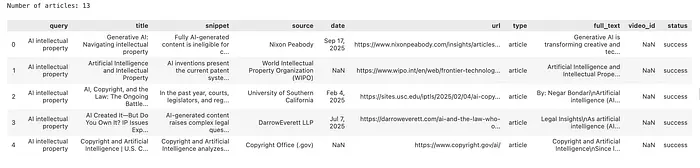
图片:使用 SerpApi 抓取的文章
步骤 11 — 转换为 LlamaIndex 文档
我们将每篇文章包装为 LlamaIndex Document 对象。
注意我们将标题和来源保留为元数据——我们不需要 LLM 提取这些,我们已经有它们了。这正是我们在本体中提出的观点:不要花钱让 LLM 重新发现你已经拥有的信息。
# Wrap each article as a LlamaIndex Document
# text is the main content; everything else is metadata
nodes = [
    Document(
        text=article["text"],
        metadata={
            "title":  article.get("title",  ""),
            "source": article.get("source", ""),
        }
    )
    for article in articles
]
步骤 12 — 构建知识图谱
现在一切都在提取管道中汇聚。
PropertyGraphIndex 编排整个工作流:
- 它将每个块传递给 GraphRAGExtractor
- 提取器使用我们的本体约束提示词调用 LLM
- 生成的解析实体和关系存储在 GraphRAGStore 中
这是最耗时的步骤。
# Instantiate the extractor with our ontology prompt
kg_extractor = GraphRAGExtractor(
    llm=EXTRACTION_LLM,
    extract_prompt=KG_TRIPLET_EXTRACT_TMPL,
    max_paths_per_chunk=MAX_PATHS_PER_CHUNK,
    num_workers=NUM_WORKERS,
)

# GraphRAGStore is both the graph database and the community detection engine
graph_store = GraphRAGStore()
print("Building knowledge graph... (this may take a few minutes)")
index = PropertyGraphIndex(
    nodes=nodes,
    kg_extractors=[kg_extractor],
    property_graph_store=graph_store,
    embed_kg_nodes=False,             # we don't need vector similarity search for this GraphRAG pipeline
    show_progress=True,
)
步骤 13 — 构建社区并生成摘要
现在我们运行社区检测并为每个集群生成 LLM 摘要。
这是启用宏观查询的步骤。GraphRAG 不是搜索相似的块,而是查询这些预先构建的社区简报——每个都是数据中主题集群的综合概述。
对于我们的 AI 版权数据集,你应该看到社区围绕以下主题形成:
- 美国版权诉讼(NYT、Getty、作者起诉 AI 公司)
- 欧盟监管活动(EU AI Act、GDPR 交互)
- 训练数据争议(合理使用论证、数据集许可)
- 特定 AI 系统及其法律风险
graph_store.build_communities()
summaries = graph_store.get_community_summaries()
print(f"\n✅ {len(summaries)} community summaries ready for querying")
步骤 14 — 可视化知识图谱
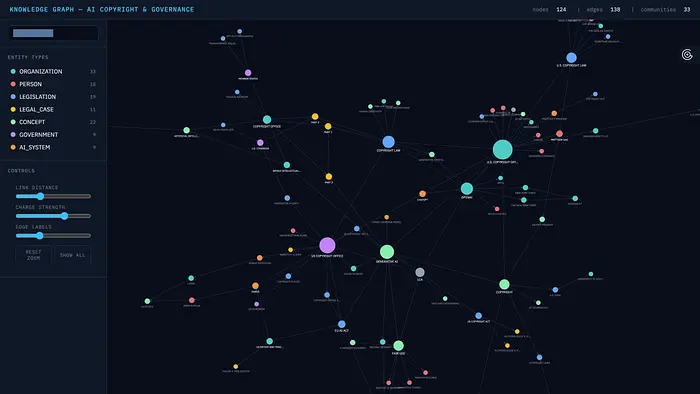
从我们构建的图谱创建 d3.js 网络图可视化。
运行此单元后在浏览器中打开 ai_copyright_graph.html。
def export_graph_data(graph_store: GraphRAGStore, output_file: str = "graph_data.json"):
    """
    Export the knowledge graph to a JSON file compatible with the D3.js template.
    Run this once after graph_store.build_communities().
    Saves to disk so you can re-run the visualization without reprocessing
    the full pipeline - which is expensive.
    """
    # Walks the graph store, builds a node metadata lookup, collects all edges,
    # and writes everything to a JSON file for the D3 template to consume.
    # Full implementation in the GitHub repo.

def visualize_graph(
    graph_store: GraphRAGStore = None,
    graph_data_file: str = "graph_data.json",
    template_file: str = "graph_template.html",
    output_file: str = GRAPH_OUTPUT_FILE,
):
    """
    Generate a D3.js interactive knowledge graph visualization.
    Can be called in two ways:
    1. Pass graph_store directly - exports fresh data then builds the HTML:
         visualize_graph(graph_store=graph_store)
    2. Load from a previously exported JSON file - no pipeline re-run needed:
         visualize_graph()  # loads graph_data.json automatically
    Features:
    - Color-coded nodes by entity type (from ontology)
    - Node size scales with degree (more connections = bigger)
    - Click a node to highlight its neighbourhood, dim everything else
    - Sidebar legend - click any entity type to toggle its visibility
    - Search bar to find and highlight any node by name
    - Sliders for link distance, charge strength, and edge label threshold
    - Hover tooltips with entity name, type, description, and connection count
    - Stats header showing total nodes, edges, and communities
    """
    # Exports the graph data to JSON, loads the D3 HTML template,
    # injects the data, and writes out the final interactive visualization file.
    # Full implementation in the GitHub repo.

# Export data and build visualization from the graph store
visualize_graph(graph_store=graph_store)
结果:
步骤 15 — 查询系统
现在我们运行标准 RAG 无法可靠回答的查询。
GraphRAGQueryEngine 对每个社区摘要评估相关性,过滤不相关的,并从最佳结果中合成最终答案,全部使用步骤 13 中生成的社区简报。
query_engine = GraphRAGQueryEngine(
    graph_store=graph_store,
    llm=QUERY_LLM,  # gpt-4o for final synthesis
)

print("✅ Query engine ready")
- 首先,一个宏观主题问题——正是标准 RAG 难以处理的那种:
# ── Query 1: Big-picture thematic question ────────────────────────────────────
# Requires synthesising the main legal arguments across many articles.
# Standard RAG would struggle — no single chunk contains the full picture.

q1 = "What are the main legal arguments being made around AI copyright and training data?"
print(f"Query: {q1}")
print("=" * 70)
print(query_engine.custom_query(q1))
答案:
围绕 AI 版权和训练数据的主要法律论点集中在以下几个关键问题:
原创性和作者身份:传统版权法要求作品具有人类作者身份和原创性才能获得版权保护。这引发了一个问题:AI 生成的内容是否可以被视为原创的,以及如果有的话,谁可以声称拥有作者身份。像 Naruto v. Slater 这样的案例已经确立了非人类不能持有版权,使 AI 生成作品的状态变得更加复杂。
合理使用原则:使用受版权保护的材料训练 AI 系统是一个有争议的问题。支持者认为这种使用可以被视为合理使用,特别是如果它是转化性的且不替代原作品。像 Authors Guild v. Google 这样的法律先例支持这一观点,但在 AI 背景下对合理使用的解释仍然存在争议。
AI 生成作品的所有权:关于谁拥有 AI 生成内容的权利,目前存在持续的争论。潜在的声索者包括 AI 的开发者、输入数据的用户,或 AI 本身,尽管现行法律通常不承认 AI 为作者。
训练数据的伦理使用:未经许可使用受版权保护的材料进行 AI 训练的合法性是一个重大关切。涉及纽约时报和 OpenAI 等诉讼突显了创新与内容创作者权利之间的紧张关系。
透明度和退出机制:倡导者呼吁在 AI 训练过程中保持透明,并实施退出机制以保护个人权利,确保在使用个人数据时获得知情同意。
平衡创新与保护:需要在促进 AI 创新与保护知识产权之间取得平衡。这包括讨论潜在的法律改革,以使版权法适应 AI 生成内容的现实。
这些论点反映了将 AI 进步与现有知识产权法律整合的复杂性,并强调了更新法规以应对这些挑战的必要性。
- 现在一个跨实体关系问题:
# ── Query 2: Cross-entity relationship question ────────────────────────────────
# Requires tracing which companies appear in disputes and what positions they hold.
# GraphRAG can follow DEFENDANT_IN, ADVOCATES_FOR, OPPOSES edges to answer this.

q2 = "Which companies are involved in AI copyright or governance disputes, and what are their positions?"
print(f"Query: {q2}")
print("=" * 70)
print(query_engine.custom_query(q2)
答案:
多家公司目前卷入了 AI 版权和治理争议,每家都有不同的立场和挑战:
Stability AI:面临来自艺术家和 Getty Images 的法律挑战,Stability AI 被指控未经授权使用受版权保护的图像来训练其 AI 模型 Stable Diffusion。该公司专注于 AI 开发和创新,而原告则倡导保护知识产权。
OpenAI 和 Meta:两家公司都因使用受版权保护的材料训练生成式 AI 系统而卷入法律争议。OpenAI 特别面临纽约时报的版权侵权诉讼。争议围绕版权法的复杂性和合理使用原则的含义。
Thomson Reuters 和 Ross Intelligence:Thomson Reuters 对 Ross Intelligence 提起诉讼,指控其未经授权使用受版权保护的材料训练 AI 模型。Ross Intelligence 正在为这些指控辩护,这些指控质疑了使用受版权保护内容进行 AI 训练的合法性。
Midjourney:参与关于 AI 生成作品版权保护的讨论,Midjourney 挑战美国版权局的规定,主张为 AI 生成内容建立版权保护。
DABUS 和 LAION:DABUS 卷入关于其作为发明人身份的法律斗争,挑战 AI 背景下传统的发明人概念。LAION 是一个为 AI 训练提供数据集的非营利组织,面临关于数据使用和版权的伦理关切,引发了关于其在 AI 训练过程中责任的疑问。
- 最后是一个比较政策问题,需要跨不同政府和管辖区进行推理:
# ── Query 3: Comparative policy question ──────────────────────────────────────
# Requires reasoning across different governments and jurisdictions —
# connecting EU, US, and UK regulatory approaches from different articles.

q3 = "How are different governments (e.g. EU, US, and UK) approaching AI governance?"
print(f"Query: {q3}")
print("=" * 70)
print(query_engine.custom_query(q3))
答案:
不同政府正在采用不同的方法进行 AI 治理,反映了各自独特的法律和监管环境。欧盟正通过 EU AI Act 推进其监管框架,旨在为 AI 系统建立全面的指导方针。该法案代表了 AI 治理的积极方法,专注于为 AI 开发和部署创建结构化环境。
相比之下,美国在知识产权领域采取更传统的立场。美国专利商标局(USPTO)不承认 AI 为合法作者或发明人,如 Thaler v. Perlmutter 和 Thaler v. Vidal 等法律案例所示。这些案例强调美国的立场是只有自然人才能被承认为专利申请的发明人,这可能无法完全适应 AI 生成的发明。
英国对 AI 治理的方法在提供的摘要中没有明确详述,但值得注意的是英国知识产权局正在考虑 AI 在创新中的影响,可能表明一种类似于欧洲专利局(EPO)的更进步立场。这表明英国可能正在将其政策与更广泛的欧洲视角保持一致,尽管具体细节未提供。
总体而言,这些不同的方法突显了监管的复杂性,以及政府在 AI 技术与知识产权法交汇领域航行时需要明确指导方针的必要性。
7、结束语
这就是一个完整可工作的 GraphRAG 系统,建立在你自己抓取的实时数据上,推理的是当前 AI 中最复杂、发展最快的主题之一。
你可以在 这里 获取完整代码,如果你想在自己的搜索主题上尝试,可以在 这里 注册 SerpAPI。
原文链接:GraphRAG: Building a Better AI System (Full Tutorial)
汇智网翻译整理,转载请标明出处