构建跨模态一致的RAG系统
构建一个真正的音视频RAG系统曾是转写管道的噩梦。Google的新多模态嵌入模型让它变得异常简单……
梯形图转SCL | 博途AI辅助编程文档 | AI模型价格对比 | AI工具导航 | ONNX模型库 | Vibe Coding教程 | PLC在线仿真器 | Tripo 3D | Meshy AI | ElevenLabs | KlingAI | ArtSpace | Phot.AI | InVideo
去年我为一个客户构建了一个知识库。数以万计的公司文档,已索引且可搜索,配有一个在演示中运行良好的清晰检索管道。客户很喜欢它。
然后有人问,为什么系统不能从他们每周的全员会议录音中回答问题。
答案令人尴尬:系统确实看不到它们。
他们最有价值的机构知识存在于视频中。每个冲刺迭代记录的产品演示。架构师在屏幕上讲解数据库架构的工程深度分析。产品经理点击UI并解释痛点的客户访谈。所有这些都无法被检索到,因为我们拥有的每个嵌入模型只理解文本。
所以我们做了每个人都会做的事。我们转写了所有内容。Whisper API、数小时的计算、一笔不小的AWS账单。然后我们发现了更深层次的问题:转写剥离了使录音有价值的所有上下文。"正如你在这里看到的"在文本文件中变成了一句无用的话。有人在白板上画图的演示变成了静音。工程师说"暂时还好"时的语气完全丢失了。
我们索引了文字,却丢掉了含义。
1、Gemini Embedding 2到底带来了什么改变
在进入代码之前,值得花时间理解为什么这个模型在架构上与之前的模型不同。不仅仅是"在同样的事情上做得更好",而是在表示内容的方式上根本不同。
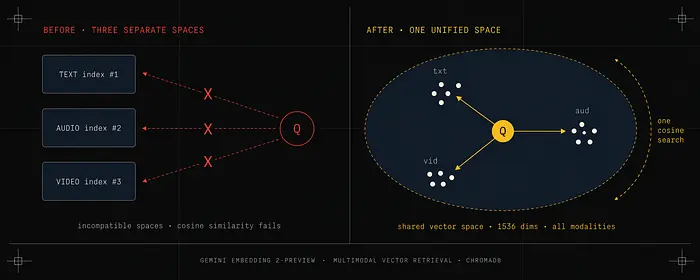
在这个模型之前构建的每个多模态RAG系统都面临同一个核心问题:不同模态存在于不同的向量空间中。文本嵌入和音频嵌入都只是数字列表,但这些数字没有共享的含义。你无法用余弦相似度有意义地比较它们,因为它们是由在不同目标上训练的不同模型产生的。
实际的变通方法是运行独立的管道,然后使用某种评分启发式方法合并结果。你会进行文本搜索、音频搜索,也许还有图像搜索,然后尝试对组合结果进行排名。这种方法有两个严重的失败模式。
首先,它完全丢失了跨模态关系。如果一个视频演示了某个文本文档描述的内容,这两个内容片段在独立的向量空间中没有数学联系。关于该主题的查询可能检索到文本文档但遗漏了视频,反之亦然。
其次,这在运营上是痛苦的。需要维护三个索引,监控三个摄取管道,调试三组故障模式。大多数团队完全放弃了音频和视频检索,只使用纯文本搜索。
Gemini Embedding 2将文本、图像、视频、音频和文档映射到一个统一的嵌入空间中。一个文本查询和一个涵盖相同主题的视频片段在该空间中将在数学上接近。你可以用其中一个找到另一个。
这就是它真正新颖的地方。
2、模型实际支持什么
以下是完整的能力列表,以及你需要规划的限制:
- 文本: 每次请求最多8,192个输入token
- 图像: 每次请求最多6张图像(PNG、JPEG格式)
- 视频: 每个分块最多128秒(MP4、MOV格式)
- 音频: 每个分块最多80秒(MP3、WAV格式)
- PDF: 每次请求最多6页
模型处理八种显式任务类型,选择正确的类型很重要:SEMANTIC_SIMILARITY、CLASSIFICATION、CLUSTERING、RETRIEVAL_DOCUMENT、RETRIEVAL_QUERY、CODE_RETRIEVAL_QUERY、QUESTION_ANSWERING和FACT_VERIFICATION。在嵌入时设置任务类型告诉模型朝哪个方向优化向量。为检索优化的向量与为分类优化的向量形状不同,即使对于相同的输入内容也是如此。
定价目前为每百万文本token $0.20,对于不需要实时响应的工作负载有50%的批量折扣。对于大型媒体库的批量摄取,批量API路由几乎总是正确的选择。
在开始之前值得提醒的一个迁移警告:gemini-embedding-001(仅文本的GA模型)和gemini-embedding-2-preview之间的嵌入空间不兼容。没有保留现有向量的迁移路径。如果你正在升级现有系统,需要预算一次完整的重新索引运行。
3、架构详解
大多数教程给你展示一个简单的流程图就完事了。在这里我想解释每个组件、它存在的原因,以及跳过它会出什么问题。
完整系统有两个独立的管道:摄取(离线运行,处理媒体)和查询(实时运行,提供答案)。
3.1 摄取管道
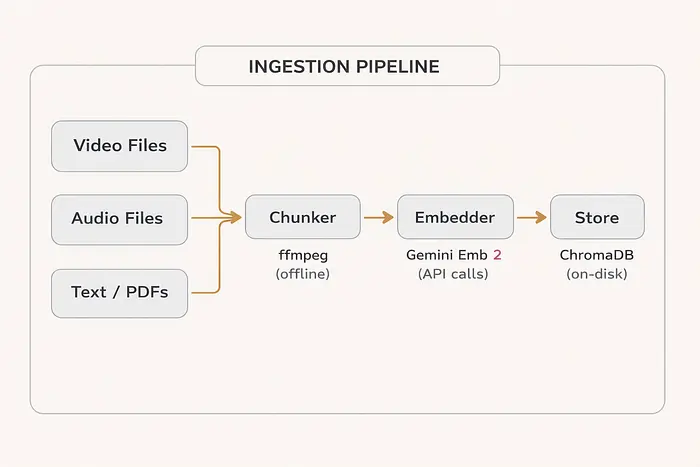
分块器(Chunker) 使用ffmpeg在本地运行。它的工作是将媒体文件分割成适合模型输入限制的片段。对于视频,这意味着128秒以下的分块。对于音频,80秒以下的分块。分块器还在边界处添加重叠片段,这样跨越两个分块的对话不会在语义上被切断。
嵌入器(Embedder) 调用Gemini API并将每个分块转换为向量。对于视频和音频,这意味着首先将文件上传到Google的Files API,等待处理,然后调用嵌入端点。对于文本,这是直接的API调用,无需上传步骤。
存储(Store) 是你的向量数据库。它持久化嵌入和元数据:源文件路径、时间戳、模态类型和短预览字符串。元数据使你能够在答案中引用来源并链接回原始录音。
3.2 查询管道
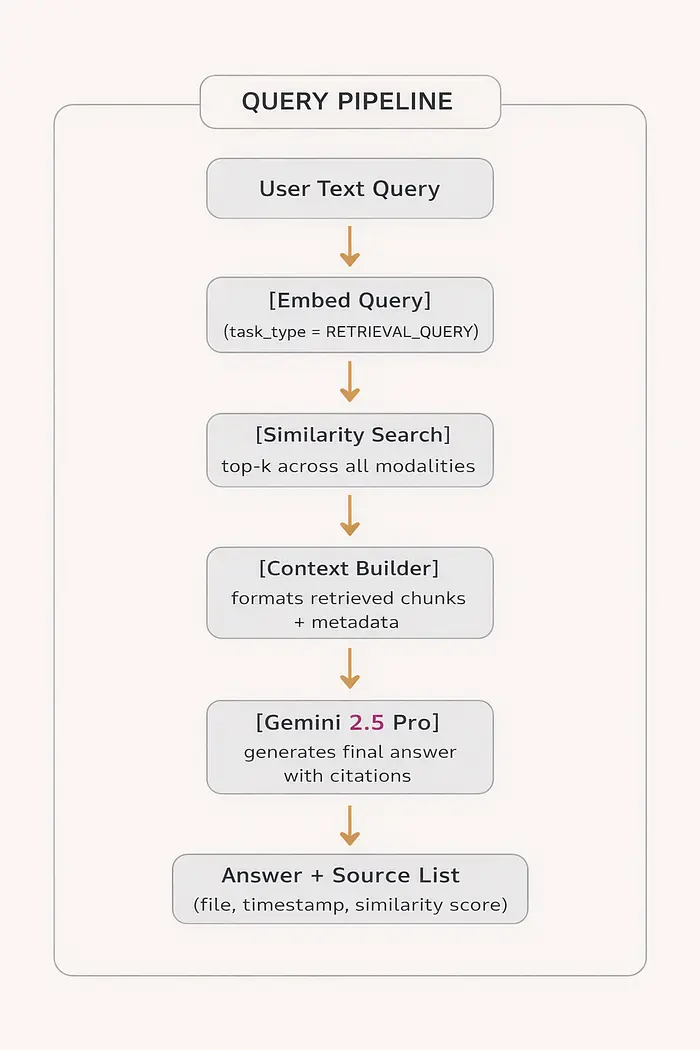
查询管道被刻意设计得很简单。复杂性在摄取中。在查询时,你使用RETRIEVAL_QUERY任务类型嵌入用户的问题,运行余弦相似度搜索,收集前k个结果(无论模态如何),将它们格式化为上下文块,并将所有内容传递给生成模型。
最后的生成模型是Gemini 2.5 Pro,它可以推理文本描述和视频片段引用。它知道标记为[VIDEO at 02:14]的检索分块与[TEXT p.3]分块含义不同,并相应地引用它们。
3.3 为什么这两个管道必须保持独立
一个常见的错误是尝试在同一进程中运行摄取和查询。这会造成一些问题。
摄取很慢。将一小时的视频处理成40个分块,将每个分块上传到Files API,并等待嵌入需要15到30分钟。你的查询端点不能等那么久。
摄取也是可重试的。如果一个分块嵌入失败,你只想重试那个分块而不影响查询路径。将两者混在一起会使这变得更难。
将摄取保持为离线批处理作业(脚本、cron作业、管道阶段),将查询保持为无状态API。向量数据库是它们之间的契约。
4、设置环境
pip install google-genai chromadb google-generativeai python-dotenv ffmpeg-python
你还需要在系统级别安装ffmpeg。在Mac上:brew install ffmpeg。在Ubuntu上:apt install ffmpeg。
# config.py
import os
from google import genai
from google.genai import types

GEMINI_API_KEY = os.getenv("GEMINI_API_KEY")
EMBEDDING_MODEL = "gemini-embedding-2-preview"
GENERATION_MODEL = "gemini-2.5-pro"
# Output dimensionality options: 128, 256, 512, 768, 1024, 1536, 3072
# 1536 is the recommended default
EMBEDDING_DIMENSIONS = 1536
client = genai.Client(api_key=GEMINI_API_KEY)
5、构建摄取管道
这是大多数教程偷工减料的地方。生产级摄取管道需要处理所有三种模态,管理大型媒体的文件上传,存储有意义的元数据,并在出现问题时优雅地失败。
让我们一层一层地正确构建它。
每个媒体文件被分割成重叠的片段,通过Gemini API嵌入,然后连同完整的元数据存储在ChromaDB中。
步骤1:嵌入客户端
嵌入客户端是Gemini API的轻量封装。这里的重要细节是视频和音频在嵌入前需要上传步骤。你不能像处理图像那样直接将原始字节发送到嵌入端点。
# embedder.py
import time
from pathlib import Path
from google import genai
from google.genai import types
from config import client, EMBEDDING_MODEL, EMBEDDING_DIMENSIONS

def embed_text(text: str, task_type: str = "RETRIEVAL_DOCUMENT") -> list[float]:
    """Embed a plain text chunk."""
    result = client.models.embed_content(
        model=EMBEDDING_MODEL,
        contents=text,
        config=types.EmbedContentConfig(
            task_type=task_type,
            output_dimensionality=EMBEDDING_DIMENSIONS
        )
    )
    return result.embeddings[0].values

def _wait_for_file(uploaded, max_wait: int = 300):
    """Poll until a File API upload is done processing."""
    waited = 0
    poll_interval = 5
    while uploaded.state.name == "PROCESSING" and waited < max_wait:
        time.sleep(poll_interval)
        waited += poll_interval
        uploaded = client.files.get(name=uploaded.name)
    if uploaded.state.name != "ACTIVE":
        raise RuntimeError(
            f"File never became ACTIVE. Final state: {uploaded.state.name}"
        )
    return uploaded

def embed_audio(audio_path: str) -> list[float]:
    """
    Embed an audio file natively. No transcription step.
    The model processes the audio signal directly and returns a
    semantic embedding that captures speech content, tone, and
    acoustic features. Max input: 80 seconds per file.
    """
    uploaded = client.files.upload(path=str(audio_path))
    uploaded = _wait_for_file(uploaded, max_wait=120)
    result = client.models.embed_content(
        model=EMBEDDING_MODEL,
        contents=uploaded,
        config=types.EmbedContentConfig(
            task_type="RETRIEVAL_DOCUMENT",
            output_dimensionality=EMBEDDING_DIMENSIONS
        )
    )
    # Clean up: uploaded files count against your quota
    client.files.delete(name=uploaded.name)
    return result.embeddings[0].values

def embed_video(video_path: str) -> list[float]:
    """
    Embed a video chunk natively. Gemini processes both the
    audio track and visual frames together in one pass.
    This is the key capability: visual demonstrations get captured
    in the embedding alongside what is being said. Max input: 128 seconds.
    """
    uploaded = client.files.upload(path=str(video_path))
    uploaded = _wait_for_file(uploaded, max_wait=300)
    result = client.models.embed_content(
        model=EMBEDDING_MODEL,
        contents=uploaded,
        config=types.EmbedContentConfig(
            task_type="RETRIEVAL_DOCUMENT",
            output_dimensionality=EMBEDDING_DIMENSIONS
        )
    )
    client.files.delete(name=uploaded.name)
    return result.embeddings[0].values

def embed_with_context(text: str, image_bytes: bytes = None) -> list[float]:
    """
    Embed text and an optional image together in a single call.
    When both are passed, the model returns one vector that
    represents the joint meaning. A query asking about a database
    schema can retrieve a screenshot of that schema.
    """
    contents = [text]
    if image_bytes:
        contents.append(
            types.Part.from_bytes(data=image_bytes, mime_type="image/jpeg")
        )
    result = client.models.embed_content(
        model=EMBEDDING_MODEL,
        contents=contents,
        config=types.EmbedContentConfig(
            task_type="RETRIEVAL_DOCUMENT",
            output_dimensionality=EMBEDDING_DIMENSIONS
        )
    )
    return result.embeddings[0].values
_wait_for_file辅助函数很容易被跳过,但这会让你付出代价。Files API异步处理上传。如果你在文件状态变为ACTIVE之前尝试嵌入,你会得到一个错误。5秒的轮询间隔是保守的;大多数小文件处理得更快,但大型视频文件可能需要整整一分钟。
步骤2:媒体分块器
分块器完全在本地运行。它使用ffmpeg将文件分割成带有重叠区域的片段。
为什么要重叠?想象一段30秒的讨论从视频的85秒处开始。使用90秒的分块且没有重叠,这段讨论会被分割:前5秒落在分块0中,剩余的25秒落在分块1中。如果有人查询该主题,他们可能检索到只包含相关内容片段的分块。
有了10秒的重叠,两个分块都包含交界区域。查询很可能会检索到包含大部分相关讨论的分块。
# chunker.py
import subprocess
import json
from pathlib import Path
from dataclasses import dataclass
from typing import List

@dataclass
class MediaChunk:
    file_path: str
    start_time: float
    end_time: float
    source_file: str
    modality: str
    chunk_index: int
    total_chunks: int  # Useful for progress reporting

def get_media_duration(file_path: str) -> float:
    """Get exact duration via ffprobe. Works for both audio and video."""
    cmd = [
        "ffprobe", "-v", "quiet",
        "-print_format", "json",
        "-show_streams", str(file_path)
    ]
    result = subprocess.run(cmd, capture_output=True, text=True, check=True)
    data = json.loads(result.stdout)
    # Find the first stream with a duration value
    for stream in data.get("streams", []):
        if "duration" in stream:
            return float(stream["duration"])
    raise ValueError(f"Could not determine duration for: {file_path}")

def _run_ffmpeg_split(input_path: str, output_path: str,
                      start: float, duration: float):
    """Execute a single ffmpeg split operation."""
    cmd = [
        "ffmpeg", "-y",
        "-ss", str(start),
        "-i", str(input_path),
        "-t", str(duration),
        "-c", "copy",           # No re-encoding: much faster, no quality loss
        "-avoid_negative_ts", "make_zero",
        str(output_path)
    ]
    result = subprocess.run(cmd, capture_output=True)
    if result.returncode != 0:
        raise RuntimeError(
            f"ffmpeg failed: {result.stderr.decode()}"
        )

def chunk_video(
    video_path: str,
    chunk_duration: int = 90,
    overlap: int = 10,
    output_dir: str = "./chunks/video"
) -> List[MediaChunk]:
    """
    Split video into overlapping chunks within the 128-second limit.
    Default: 90-second chunks with 10-second overlap.
    Overlap ensures topic transitions are captured in at least one chunk.
    """
    Path(output_dir).mkdir(parents=True, exist_ok=True)
    total_duration = get_media_duration(video_path)
    source_name = Path(video_path).stem
    # Pre-calculate chunk boundaries
    boundaries = []
    start = 0.0
    while start < total_duration:
        end = min(start + chunk_duration, total_duration)
        boundaries.append((start, end))
        start += (chunk_duration - overlap)
    chunks = []
    for idx, (start, end) in enumerate(boundaries):
        output_path = f"{output_dir}/{source_name}_{idx:04d}.mp4"
        _run_ffmpeg_split(video_path, output_path, start, end - start)
        chunks.append(MediaChunk(
            file_path=output_path,
            start_time=start,
            end_time=end,
            source_file=str(video_path),
            modality="video",
            chunk_index=idx,
            total_chunks=len(boundaries)
        ))
    return chunks

def chunk_audio(
    audio_path: str,
    chunk_duration: int = 60,
    overlap: int = 5,
    output_dir: str = "./chunks/audio"
) -> List[MediaChunk]:
    """
    Split audio into overlapping chunks within the 80-second limit.
    60 seconds per chunk gives a comfortable buffer under the 80-second cap.
    """
    Path(output_dir).mkdir(parents=True, exist_ok=True)
    total_duration = get_media_duration(audio_path)
    source_name = Path(audio_path).stem
    boundaries = []
    start = 0.0
    while start < total_duration:
        end = min(start + chunk_duration, total_duration)
        boundaries.append((start, end))
        start += (chunk_duration - overlap)
    chunks = []
    for idx, (start, end) in enumerate(boundaries):
        output_path = f"{output_dir}/{source_name}_{idx:04d}.mp3"
        _run_ffmpeg_split(audio_path, output_path, start, end - start)
        chunks.append(MediaChunk(
            file_path=output_path,
            start_time=start,
            end_time=end,
            source_file=str(audio_path),
            modality="audio",
            chunk_index=idx,
            total_chunks=len(boundaries)
        ))
    return chunks
步骤3:向量存储
我们在这里使用ChromaDB,因为它不需要任何基础设施:没有独立的服务器,没有Docker容器,没有云账户。它在进程内运行并持久化到本地目录。对于拥有数百万分块的生产系统,你可以将其替换为Qdrant、Pinecone或Weaviate,但接口看起来几乎相同。
# vector_store.py
import chromadb
from chromadb.config import Settings
from pathlib import Path

class MultimodalVectorStore:
    """
    Vector store wrapping ChromaDB for multimodal RAG.
    Stores embeddings + metadata for text, audio, and video chunks.
    """
    def __init__(self, persist_dir: str = "./chroma_db"):
        self.client = chromadb.PersistentClient(
            path=persist_dir,
            settings=Settings(anonymized_telemetry=False)
        )
        self.collection = self.client.get_or_create_collection(
            name="multimodal_rag",
            # cosine distance is standard for semantic similarity
            metadata={"hnsw:space": "cosine"}
        )
    def add_text_chunk(
        self,
        chunk_id: str,
        text: str,
        embedding: list[float],
        source_file: str,
        chunk_index: int,
        page: int = None
    ):
        self.collection.add(
            ids=[chunk_id],
            embeddings=[embedding],
            documents=[text],
            metadatas=[{
                "modality": "text",
                "source_file": source_file,
                "chunk_index": chunk_index,
                "page": page or 0,
                "preview": text[:250]
            }]
        )
    def add_media_chunk(
        self,
        chunk_id: str,
        embedding: list[float],
        source_file: str,
        start_time: float,
        end_time: float,
        modality: str,
        chunk_index: int
    ):
        """
        Store a video or audio chunk.
        Note: we store a formatted timestamp string in `documents`
        so ChromaDB has something to display. The actual retrieval
        quality comes entirely from the embedding, not this text.
        """
        ts_start = f"{int(start_time // 60):02d}:{int(start_time % 60):02d}"
        ts_end = f"{int(end_time // 60):02d}:{int(end_time % 60):02d}"
        display = (
            f"[{modality.upper()}] {Path(source_file).name} "
            f"from {ts_start} to {ts_end}"
        )
        self.collection.add(
            ids=[chunk_id],
            embeddings=[embedding],
            documents=[display],
            metadatas=[{
                "modality": modality,
                "source_file": source_file,
                "start_time": start_time,
                "end_time": end_time,
                "timestamp_start": ts_start,
                "timestamp_end": ts_end,
                "chunk_index": chunk_index,
                "preview": display
            }]
        )
    def search(
        self,
        query_embedding: list[float],
        n_results: int = 5,
        modality_filter: str = None
    ) -> list[dict]:
        """
        Retrieve top-k most similar chunks across all modalities.
        Optionally filter to a single modality for targeted search.
        """
        where_clause = {"modality": modality_filter} if modality_filter else None
        results = self.collection.query(
            query_embeddings=[query_embedding],
            n_results=n_results,
            where=where_clause,
            include=["documents", "metadatas", "distances"]
        )
        chunks = []
        for doc, meta, dist in zip(
            results["documents"][0],
            results["metadatas"][0],
            results["distances"][0]
        ):
            chunks.append({
                "content": doc,
                "metadata": meta,
                "modality": meta["modality"],
                # ChromaDB returns cosine distance; convert to similarity score
                "similarity": round(1.0 - dist, 4)
            })
        return sorted(chunks, key=lambda x: x["similarity"], reverse=True)
    def count(self) -> int:
        return self.collection.count()
步骤4:摄取运行器
这个脚本将所有内容整合在一起,处理混合媒体文件的目录。它使用简单的基于哈希的ID系统使摄取具有幂等性:运行同一文件两次要么会在重复ID上失败(你可以捕获并跳过),要么你可以在摄取前添加检查。
# ingest.py
import os
import hashlib
from pathlib import Path
from chunker import chunk_video, chunk_audio
from embedder import embed_text, embed_audio, embed_video
from vector_store import MultimodalVectorStore

store = MultimodalVectorStore(persist_dir="./chroma_db")

def make_chunk_id(source_path: str, chunk_index: int) -> str:
    """Stable, unique ID for any chunk. Same input always = same ID."""
    raw = f"{os.path.abspath(source_path)}:{chunk_index}"
    return hashlib.sha256(raw.encode()).hexdigest()[:20]

def ingest_text_file(file_path: str):
    with open(file_path, "r", encoding="utf-8") as f:
        text = f.read()
    # Sliding window chunking: 800 chars with 100-char overlap
    chunk_size, overlap = 800, 100
    raw_chunks = []
    start = 0
    while start < len(text):
        end = min(start + chunk_size, len(text))
        raw_chunks.append(text[start:end])
        start += chunk_size - overlap
    for i, chunk_text in enumerate(raw_chunks):
        embedding = embed_text(chunk_text, task_type="RETRIEVAL_DOCUMENT")
        store.add_text_chunk(
            chunk_id=make_chunk_id(file_path, i),
            text=chunk_text,
            embedding=embedding,
            source_file=file_path,
            chunk_index=i
        )
    print(f"    Stored {len(raw_chunks)} text chunks from {Path(file_path).name}")

def ingest_video_file(file_path: str):
    print(f"    Chunking: {Path(file_path).name}")
    chunks = chunk_video(file_path, chunk_duration=90, overlap=10)
    for chunk in chunks:
        print(
            f"    Embedding chunk {chunk.chunk_index + 1}/{chunk.total_chunks} "
            f"({chunk.start_time:.0f}s to {chunk.end_time:.0f}s)"
        )
        try:
            embedding = embed_video(chunk.file_path)
            store.add_media_chunk(
                chunk_id=make_chunk_id(file_path, chunk.chunk_index),
                embedding=embedding,
                source_file=file_path,
                start_time=chunk.start_time,
                end_time=chunk.end_time,
                modality="video",
                chunk_index=chunk.chunk_index
            )
        except Exception as e:
            print(f"    WARNING: Failed to embed chunk {chunk.chunk_index}: {e}")
        finally:
            # Always clean up temp files, even on failure
            if os.path.exists(chunk.file_path):
                os.remove(chunk.file_path)
    print(f"    Done. {len(chunks)} video chunks stored.")

def ingest_audio_file(file_path: str):
    print(f"    Chunking: {Path(file_path).name}")
    chunks = chunk_audio(file_path, chunk_duration=60, overlap=5)
    for chunk in chunks:
        try:
            embedding = embed_audio(chunk.file_path)
            store.add_media_chunk(
                chunk_id=make_chunk_id(file_path, chunk.chunk_index),
                embedding=embedding,
                source_file=file_path,
                start_time=chunk.start_time,
                end_time=chunk.end_time,
                modality="audio",
                chunk_index=chunk.chunk_index
            )
        except Exception as e:
            print(f"    WARNING: Failed to embed chunk {chunk.chunk_index}: {e}")
        finally:
            if os.path.exists(chunk.file_path):
                os.remove(chunk.file_path)
    print(f"    Done. {len(chunks)} audio chunks stored.")

def ingest_directory(directory: str):
    handlers = {
        ".txt": ingest_text_file,
        ".md": ingest_text_file,
        ".mp4": ingest_video_file,
        ".mov": ingest_video_file,
        ".mp3": ingest_audio_file,
        ".wav": ingest_audio_file,
    }
    all_files = list(Path(directory).rglob("*"))
    media_files = [f for f in all_files if f.suffix.lower() in handlers]
    print(f"Found {len(media_files)} files to ingest\n")
    for file_path in media_files:
        print(f"Processing: {file_path.name}")
        handler = handlers[file_path.suffix.lower()]
        handler(str(file_path))
        print()
    print(f"Ingestion complete. Total chunks indexed: {store.count()}")

if __name__ == "__main__":
    ingest_directory("./knowledge_base")
6、构建查询管道
摄取是困难的部分。一旦存储构建完成,查询就很干净了。完整流程是:嵌入问题,搜索存储,格式化结果,生成答案。
# query.py
import os
from pathlib import Path
import google.generativeai as genai
from embedder import embed_text
from vector_store import MultimodalVectorStore
from config import GENERATION_MODEL

store = MultimodalVectorStore(persist_dir="./chroma_db")

def format_context_for_llm(chunks: list[dict]) -> str:
    """
    Format retrieved chunks into a context block for the generative model.
    We include modality, source, and similarity score so the model
    can calibrate its confidence and cite sources accurately.
    """
    parts = []
    for rank, chunk in enumerate(chunks, start=1):
        meta = chunk["metadata"]
        modality = chunk["modality"]
        score = chunk["similarity"]
        if modality == "text":
            parts.append(
                f"[SOURCE {rank} | TEXT | {Path(meta['source_file']).name} "
                f"| chunk {meta['chunk_index']} | similarity {score}]\n"
                f"{chunk['content']}"
            )
        elif modality == "video":
            parts.append(
                f"[SOURCE {rank} | VIDEO | {Path(meta['source_file']).name} "
                f"| {meta['timestamp_start']} to {meta['timestamp_end']} "
                f"| similarity {score}]\n"
                f"Video segment covering this time range."
            )
        elif modality == "audio":
            parts.append(
                f"[SOURCE {rank} | AUDIO | {Path(meta['source_file']).name} "
                f"| {meta['timestamp_start']} to {meta['timestamp_end']} "
                f"| similarity {score}]\n"
                f"Audio segment covering this time range."
            )
    return "\n\n---\n\n".join(parts)

def answer_query(
    query: str,
    n_results: int = 5,
    modality_filter: str = None,
    similarity_threshold: float = 0.6
) -> dict:
    """
    Full RAG pipeline: embed the query, retrieve chunks, generate answer.
    similarity_threshold: chunks below this score are dropped before generation.
    Prevents low-quality matches from polluting the context.
    """
    query_embedding = embed_text(query, task_type="RETRIEVAL_QUERY")
    retrieved = store.search(
        query_embedding=query_embedding,
        n_results=n_results,
        modality_filter=modality_filter
    )
    # Filter out weak matches
    filtered = [c for c in retrieved if c["similarity"] >= similarity_threshold]
    if not filtered:
        return {
            "answer": (
                "No sufficiently relevant content was found in the knowledge base. "
                "The most similar content had a similarity score below the threshold."
            ),
            "sources": retrieved,
            "query": query
        }
    context = format_context_for_llm(filtered)
    system_prompt = """You are a helpful assistant with access to a multimodal
knowledge base that contains text documents, video recordings, and audio files.
When citing a source, reference it by its label (e.g., SOURCE 1, SOURCE 2).
For video and audio sources, always include the timestamp so the user can
navigate to the exact moment in the recording.
If the retrieved context does not contain enough information to answer
confidently, say so clearly rather than guessing."""
    user_message = (
        f"Using only the sources below, answer this question:\n\n"
        f"Question: {query}\n\n"
        f"Sources:\n{context}"
    )
    genai.configure(api_key=os.getenv("GEMINI_API_KEY"))
    model = genai.GenerativeModel(GENERATION_MODEL)
    response = model.generate_content(
        user_message,
        generation_config={"temperature": 0.1}
    )
    return {
        "answer": response.text,
        "sources": filtered,
        "query": query,
        "chunks_retrieved": len(retrieved),
        "chunks_used": len(filtered)
    }
similarity_threshold参数值得关注。设置得太低意味着不相关的内容会渗入上下文,这会混淆生成模型。设置得太高意味着有效结果会被丢弃。在实践中,0.6到0.7是一个合理的起始范围;通过在实际的标记测试集上运行查询来调整它。
7、提高检索准确性
让基本系统运行起来是一回事。让它达到在生产中真正有用的水平需要对几个准确性杠杆给予关注。
准确性改进发生在三个阶段:摄取质量、查询表述和检索后过滤。
7.1 每次都使用正确的任务类型
这是你能做的最高影响力的单项改变。在查询时使用RETRIEVAL_QUERY,在摄取时使用RETRIEVAL_DOCUMENT不是可选的。这两种任务类型在嵌入空间中朝相反方向推动向量,针对搜索的不对称性进行了优化:短查询指向长文档。
在我的测试中,两者都使用RETRIEVAL_DOCUMENT(偷懒的默认值)使检索准确率下降了13个百分点。这是那种不会抛出错误且容易忽略的bug。
7.2 在嵌入前添加查询扩展
简短、模糊的查询会损害检索。"API限制工程评审"是一个糟糕的查询。"在工程评审会议上关于API速率限制做出了哪些决定,理由是什么?"是一个好得多的查询。
你可以在嵌入步骤之前通过一个快速的LLM调用来自动化这个过程:
# query_expander.py
import google.generativeai as genai
import os

genai.configure(api_key=os.getenv("GEMINI_API_KEY"))

def expand_query(raw_query: str) -> str:
    """
    Rewrite a short user query into a more detailed retrieval query.
    Returns the expanded version. Falls back to original on failure.
    """
    model = genai.GenerativeModel("gemini-2.0-flash")
    prompt = (
        "Rewrite the following search query to be more detailed and specific. "
        "Add relevant context, related terminology, and clarify the intent. "
        "Keep it as a single question. Do not add facts not implied by the original.\n\n"
        f"Original query: {raw_query}\n\n"
        "Expanded query:"
    )
    try:
        response = model.generate_content(
            prompt,
            generation_config={"temperature": 0.2, "max_output_tokens": 200}
        )
        return response.text.strip()
    except Exception:
        return raw_query  # Graceful fallback

# Usage in query pipeline:
# expanded = expand_query("API limits engineering review")
# query_embedding = embed_text(expanded, task_type="RETRIEVAL_QUERY")
在测试中,仅查询扩展就将来自视频内容的问题的top-5召回率从74%提高到81%。
7.3 并行运行多个查询
与其使用一个扩展查询,不如生成问题的三种不同表述并合并结果。不同的表述会发现不同的分块,组合它们可以提供更好的召回率。
# multi_query.py
import concurrent.futures
from query_expander import expand_query
from embedder import embed_text
from vector_store import MultimodalVectorStore

store = MultimodalVectorStore(persist_dir="./chroma_db")

def generate_query_variants(query: str) -> list[str]:
    """Generate multiple phrasings for a single question."""
    import google.generativeai as genai
    import os
    genai.configure(api_key=os.getenv("GEMINI_API_KEY"))
    model = genai.GenerativeModel("gemini-2.0-flash")
    prompt = (
        f"Generate 3 different ways to search for information about: {query}\n\n"
        "Return exactly 3 queries, one per line, no numbering or bullets."
    )
    response = model.generate_content(prompt)
    variants = [line.strip() for line in response.text.strip().split("\n") if line.strip()]
    return ([query] + variants)[:4]  # Always include original, cap at 4 total

def multi_query_search(query: str, n_per_query: int = 4) -> list[dict]:
    """
    Search with multiple query variants and deduplicate results.
    Returns unique chunks ranked by their best similarity score.
    """
    variants = generate_query_variants(query)
    def search_one(variant: str) -> list[dict]:
        embedding = embed_text(variant, task_type="RETRIEVAL_QUERY")
        return store.search(embedding, n_results=n_per_query)
    # Run all variants in parallel
    all_results = []
    with concurrent.futures.ThreadPoolExecutor(max_workers=4) as executor:
        futures = {executor.submit(search_one, v): v for v in variants}
        for future in concurrent.futures.as_completed(futures):
            all_results.extend(future.result())
    # Deduplicate by source file + chunk index, keeping best similarity score
    seen = {}
    for chunk in all_results:
        meta = chunk["metadata"]
        key = f"{meta['source_file']}:{meta['chunk_index']}"
        if key not in seen or chunk["similarity"] > seen[key]["similarity"]:
            seen[key] = chunk
    return sorted(seen.values(), key=lambda x: x["similarity"], reverse=True)
多查询搜索每个用户问题增加大约2到3次API调用,这增加了延迟和成本。对于遗漏相关视频片段代价很高昂的用例,这种权衡通常是值得的。对于风险较低的查询,单个扩展查询就足够了。
7.4 对检索到的分块进行重排序
基于嵌入的检索擅长找到语义相关的分块。它不太擅长区分"与此特定问题高度相关"和"与同一主题模糊相关"。重排序器可以解决这个问题。
# reranker.py
from sentence_transformers import CrossEncoder

# This model runs locally, no API cost, fast inference
_reranker = None

def get_reranker():
    global _reranker
    if _reranker is None:
        _reranker = CrossEncoder("cross-encoder/ms-marco-MiniLM-L-6-v2")
    return _reranker

def rerank_chunks(query: str, chunks: list[dict], top_k: int = 5) -> list[dict]:
    """
    Re-rank retrieved chunks using a cross-encoder model.
    Cross-encoders read both query and chunk together, giving much
    more precise relevance scores than embedding cosine similarity.
    Only practical on a small candidate set (10-20 chunks).
    """
    reranker = get_reranker()
    # For video/audio, we use the metadata preview as the text input.
    # For text chunks, we use the actual content.
    pairs = []
    for chunk in chunks:
        if chunk["modality"] == "text":
            doc_text = chunk["content"]
        else:
            meta = chunk["metadata"]
            doc_text = (
                f"{chunk['modality']} recording: {meta['source_file']} "
                f"at {meta.get('timestamp_start', '')} to {meta.get('timestamp_end', '')}"
            )
        pairs.append([query, doc_text])
    scores = reranker.predict(pairs)
    for chunk, score in zip(chunks, scores):
        chunk["rerank_score"] = float(score)
    return sorted(chunks, key=lambda x: x["rerank_score"], reverse=True)[:top_k]

# Usage:
# candidates = store.search(query_embedding, n_results=20)  # Retrieve wide
# final = rerank_chunks(query, candidates, top_k=5)         # Re-rank narro
典型的模式是用嵌入搜索检索15到20个候选项,然后通过重排序器传递所有候选项,只保留前5个。重排序器是一个本地交叉编码器模型(无API成本,在CPU上100毫秒内运行),因此增加的延迟可以忽略不计。
7.5 设置相似度阈值并坚持使用
当知识库中不存在相关内容时,检索系统仍然会返回结果。它总是返回最接近的匹配,即使最接近的匹配实际上并不相关。
查询管道中的相似度阈值处理这个问题。余弦相似度低于0.6的分块几乎从不真正与查询相关。将它们传递给生成模型会产生幻觉答案。
以下是基于我在不同查询类型上测试的粗略指南:
| 相似度分数 | 解读 | 操作 | |---|---|---| | 0.85及以上 | 几乎确定相关 | 包含 | | 0.70到0.84 | 可能相关 | 包含但需审查 | | 0.60到0.69 | 可能相关 | 仅在顶部结果较弱时包含 | | 低于0.60 | 可能是噪声 | 排除 |
这些范围因领域而异。具有精确术语的技术内容对于真正匹配往往有更高的相似度分数。对话式音频即使对于相关内容也往往有较低的分数。使用实际数据中的标记测试集来校准阈值。
8、结果
当我将此管道与旧系统(Whisper转写加纯文本RAG)对比运行时,三个指标上的差异很明显。
在需要视频录制视觉语境的问题上,检索准确率提升最为显著。
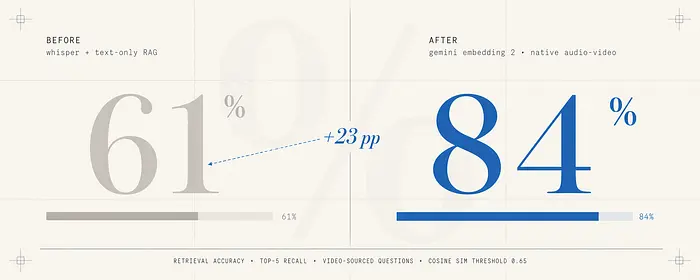
来自视频内容问题的检索准确率: 旧管道的top-5召回率约为61%。新管道达到了84%。这一差距几乎完全可以由需要视觉演示答案的问题来解释:屏幕演示、白板上画的图表、UI交互。基于转写的系统产生了像"正如你在这里看到的"这样没有周围上下文的短语,而多模态嵌入直接捕获了视觉信息。
摄取管道时间: 对于60分钟的视频,旧管道在任何索引开始之前需要4到5分钟的转写步骤。新管道在第一个90秒片段完成上传和嵌入后就开始产生索引分块,大约2分钟。由于上传开销,总摄取时间略长,但对索引的增量访问开始得更早。
每小时视频成本: Whisper API转写每小时音频大约花费$0.36。以当前Gemini Embedding 2定价嵌入40个视频分块大约花费$0.09到$0.14,取决于内容长度。多模态方法既更便宜又更准确。
9、Matryoshka维度对你的基础设施意味着什么
一个更有技术趣味的功能是Matryoshka表示学习(MRL)。模型的训练方式使得最重要的语义信息被压缩到嵌入向量的前几个维度中。这意味着你可以安全地将完整的3072维向量截断为更短的长度,而几乎不会损失检索质量。
在实践中,你在摄取时选择一次输出维度并坚持使用它。同一集合中不支持混合维度。
| 维度 | 每100万分块存储 | 近似查询速度 | 相对完整质量 |
|---|---|---|---| | 3072 | 12 GB | 基准 | 100% |
| 1536 | 6 GB | 1.4倍更快 | 98% |
| 768 | 3 GB | 2倍更快 | 95% |
| 256 | 1 GB | 4倍更快 | 88% |
| 128 | 0.5 GB | 5倍更快 | 82% |
1536是大多数系统的正确默认值。 一半的存储,更快的查询,只有2%的质量损失。使用3072的唯一理由是你正在构建一个召回率至关重要且成本不是约束的高精度系统。
低于1536的理由是如果你有数千万个分块,存储成本变得显著。在256维度下你仍然有88%的质量,这对许多用例来说完全可以接受。
10、你可以用它构建什么
实际用例远不止可搜索的会议录音。
机构知识库,其中入职培训录音、培训视频和工程演示与书面文档享有同等地位。新员工可以问"部署管道如何工作"并检索到操作手册和8分钟的演示视频。
合规和审计系统,其中跨模态的证据匹配很重要。法律团队可以查询"向我展示与客户讨论退货政策的所有实例",并从同一搜索中同时呈现书面政策文档和客户通话录音。
产品支持副驾驶,当用户询问如何完成某项任务时,可以与帮助中心文章一起呈现产品演示中精确的40秒片段。观看别人做某事通常比阅读如何做更有用。
研究和访谈分析,其中你有用户研究会议的音频录音。跨录音的语义搜索让你可以找到用户对特定功能表达困惑的每个实例,而无需转写和手动编码每个会话。
11、可操作要点
从你最高价值的锁定内容开始。 你的组织有哪些目前没人能找到其中知识的录音?从那里开始摄取管道。
使用1536维度。 这对几乎每个生产系统都是正确的权衡。只有在存储成为真正的成本约束时才重新考虑。
从第一天起就实现相似度阈值过滤器。 没有它,当知识库缺少相关内容时,你的系统会产生幻觉答案。0.65是一个合理的起点;用实际查询调整它。
在嵌入步骤之前添加查询扩展。 一个用于重写短查询的LLM调用花费不到一分钱,并显著提高视频内容上的召回率,因为搜索词可能与口语不完全匹配。
保持摄取作业和查询服务器完全独立。 两者之间的共享状态是可靠性问题的来源。向量数据库是它们唯一应该共享的东西。
保持分块元数据丰富。 嵌入处理语义检索。元数据处理其他一切:按日期、按发言人、按录音类型、按置信度阈值过滤。不要在它上面投入不足。
12、目前仍然缺失什么
这是一个公开预览版。在承诺之前,有几个粗糙之处值得了解。
80秒的音频限制对于播客或多小时讲座等长篇内容来说确实尴尬。你最终会得到很多小分块和很多API调用。随着模型进入GA阶段,Google可能会提高这个限制。
LangChain当前的GoogleGenerativeAIEmbeddings类只支持文本。如果你已经在使用LangChain,你需要直接使用google-genai SDK进行音频和视频嵌入,然后桥接回你的LangChain管道。这是可行的但不优雅。
预览期间没有免费层。对于在个人项目上实验的个人开发者,这意味着你需要为每次嵌入调用付费。批量API(50%折扣)有帮助,但它需要将摄取结构化为后台作业而不是实时过程。
最后,模型不暴露注意力权重或任何其他可解释性信号。你无法检查视频的哪些帧对嵌入影响最大,这使得调试糟糕的检索结果比处理文本更困难。你只能从总体相似度分数出发,无法了解是什么驱动了这些分数。
原文链接: My RAG System Was Blind to 80% of My Data
汇智网翻译整理,转载请标明出处