如何用AI精准提取文档内容
让AI模型以特定格式输出,会如何改变一切

博途PLC工程智能体 | AI智能体博途网关 | 博途PLC程序知识图谱 | 梯形图转SCL | 自然语言生成梯形图 | 自然语言生成SCL | 逆向生成程序块文档 | 梯形图在线查看 | 博途编程文档MCP | AI模型价格对比 | AI工具导航 | ONNX模型库 | Vibe Coding教程 | PLC在线仿真器 | Tripo 3D | Meshy AI
从文档中精确提取内容对AI应用至关重要。例如,在用AI处理采购订单以生成销售草稿时,AI代理或LLM首先需要精确理解采购订单的内容及其确切布局。
表头错位会让LLM读错数量,从而导致价格计算错误。同样,因表格跨页断裂而漏掉的一个行项目,可能会让LLM完全跳过某个产品。
我们在自己的生成式AI项目(GAIK)中经常遇到这种情况。该项目使用我们的开源生成式AI工具包为企业文档构建AI应用(见GAIK的GitHub仓库此处)。
许多客户文档,如采购订单或物料清单,都包含杂乱的表格。例如,请看下面2页采购订单(出于隐私原因修改了内容,但保留了布局)。
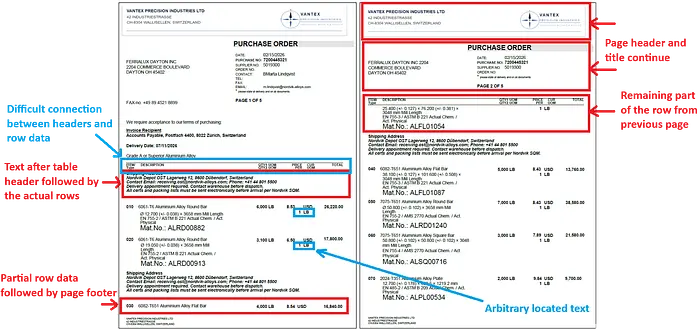
表格表头和行数据之间有一段文本。当然,这不是添加这段文本的正确位置。它本可以添加到表格之前或之后的其他地方。但在客户文档中遇到这种结构是很常见的。这段文本还在同一表格的其他位置被不必要地重复。
表格延续到多个页面,行数据部分地跨页书写。例如,第一页包含第三个条目(030)的部分数据,接着是表尾;下一页则是(重复的)页眉和标题。
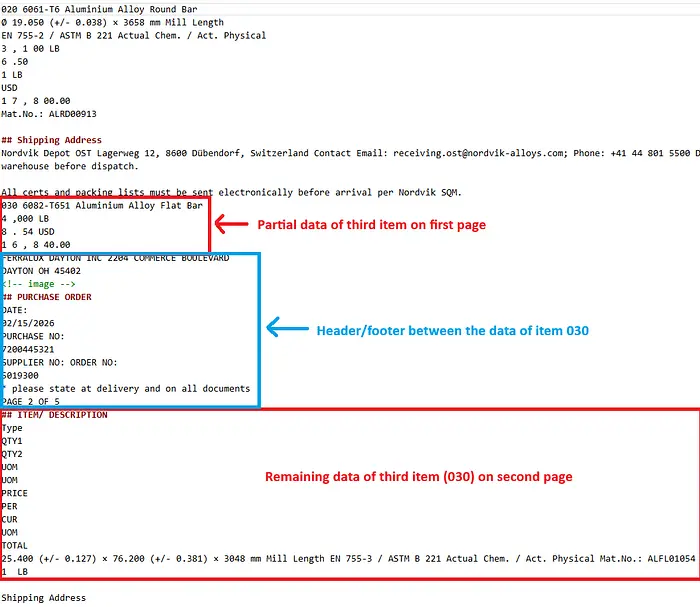
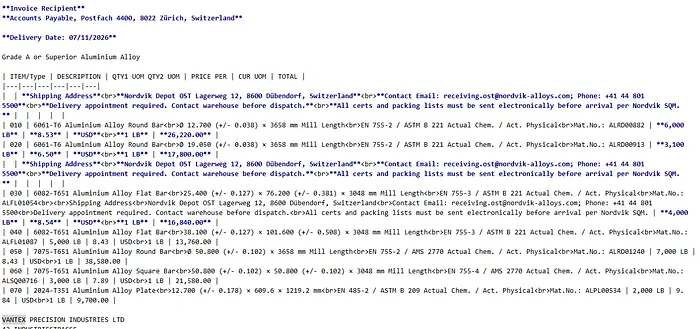
专门的解析器,如PyMuPDF、PyMuPDF4LLM或Docling,无法精确提取这种表格结构。
即使是这两个解析器,也无法正确提取这种杂乱的表格布局。请看以下提取快照。
最终的解决方案比我预想的简单得多。
关键就在于使用正确的提示词。只是换一种方式向AI模型提出你的需求。
本月早些时候,LlamaIndex 发布了他们在基准研究中使用的文档解析提示词,这些提示词改变了一切。
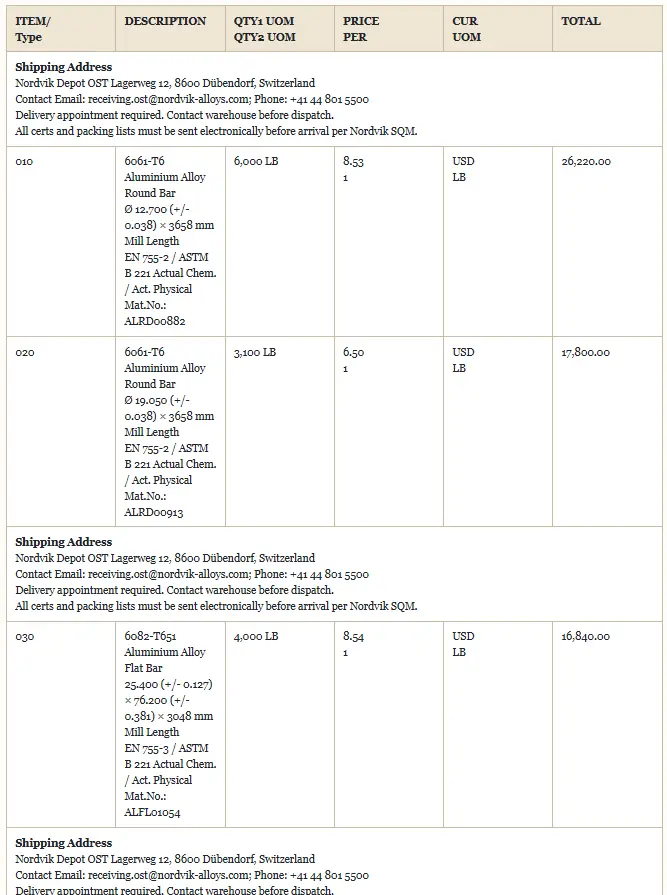
这就是证据。同一份让其他所有解析器都失败的采购订单:
在本文中,我们将创建一个多模态解析器,用于精确提取/解析布局杂乱的文档内容。
该多模态解析器允许用户选择提供商和模型(OpenAI、Anthropic或Google),以及若干其他选项,来评估其用例的解析质量。
多模态解析器的源代码及详细指南和文档,可以在GAIK工具包GitHub仓库的以下链接找到:multimodal_parser。它至少需要一个提供商(OpenAI、Azure或Google Vertex AI)的API凭证。
1、关键在于一些特定的提示词
本月早些时候,LlamaIndex 发布了一个开源框架(ParseBench),用于基准测试文档解析器将PDF转换为AI代理真正可用输出的能力。他们测试了14种不同方法:通用视觉LLM、专门的解析器,以及他们自己的LlamaParse。
这些结果表明,代理式解析(如他们自己的LlamaParse)和基于LLM的解析(如使用Gemini 3 Flash)优于专门的文档解析器。
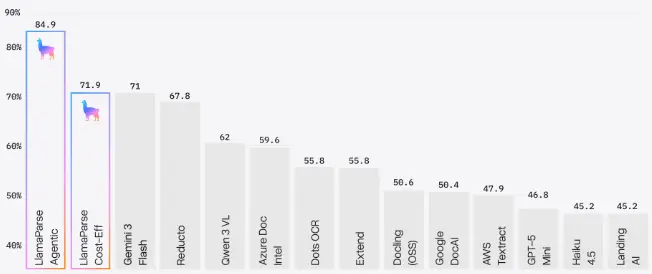
我很好奇他们是如何让基于LLM的解析表现如此出色的。于是我去读了这篇研究论文。
我原本期待某种巧妙的架构技巧:一个微调过的模型,或一个带验证循环的多步骤流水线。
结果我发现的是一些特定的提示词。一些我们从未想过要用的提示词。
3、这些提示词有什么特别之处?
当你要求LLM以Markdown格式输出表格(这是大多数解析器的默认格式)时,它无法正确保留合并单元格和多级表头的布局。例如,一个双行表头横跨多列的采购订单,会变成扁平而模糊的形式。
LlamaIndex提出的提示词使用HTML colspan和rowspan属性提取表格,这些属性编码了完整结构。提示词要求LLM将表格转换为HTML格式(<table>、<tr>、<th>、<td>),并使用colspan和rowspan属性来保留合并单元格和分层表头。
同样,对于图表,LLM被要求使用扁平的合并列标题将其转换为表格,这样每个数据单元格所在的行就包含其所有标签。
论文建议对OpenAI和Claude模型使用共享的系统提示词。对于Google模型,用户提示词略有不同。
以下是我们将用于构建可复用多模态解析器包的、LlamaParse为OpenAI和Claude模型提出的系统提示词和用户提示词。
OPENAI_CLAUDE_SYSTEM_PROMPT = """You are a document parser. Your task is to convert document PDFs into clean, well-structured Markdown.

Guidelines:
- Preserve the document structure, including headings, paragraphs, lists, and tables.
- Convert tables to HTML using `<table>`, `<tr>`, `<th>`, and `<td>`.
- For existing tables in the document, use `colspan` and `rowspan` attributes to preserve merged cells and hierarchical headers.
- For charts or graphs converted into tables, use flat combined column headers (for example, "Primary 2015" instead of separate header rows) so that each data cell's row contains all of its labels.
- Describe images and figures briefly in square brackets, for example: `[Figure: description]`.
- Preserve any code blocks with appropriate syntax highlighting.
- Maintain reading order: left to right, top to bottom for Western documents.
- Do not add commentary or explanations. Output only the parsed content.

Additionally, wrap each layout element in a `<div>` tag with:
- `data-bbox="[x1, y1, x2, y2]"` for the bounding box in normalized 0-1000 coordinates, where x is horizontal (left edge = 0, right edge = 1000) and y is vertical (top = 0, bottom = 1000). `x1, y1` is the top-left corner and `x2, y2` is the bottom-right corner.
- `data-label="<category>"` where category is one of: `Caption`, `Footnote`, `Formula`, `List-item`, `Page-footer`, `Page-header`, `Picture`, `Section-header`, `Table`, `Text`, `Title`.

Place elements in reading order. Every piece of content must be inside exactly one `<div>` wrapper."""

OPENAI_CLAUDE_USER_PROMPT = """The attached PDF is read from the input folder next to this script.

Parse the full document and output its content as clean markdown, with each layout element wrapped in a <div data-bbox="[x1,y1,x2,y2]" data-label="Category"> tag. Use HTML tables for any tabular data. For charts and graphs, use flat combined column headers. Output ONLY the parsed content with div wrappers and no explanations.
"""
Google的Gemini模型使用相同的提示词,唯一区别是data-bbox格式改成了它们原生的坐标顺序。
对于Gemini模型,使用以下系统提示词和用户提示词:
GOOGLE_SYSTEM_PROMPT = """You are a document parser. Your task is to convert document PDFs into clean, well-structured Markdown.

Guidelines:
- Preserve the document structure, including headings, paragraphs, lists, and tables.
- Convert tables to HTML using `<table>`, `<tr>`, `<th>`, and `<td>`.
- For existing tables in the document, use `colspan` and `rowspan` attributes to preserve merged cells and hierarchical headers.
- For charts or graphs converted into tables, use flat combined column headers (for example, "Primary 2015" instead of separate header rows) so that each data cell's row contains all of its labels.
- Describe images and figures briefly in square brackets, for example: `[Figure: description]`.
- Preserve any code blocks with appropriate syntax highlighting.
- Maintain reading order: left to right, top to bottom for Western documents.
- Do not add commentary or explanations. Output only the parsed content.

Additionally, wrap each layout element in a `<div>` tag with:
- `data-bbox="[y_min, x_min, y_max, x_max]"` for the bounding box in normalized 0-1000 coordinates where x is horizontal (left edge = 0, right edge = 1000) and y is vertical (top = 0, bottom = 1000). The order is `[y_min, x_min, y_max, x_max]`.
- `data-label="<category>"` where category is one of: `Caption`, `Footnote`, `Formula`, `List-item`, `Page-footer`, `Page-header`, `Picture`, `Section-header`, `Table`, `Text`, `Title`.

Place elements in reading order. Every piece of content must be inside exactly one `<div>` wrapper."""

GOOGLE_USER_PROMPT = """Parse this document page and output its content as clean markdown, with each layout element wrapped in a <div data-bbox="[y_min,x_min,y_max,x_max]" data-label="Category"> tag.
Use HTML tables for any tabular data. For charts/graphs, use flat combined column headers. Output ONLY the parsed content with div wrappers, no explanations.
"""
提示词没有要求使用无法准确表示合并单元格的Markdown表格,以及杂乱的真实世界表格,而是要求使用带colspan和rowspan的HTML表格。每个布局元素都会获得一个归一化坐标的边界框。这意味着下游代码可以重建页面的空间布局,而无需依赖原始的PDF渲染器。
Google的提示词使用了不同的边界框坐标顺序([y_min, x_min, y_max, x_max]),因为这匹配Gemini模型的原生输出。
解析提示词定义在GitHub的prompts.py脚本中。
4、用于精确解析的多模态解析器
我使用上述提示词,将一个解析流水线封装成Python类。它读取PDF文档,并让用户选择提供商和模型(OpenAI、Anthropic或Google),以及若干其他选项。
完整的代码结构在GitHub仓库中。MultimodalParser类的完整实现在multimodal_parser.py中。
MultimodalParser只有一个方法parse(),它协调整个流水线。
parser = MultimodalParser(
    model_provider="google",
    model="gemini-3.1-flash-lite-preview",
    reasoning_effort="low",
    merge_table=True,
    create_html=True,
)
result = parser.parse("document.pdf")
几个值得理解的参数:
reasoning_effort— 模型的思考预算:"low"、"medium"或"high"。更高的努力程度可以提高复杂布局上的准确性,但更慢、成本更高。merge_table— 设为True时,会向用户提示词追加一条指令,告诉模型合并跨页拆分的表格。additional_instructions— 追加到用户提示词中的额外指令,用于特定领域的规则。create_html— 设为True时,将清理后的Markdown渲染为HTML文档。
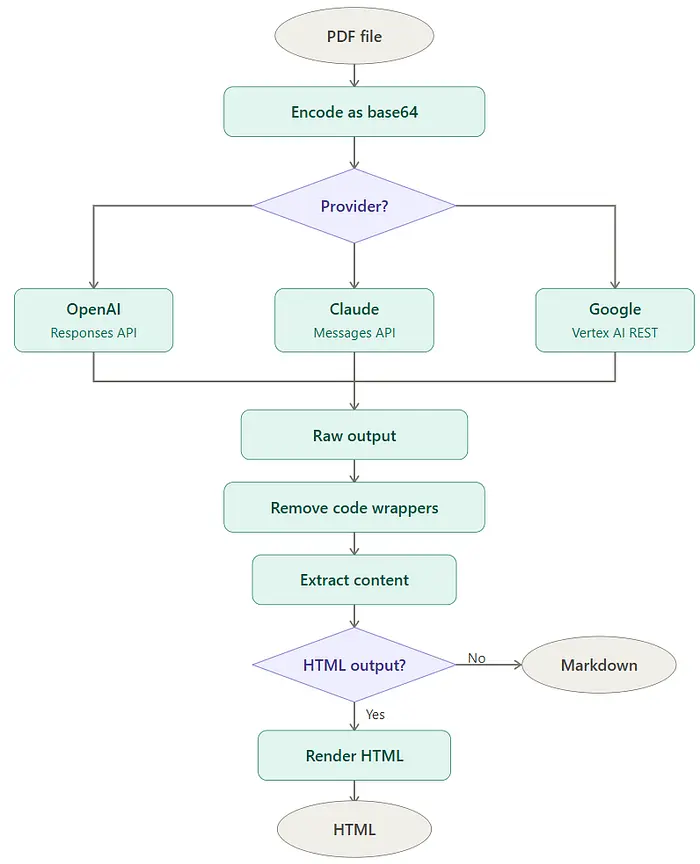
parse()方法首先将PDF作为原始字节读取,并编码为base64字符串,以便嵌入JSON API负载中,随上述提供商特定的提示词一起发送给选定的LLM。
然后,它根据所选提供商构建正确的消息结构,因为OpenAI、Claude和Google各自期望不同的内容格式。
在LLM API调用之后,模型返回其原始响应,这是Markdown文本和含有页面每个布局元素边界框坐标的<div>包装器的组合。一个清理过程会移除模型可能包裹在输出外的任何代码块围栏。另一个方法从这些<div>包装器中提取实际内容,形成干净的Markdown。
如果设置了create_html=True,干净的Markdown会被转换为带样式的HTML文档,你可以直接在浏览器中打开,直观地检查提取结果。
每次调用都会在解析内容之外返回一个UsageRecord,提供token消耗和相关成本的详细信息。
5、如何使用
多模态解析器已作为我们GAIK项目的开源生成式AI工具包中的可复用软件组件创建。该软件组件可以按如下方式作为独立Python包安装:
pip install "gaik[multimodal-parser]"
下面是一个最小示例,用gemini-3.1-flash-lite-preview配合低推理努力程度解析同一份采购订单。该示例将解析输出保存为原始Markdown、干净Markdown和HTML格式。
有关token消耗和价格计算的详细示例,请查看此链接。
from pathlib import Path
from dotenv import load_dotenv
from gaik.software_components.parsers.multimodal_parser import MultimodalParser

load_dotenv()

OUTPUT_DIR = Path(__file__).parent / "output"

def save_result(result, prefix: str) -> None:
    """Save parse results to the output directory."""
    OUTPUT_DIR.mkdir(parents=True, exist_ok=True)

    raw_path = OUTPUT_DIR / f"{prefix}_raw.md"
    raw_path.write_text(result.raw_markdown, encoding="utf-8")

    clean_path = OUTPUT_DIR / f"{prefix}_clean.md"
    clean_path.write_text(result.clean_markdown, encoding="utf-8")

    print(f"Saved: {raw_path}")
    print(f"Saved: {clean_path}")

    if result.html is not None:
        html_path = OUTPUT_DIR / f"{prefix}_clean.html"
        html_path.write_text(result.html, encoding="utf-8")
        print(f"Saved: {html_path}")

parser = MultimodalParser(
    model_provider="google",
    model="gemini-3.1-flash-lite-preview",
    reasoning_effort="low",
    merge_table=True,
    create_html=True,
)
result = parser.parse("sample_PO.pdf")
save_result(result, "output_google")
同一份采购订单的输出,被正确合并和结构化,如上所示(HTML格式)。
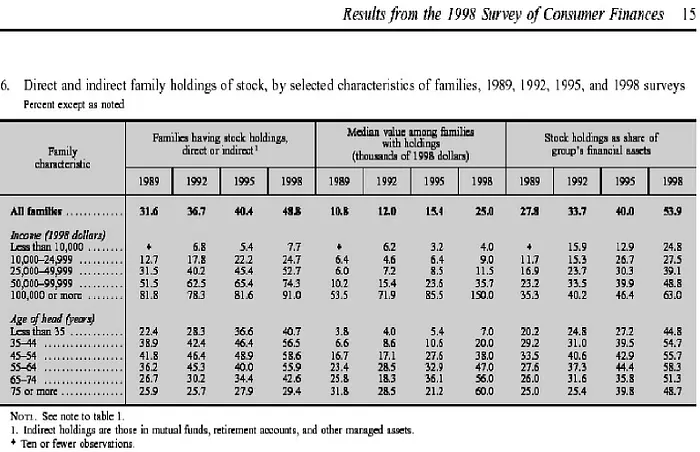
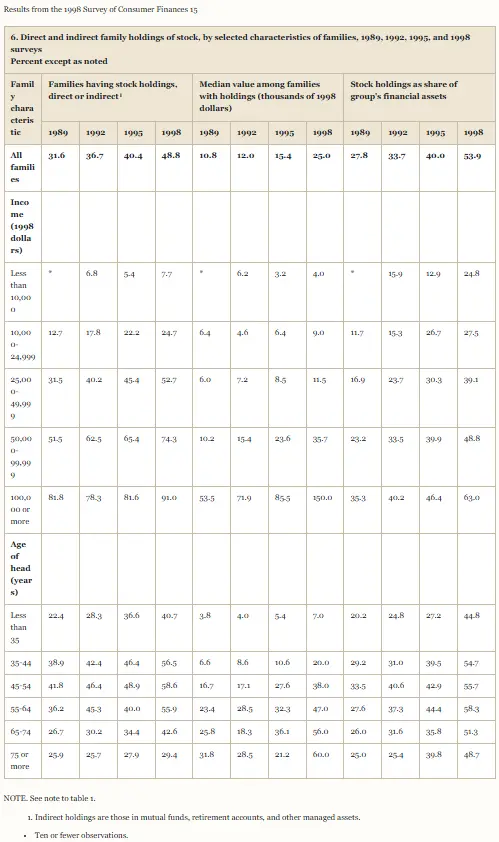
下面再给出几个输入输出示例。
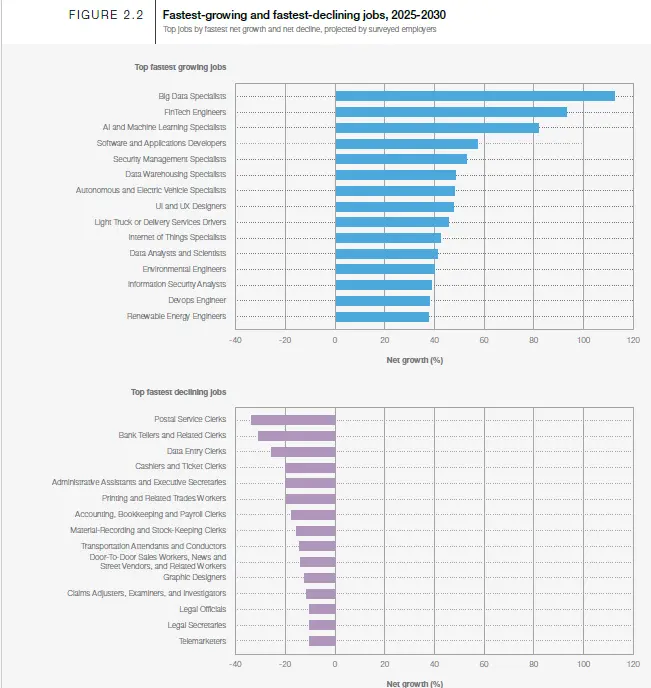
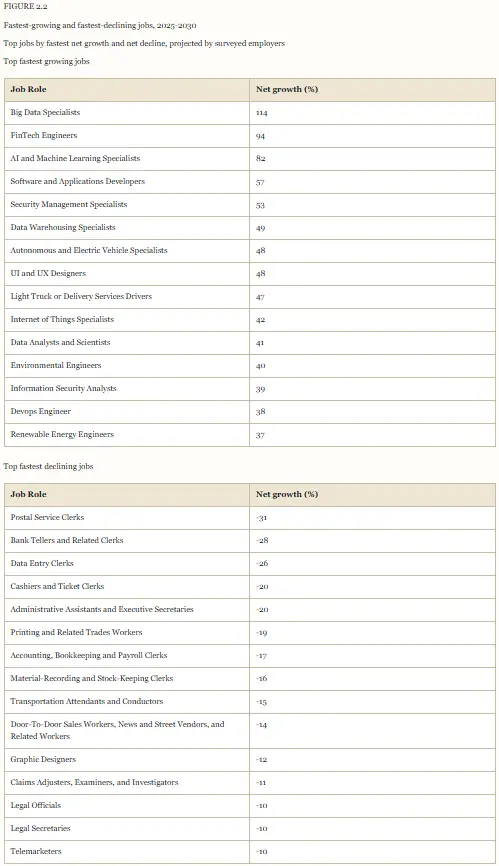
6、观察与最终思考
即使是较小的模型,如gemini-3.1-flash-lite-preview和gpt-5.4-mini,在reasoning_effort设置为low的情况下,也能准确提取杂乱的采购订单。关键就在于使用正确的提示词。
需要注意的是,这种解析适用于准确性比速度更重要、且不需要快速或实时响应的场景。例如,在采购订单处理中,为准确计算价格而进行的精确解析比速度更重要。
提高推理努力程度会大幅增加处理时间和成本。较大的模型,如将推理努力程度设置为high的gpt-5.4,会变得非常慢。因此,high推理,尤其是对于较大的模型,只应应用于布局非常复杂的文档。
在成本和速度方面,gemini-3.1-flash-lite-preview是最佳选择。
additional_instructions参数可用于提供特定用例的解析指令。例如,对于法律文档,可以将其设置为"按照原文精确保留脚注编号"。
原文链接: How to Accurately Extract Everything from Documents Using AI
汇智网翻译整理,转载请标明出处